node-red-contrib-viewtron 2.1.1
Receive AI detection events from Viewtron IP cameras — license plate recognition (LPR/ALPR), human detection, vehicle detection, face detection. On-camera AI, no cloud required.
node-red-contrib-viewtron
Viewtron AI camera node for Node-RED. Receives AI detection events from Viewtron AI security cameras and NVRs. License plate recognition (LPR/ALPR), human detection, vehicle detection, face detection, people counting, and intrusion detection — all processed on the camera with no cloud service required. Supports both direct camera connections (IPC v1.x) and NVR forwarding (v2.x) with automatic version detection.
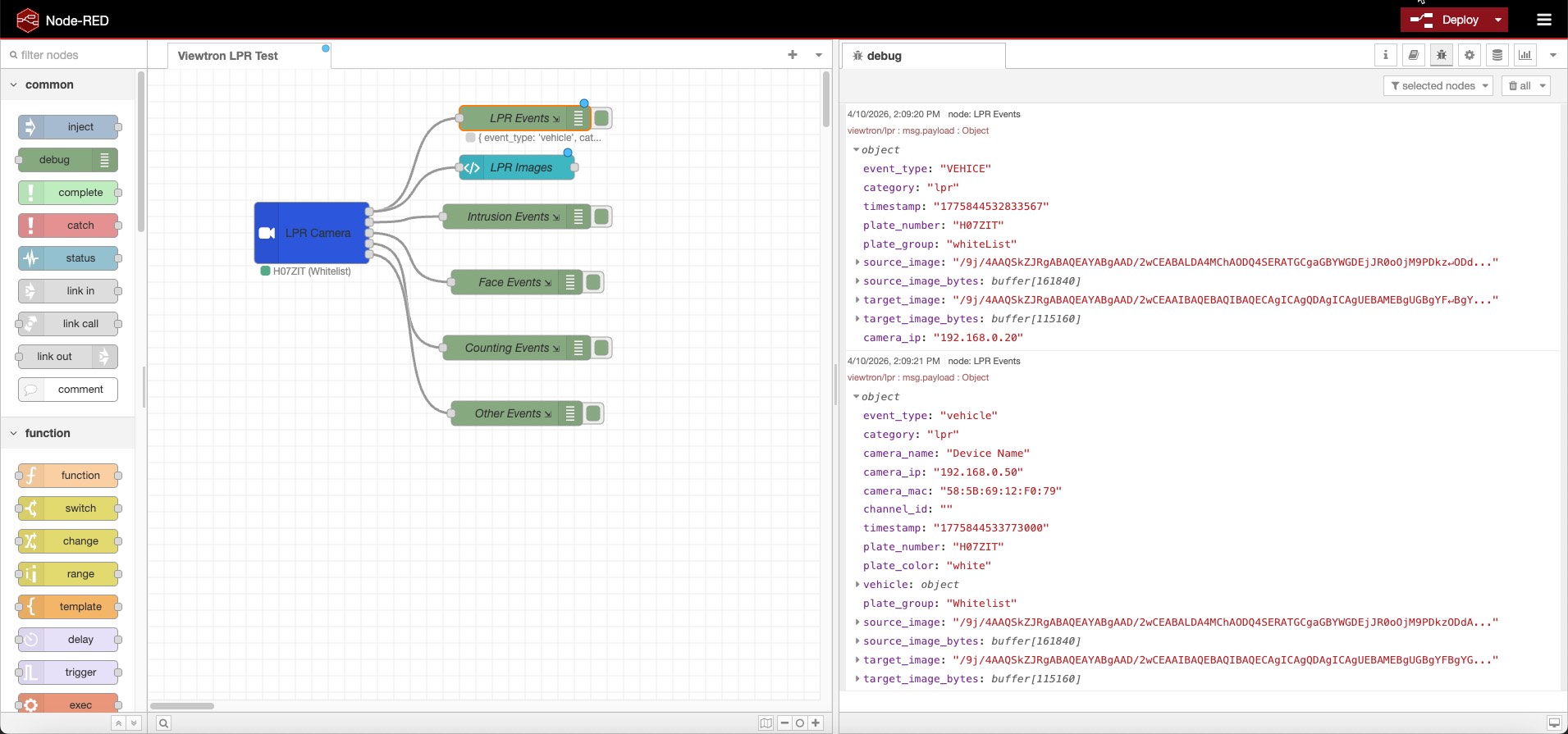
Install
In Node-RED: Menu > Manage palette > Install > search node-red-contrib-viewtron
Or via command line:
cd ~/.node-red
npm install node-red-contrib-viewtron
Requires Node.js 18+, Node-RED 2.0+, and viewtron-sdk 1.1.0 or newer. The SDK dependency is installed automatically.
How It Works
v2.0.0 uses a Config Node + Listener Node architecture built on the Viewtron Node.js SDK.
                                    +---> Viewtron AI Camera node ---> LPR Flow
                                    |
Camera 1 ---+                       +---> Viewtron AI Camera node ---> Intrusion Flow
             \                      |
Camera 2 ----+---> Viewtron Server -+
             /    (Config Node)     |
Camera 3 ---+     port 5050        +---> Viewtron AI Camera node ---> Dashboard
                                    |
NVR ---------+                      +---> Viewtron AI Camera node ---> MQTT Bridge
Viewtron Server (config node) — runs a shared HTTP server on a single port. All cameras and NVRs connect to this one server. Handles persistent connections, keepalive heartbeats, XML parsing, and all camera protocol requirements via the SDK. Hidden from the palette; created from the server dropdown on the Viewtron AI Camera node.
Viewtron AI Camera (listener node) — receives parsed events from the server and routes them to 5 category outputs: LPR, Intrusion, Face, Counting, and Other. Multiple listener nodes can share one server. Each listener receives every event from every connected camera. Optional filters on the listener (direction, minimum confidence, plate list) apply to the LPR output only and default to passing every plate. Use standard Node-RED Switch nodes after any output to branch by camera, channel, plate list, direction, confidence, or any other field.
No middleware, no bridge, no cloud API. The cameras post directly to Node-RED.
Camera Setup
1. Add the node to your flow
Drag the Viewtron AI Camera node from the palette onto the canvas. Select a Viewtron Server from the dropdown (or create one with the pencil icon). The default port is 5050.
2. Configure HTTP POST on the camera
Open your camera's web interface and navigate to Network > Advanced > HTTP Notification.
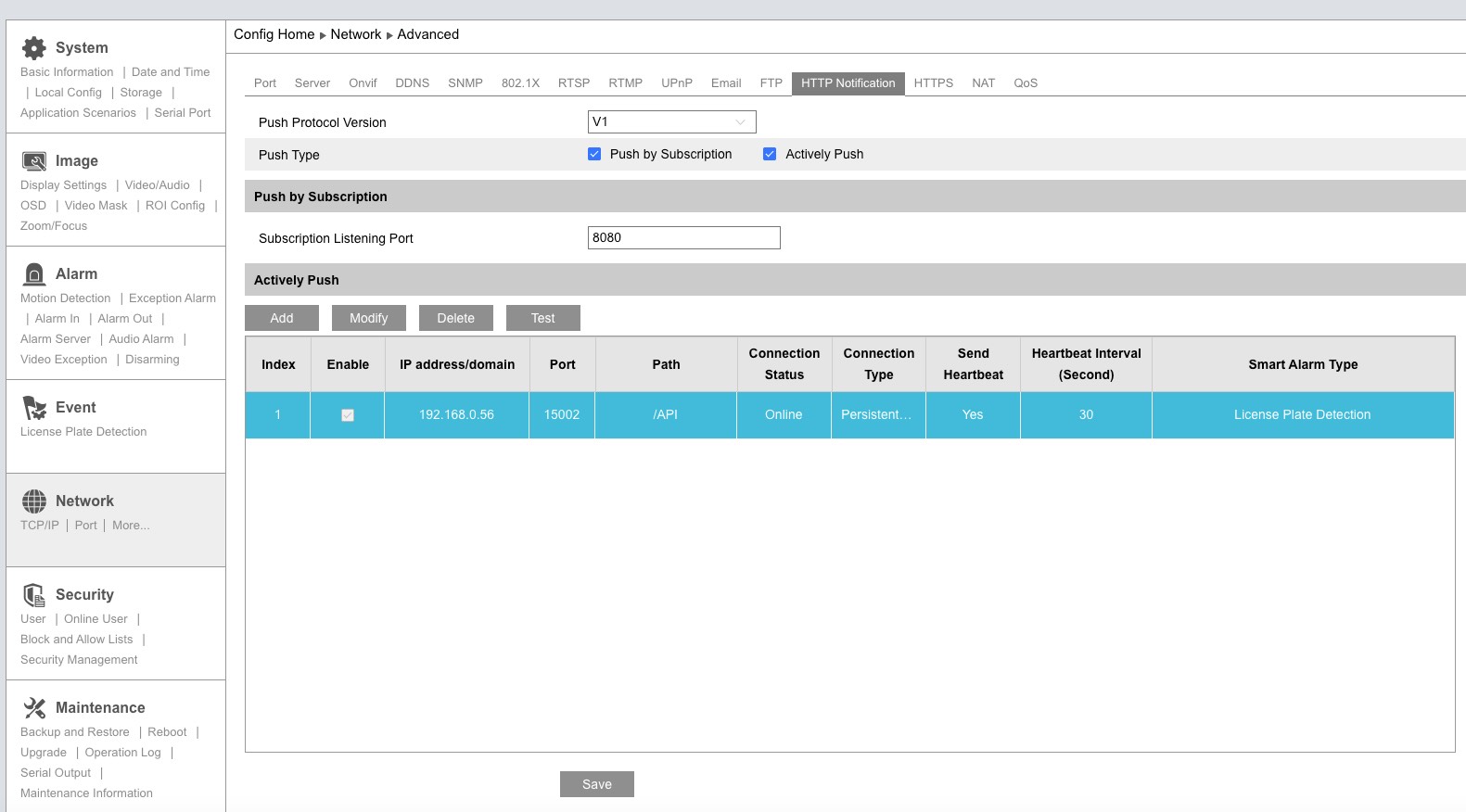
Set the Push Protocol Version to V1, then click Add to create a server entry.
3. Configure the server connection
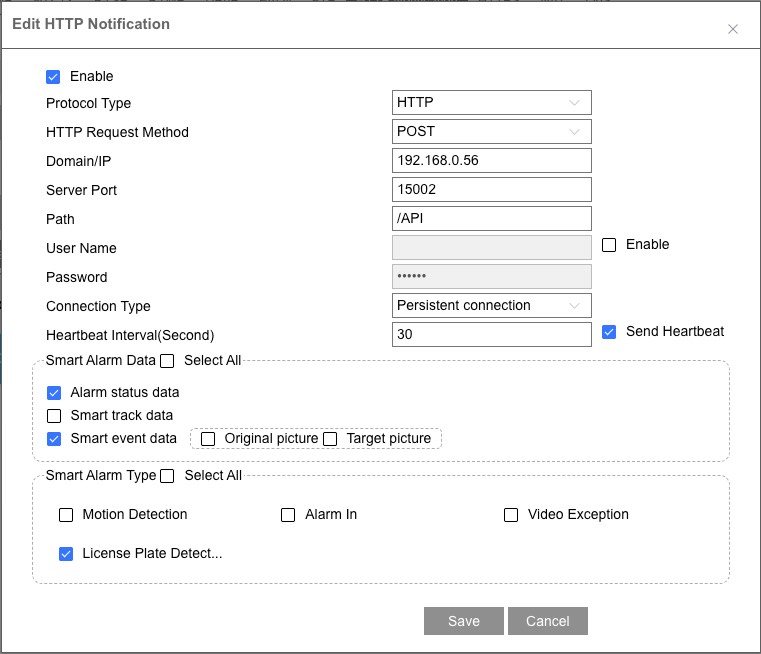
| Setting | Value |
|---|---|
| Enable | Checked |
| Domain/IP | Your Node-RED machine's IP address |
| Server Port | Port configured in the Viewtron Server config node (default: 5050) |
| Path | /API |
| Connection Type | Persistent connection |
| Send Heartbeat | Checked |
| Heartbeat Interval | 30 seconds |
| Smart Alarm Data | Check Smart event data |
| Original picture | Check to include full scene image in events |
| Target picture | Check to include cropped target image in events |
| Smart Alarm Type | Select the detection types you want (e.g., License Plate Detection) |
Click Save, then reboot the camera — required after changing HTTP POST settings. Deploy your flow in Node-RED and events will start arriving immediately.
Connection status
The camera maintains a persistent HTTP connection and sends heartbeats to confirm the server is reachable. The node status shows a green ring when listening and updates with a green dot and the latest event data (e.g., plate number and group).
Direct Connection vs NVR
For the easiest filtering, connect IP cameras directly to your network and configure each camera's HTTP POST to send events to the Viewtron Server. Each camera connects from its own IP address, so you can filter events using msg.payload.cameraIp in a Switch node.
When cameras are connected to an NVR's PoE ports and the NVR forwards events, all events arrive from the NVR's IP address. Intrusion, face, and counting events include a msg.payload.channelId that identifies which camera on the NVR triggered the event. However, NVR license plate events do not include a channel ID, so there is no way to determine which LPR camera behind the NVR detected the plate.
For LPR cameras, always connect directly to the network so each camera has its own IP address for filtering.
| IPC (Direct) | NVR (Forwarded) | |
|---|---|---|
| Connection | Camera -> Node-RED | Camera -> NVR -> Node-RED |
| XML Version | v1.x | v2.x |
| Plate detection | Yes | Yes |
| Plate database groups | Fixed: whiteList, blackList, temporaryList, strangerList | User-defined: any group name |
| Direction | approach, away, or null |
null |
| Confidence | 0–100, or null when the camera omits it | null |
| Vehicle attributes | When the camera sends them | Yes (brand, color, type, model) |
| Owner from database | No | Yes |
| Channel ID | No | Yes (intrusion, face, counting only — not LPR) |
| Images | Yes (both) | Yes (both) |
Outputs
The node has 5 outputs, one per detection category:
| Output | Category | Key Fields |
|---|---|---|
| 1 | LPR | plateNumber, plateGroup, plateList, direction, confidence, eventTime, vehicle / vehicleColor / vehicleBrand / vehicleType / vehicleModel, carOwner (NVR only) |
| 2 | Intrusion | targetType (person, car, motorcycle), eventId, status, boundary (area, tripwire — NVR only) |
| 3 | Face | face.age, face.sex, face.glasses, face.mask (NVR only) |
| 4 | Counting | targetType, boundary |
| 5 | Other | Video metadata and unclassified events |
Wire each output to the flow logic you need — separate handling for plates vs. people vs. faces.
LPR Fields (Output 1)
| Field | IPC | NVR | Description |
|---|---|---|---|
plateNumber |
Yes | Yes | Detected license plate text |
plateGroup |
Yes | Yes | Raw plate database group — see Plate Groups |
plateList |
Yes | When the group name is one of the four known lists | whiteList, blackList, temporaryList, strangerList, or null |
direction |
Yes | null | approach, away, or null when the camera does not send a direction |
confidence |
Yes | null | Recognition confidence from 0 to 100. A camera value of 9900 is 99. 0 is a real score. Missing is null |
eventTime |
Yes | Yes | Date parsed from the camera clock. timestamp stays the raw text |
vehicle.type / vehicleType |
When sent | Yes | Vehicle type (e.g., "sedan", "SUV") |
vehicle.color / vehicleColor |
When sent | Yes | Vehicle color |
vehicle.brand / vehicleBrand |
When sent | Yes | Vehicle brand (e.g., "Toyota") |
vehicle.model / vehicleModel |
When sent | Yes | Vehicle model |
plateColor |
No | Yes | Plate color (e.g., "white") |
carOwner |
No | Yes | Owner name from NVR plate database |
sourceImage |
Yes | Yes | Overview image (base64 JPEG) |
sourceImageBytes |
Yes | Yes | Overview image (Buffer) |
targetImage |
Yes | Yes | Plate crop image (base64 JPEG) |
targetImageBytes |
Yes | Yes | Plate crop image (Buffer) |
vehicle and the flat vehicleColor, vehicleBrand, vehicleType, and vehicleModel fields carry the same attributes. The flat fields are empty strings when the post has no vehicle attributes. plateList is null for custom NVR group names; those names stay on plateGroup.
Common Fields
Every event message includes:
| Field | Type | Description |
|---|---|---|
msg.payload.source |
string | IPC (direct from camera) or NVR (via NVR) |
msg.payload.category |
string | lpr, intrusion, face, counting, metadata |
msg.payload.eventType |
string | Raw alarm type from camera (e.g., VEHICE, PEA, regionIntrusion) |
msg.payload.eventDescription |
string | Human-readable description of the event type |
msg.payload.cameraIp |
string | Camera IP (direct connection) or NVR IP (NVR connection) |
msg.payload.cameraName |
string | Device name configured on the camera or NVR |
msg.payload.cameraMac |
string | MAC address of the camera or NVR |
msg.payload.channelId |
string | NVR channel number (intrusion, face, counting only — not present on NVR LPR events) |
msg.payload.timestamp |
string | Raw camera currentTime text. Direct camera posts often send microseconds, including on 5.3.x firmware. This value is not converted |
msg.payload.eventTime |
Date | The same instant as a Date, or null when the camera time is missing. Values of 100 trillion or more are microseconds, 100 billion or more are milliseconds, and smaller values are seconds |
msg.payload.configVersion |
string | Config version from the post, for example 1.7 or 2.1.0 |
msg.payload.format |
string | v1 or v2, from the config version major |
msg.payload.hasImages |
boolean | true when images are present |
msg.topic |
string | viewtron/{category} for easy MQTT republishing |
Images
When Original picture and Target picture are enabled on the camera, events include both base64 strings and decoded Buffer bytes:
| Field | Type | Description |
|---|---|---|
sourceImage |
string | Full scene image as base64 JPEG |
sourceImageBytes |
Buffer | Full scene image as decoded JPEG bytes |
targetImage |
string | Cropped target (plate, face) as base64 JPEG |
targetImageBytes |
Buffer | Cropped target as decoded JPEG bytes |
The Buffer fields are ready to pipe directly to file nodes, dashboard image widgets, or MQTT nodes. The base64 fields are useful for embedding in HTML or sending via API.
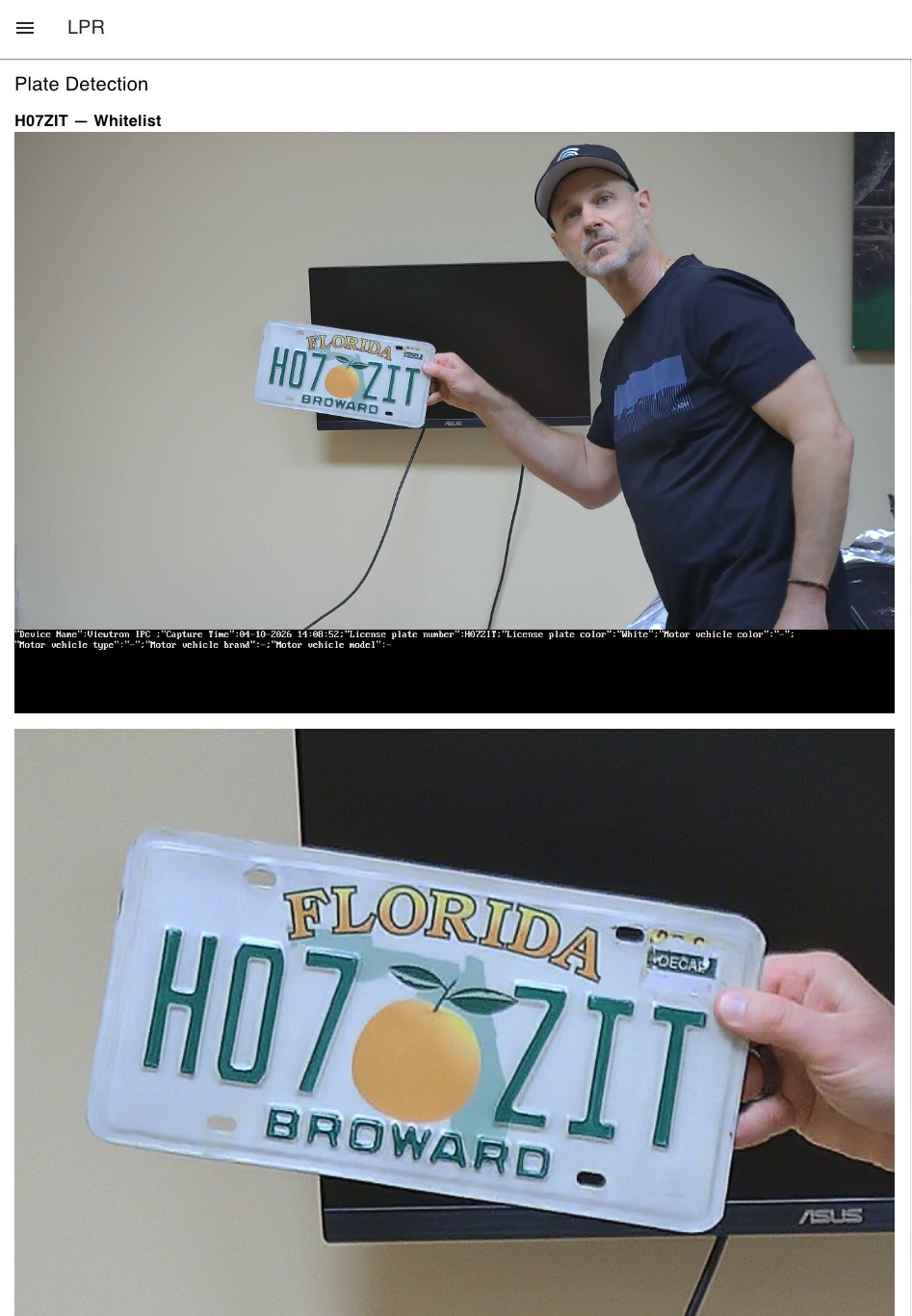
Screenshot of sourceImage and targetImage displayed in a Dashboard 2.0 template widget. To recreate this, wire the LPR output (output 1) to a ui-template node with this content:
<div v-if="msg?.payload?.plateNumber">
  <h3>{{ msg.payload.plateNumber }} — {{ msg.payload.plateList || msg.payload.plateGroup || "unknown" }}</h3>
  <p v-if="msg.payload.confidence != null">
    {{ msg.payload.direction || "direction unknown" }} · {{ msg.payload.confidence }}
  </p>
</div>
<div v-if="msg?.payload?.sourceImage" style="margin-bottom:10px">
  <img :src="'data:image/jpeg;base64,' + msg.payload.sourceImage" style="width:100%" />
</div>
<div v-if="msg?.payload?.targetImage">
  <img :src="'data:image/jpeg;base64,' + msg.payload.targetImage" style="width:100%" />
</div>
Requires @flowfuse/node-red-dashboard (Dashboard 2.0).
Filtering by Camera
By default the node outputs every event from every connected camera. The listener has three optional LPR filters. Leave them blank and every plate is passed through. They do not affect intrusion, face, counting, or other events.
| Node setting | Default | Effect on the LPR output |
|---|---|---|
| Direction | Any | Keep only approach or only away |
| Min confidence | Blank | Drop plates below this score. A plate with no confidence is dropped when a minimum is set |
| Plate list | Any | Keep one of whiteList, blackList, temporaryList, or strangerList |
All three are combined. A plate must match every filter that is set. Existing flows have no filter values, so they keep receiving every plate.
Use a Switch node when one event needs more than one destination, for example opening a gate and also alerting. Switch fields:
| Field | Use Case |
|---|---|
msg.payload.cameraIp |
Filter by camera IP address (best for direct connections) |
msg.payload.channelId |
Filter by NVR channel number (intrusion, face, counting events only) |
msg.payload.source |
Filter by IPC (direct) or NVR |
msg.payload.plateList |
Route known lists: whiteList, blackList, temporaryList, strangerList |
msg.payload.plateGroup |
Route by the raw plate database group, including custom NVR names |
msg.payload.direction |
Route approach or away |
msg.payload.confidence |
Route by a minimum score |
msg.payload.targetType |
Filter by person, car, motorcycle |
Example: filter LPR events from a specific camera. Wire the LPR output to a Switch node with property msg.payload.cameraIp equals 192.168.1.100.
Example: LPR Gate Access
Import this flow to get started with license plate gate access control. The Viewtron AI Camera node reads plates, and a Switch node routes plates based on their group.
[
    {
        "id": "server1",
        "type": "viewtron-server",
        "name": "Camera Server",
        "port": "5050"
    },
    {
        "id": "viewtron1",
        "type": "viewtron-camera",
        "name": "Gate Camera",
        "server": "server1",
        "wires": [["switch1"], [], [], [], []]
    },
    {
        "id": "switch1",
        "type": "switch",
        "name": "Check Group",
        "property": "payload.plateGroup",
        "rules": [
            {"t": "eq", "v": "whiteList"},
            {"t": "else"}
        ],
        "outputs": 2,
        "wires": [["gate_open"], ["notify"]]
    },
    {
        "id": "gate_open",
        "type": "debug",
        "name": "Open Gate"
    },
    {
        "id": "notify",
        "type": "debug",
        "name": "Alert: Unknown Vehicle"
    }
]
Example: Allow List Gate and Block List Alert
Leave the node's direction, confidence, and plate list filters blank.
This is the same allow / block logic we use for license plate recognition gate access. For a code version of an entry gate, see LPR camera API for entry gate automation.
This flow uses the LPR output and Switch nodes so one camera can do both jobs:
- Open the gate only for an allow-list plate (
plateList=whiteList) that is approaching with confidence of at least 90. - Alert when the plate is on the block list (
plateList=blackList).
Plates that miss any of the allow-list checks are dropped. Custom NVR group names are on plateGroup instead of plateList; switch on plateGroup for those.
[
    {
        "id": "server1",
        "type": "viewtron-server",
        "name": "Camera Server",
        "port": "5050"
    },
    {
        "id": "gate_camera",
        "type": "viewtron-camera",
        "name": "Gate Camera",
        "server": "server1",
        "direction": "",
        "minConfidence": "",
        "plateList": "",
        "wires": [["switch_list"], [], [], [], []]
    },
    {
        "id": "switch_list",
        "type": "switch",
        "name": "Plate list",
        "property": "payload.plateList",
        "propertyType": "msg",
        "rules": [
            {"t": "eq", "v": "whiteList", "vt": "str"},
            {"t": "eq", "v": "blackList", "vt": "str"}
        ],
        "checkall": "false",
        "outputs": 2,
        "wires": [["switch_direction"], ["alert_block"]]
    },
    {
        "id": "switch_direction",
        "type": "switch",
        "name": "Approaching",
        "property": "payload.direction",
        "propertyType": "msg",
        "rules": [
            {"t": "eq", "v": "approach", "vt": "str"}
        ],
        "checkall": "false",
        "outputs": 1,
        "wires": [["switch_confidence"]]
    },
    {
        "id": "switch_confidence",
        "type": "switch",
        "name": "Confidence at least 90",
        "property": "payload.confidence",
        "propertyType": "msg",
        "rules": [
            {"t": "gte", "v": "90", "vt": "num"}
        ],
        "checkall": "false",
        "outputs": 1,
        "wires": [["gate_open"]]
    },
    {
        "id": "gate_open",
        "type": "debug",
        "name": "Open Gate"
    },
    {
        "id": "alert_block",
        "type": "debug",
        "name": "Alert: Block list"
    }
]
The same allow-list rule can be set on the node itself (Direction = Approaching, Min confidence = 90, Plate list = Allow list) when that listener should not receive other plates. Use a second listener on the same server, with Plate list = Block list, for the alert.
Plate Groups
The plateGroup field contains the raw value from the camera or NVR plate database. Your flow decides what each group means. plateList repeats that value when it is whiteList, blackList, temporaryList, or strangerList, and is null for any other group name.
IPC cameras use fixed group names (these are the raw XML values):
| plateGroup | Camera UI Label |
|---|---|
whiteList |
Allow list |
blackList |
Block list |
temporaryList |
Temporary vehicle |
strangerList |
Stranger list |
| (empty) | Not in database |
NVRs use user-defined group names — you create groups and name them whatever you want (e.g., "Whitelist", "Residents", "Banned"). The plateGroup field shows the group name, or empty if the plate is not in the database.
Plates are added to the camera's database through its web interface or programmatically via the viewtron Python SDK (pip install viewtron).
Supported Event Types
IPC v1.x (Direct from Camera)
| Alarm Type | Category | Detection |
|---|---|---|
VEHICE / VEHICLE |
lpr | License plate recognition |
VFD |
face | Face detection |
PEA |
intrusion | Perimeter intrusion |
AOIENTRY |
zone_entry | Zone entry |
AOILEAVE |
zone_exit | Zone exit |
LOITER |
loitering | Loitering detection |
VSD |
metadata | Video metadata |
PASSLINECOUNT |
counting | People/vehicle counting |
NVR v2.x (Forwarded via NVR)
| Alarm Type | Category | Detection |
|---|---|---|
vehicle |
lpr | LPR with vehicle brand, color, type, model |
videoFaceDetect |
face | Face with age, sex, glasses, mask attributes |
regionIntrusion |
intrusion | Perimeter intrusion |
lineCrossing |
line_crossing | Tripwire line crossing |
targetCountingByLine |
counting | Counting by line |
targetCountingByArea |
counting | Counting by area |
videoMetadata |
metadata | Continuous object detection |
Version detection is automatic — the SDK handles both formats.
Compatible Cameras
Any Viewtron AI security camera or NVR with HTTP POST support:
- Viewtron LPR-IP4 license plate recognition camera — 4MP LPR camera with on-camera plate recognition. API 2.1 firmware (5.3.x) adds direction, confidence, plate list and vehicle attributes to every plate. Fully tested with Node-RED.
- AI security cameras — person, vehicle, and face detection. Testing scheduled.
- NVRs — forward events from all connected cameras. LPR tested and working.
All Viewtron products are NDAA compliant.
Troubleshooting
Camera shows "Online" but no events appear: The camera's persistent connection is alive (heartbeats work) but alarm events may not be flowing. Try:
- Reboot the camera — required after changing HTTP POST settings
- Check that Smart event data and the correct Smart Alarm Type are enabled
- For NVR: ensure License Plate Detection is enabled in the HTTP Post settings
Port conflict ("port in use" status): Another process is already listening on the configured port. Either stop the other process or change the port in the Viewtron Server config node. Only one Viewtron Server config node should use a given port.
Debug tool: A standalone debug server is included for diagnosing connection issues:
node debug-server.js 5050
This logs every HTTP POST with full headers, body preview, and post classification (keepalive, alarm data, etc.) — no filtering. Raw XML is saved to raw_posts/ for inspection.
New in 2.1.1
Documentation only: link fixes and example updates. No code changes.
New in 2.1.0
2.1.0 adds fields. It does not change the five outputs or rename existing fields. Flows built for 2.0.0 keep working when the new filters are left blank.
Plate messages now include eventTime, direction, confidence, plateList, vehicleColor, vehicleBrand, vehicleType, and vehicleModel. Every event also includes configVersion and format. timestamp is still the raw camera time.
Alarm on/off notices are not detection events. They are not sent to any output. Keepalives are ignored the same way.
Requires viewtron-sdk 1.1.0 or newer.
Flows, screenshots and the full field list are in the Node-RED IP camera integration guide. See Compatible Cameras for the tested LPR camera.
Breaking Changes from v1
v2.0.0 is a full rewrite. Existing flows will need to be updated.
| Change | v1 | v2 |
|---|---|---|
| Architecture | Single node with embedded HTTP server | Config Node (Viewtron Server) + Listener Node (Viewtron AI Camera) |
| Server | Each node runs its own server | Shared server via config node — one port for all cameras |
| SDK | XML parsing built into the node | Uses viewtron-sdk npm package |
| Default port | 5002 | 5050 |
| Field names | snake_case (plate_number, plate_group, car_owner, camera_ip, event_type, source_image) |
camelCase (plateNumber, plateGroup, carOwner, cameraIp, eventType, sourceImage) |
| Image Buffers | Not available | sourceImageBytes and targetImageBytes (decoded Buffer objects) |
source field |
Not available | IPC or NVR — identifies connection type |
| Image toggle | includeImages checkbox on node |
Always included when camera sends them (enable/disable on the camera) |
| Filtering | Not available | Use Switch nodes on cameraIp, channelId, plateGroup, targetType |
| Node settings | Port + Include images | Server dropdown only (port is on the config node) |
To migrate: Delete the old Viewtron AI Camera node, add a new one from the updated palette, create a Viewtron Server config node, and update any downstream nodes that reference payload field names from snake_case to camelCase.
Documentation
- Viewtron API Developer Docs — full API reference
- HTTP POST Setup Guide — camera configuration walkthrough with screenshots
- Node.js SDK —
npm install viewtron-sdkfor standalone Node.js projects - Python SDK —
pip install viewtronfor Python projects - Home Assistant Integration — MQTT bridge for Home Assistant
- Node-RED IP camera integration guide — this node on the developer portal, with flows and screenshots
- License plate recognition camera API — every LPR field the camera sends
- Home Assistant license plate recognition — the same camera events in Home Assistant
Related Projects
- viewtron-nodejs-sdk — Node.js SDK for Viewtron camera events (
npm install viewtron-sdk, used by this node) - viewtron-home-assistant — Home Assistant integration via MQTT
- viewtron-python-sdk — Python SDK (
pip install viewtron) - IP-Camera-API — API documentation, XML examples, Docusaurus site
Maintainers: see RELEASING.md.
Author
Mike Haldas — CCTV Camera Pros
