node-red-contrib-myhome-bticino-v2 3.0.1
Control Bticino / Legrand MyHome components from Node-RED
node-red-contrib-myhome-bticino-v2
Control Bticino / Legrand MyHome™ components from Node-RED : node-red-contrib-myhome-bticino-v2 is a Node-RED nodes pack to interact with Bticino / Legrand MyHome™ devices making use of OpenWebNet protocol through a supported gateway (see gateway info underneath).
1. Available nodes
- MH Light
- ON / OFF / TOGGLE
- Dimming : UP / DOWN / percentage based
- MH Shutter
- OPEN / CLOSE / STOP
- MH Scenario
- CEN and CEN+ scenario buttons management : Short and Long press (start / extended / release)
- MH Temperature Central Unit
- MANUAL:xx.x°C / PROGRAM:x / SCENARIO:xx / OFF / ANTIFREEZE / THERMAL_PROTECT
- MH Temperature Zone
- (MANUAL:)xx.x°C / AUTO / OFF / ANTIFREEZE / THERMAL_PROTECT
- MH Energy
- Read energy meters power consumption measurements
- MH Monitoring
- Listen for any message on the bus and sends it as payload
- MH Inject
- Sends any message provided in payload to bus. e.g.
*1*1*16##to turn on light 16*#1*16##to ask for status about light 16, receiving as a response*1*1*16##when is ON or*1*0*16##when is OFF
- Sends any message provided in payload to bus. e.g.
2. Version history
v3.0.1 (latest available) - 10/2026
- General
- Improvement : node configuration dialogs (and their related documentations) now support correctly the dark theme Node-RED introduced in v5.0.0.
v3.0.0 - 09/2026
- General
- Improvement : many typo's, translations were corrected / improved to better fit within UI constraints
- MH Gateway
- Improvement : the gateway configuration now includes a BUS points registry. Each type (lights, shutters, energy,...) can now be managed by defining a list of known points , each with a room, a description and an icon. This enables to no longer have to keep a separate note of which codes maps to which physical light/shutter/energy ID/... Points which respond on the BUS (from normal use, or from the existing on-(re)connect refresh) are automatically added to the list if not already present, and it is possible to add your own alongside.
- Improvement : a new option was added to gather states of all BUS connected shutters on (re)connection, mirroring the existing lights option. This can be configured in the gateway, and is disabled by default for new installs (unlike the lights option).
- Bug fix : the "Advanced BUS tracking logging options" for Lights, Shutters, Scenario, Energy and Others had no effect (only Temperature worked). All 5 now correctly enable/disable their logging as configured.
- MH Light / MH Shutter / MH Temperature Zone / MH Energy
- Improvement : each point can be selected using the list of registered lights from the gateway or by typing a code manually as before. When point is registered at the gateway level, summary info is displayed for easier readings.
- Improvement :
msg.mh_nodeConfigInfonow also includes.roomand.description(when a matching entry was found in the gateway's registry) and.pointid_UI(the human-readable A.PL address, e.g.1.1or10.5instead of11or1005for lights).
The complete version history is available in CHANGELOG.md file included in npm package or using this link to GitHub repository
3. Installation
Note : Using the previous node version node-red-contrib-myhome-bticino ? See more upgrade info/path in revision history file.
Easy approach when Node-RED is installed If you have Node-RED already installed the recommended install method is to use the editor. To do this, select
Manage Pallettefrom the Node-RED menu (top right), and then selectinstalltab in the pallette. Search for and install this node (node-red-contrib-myhome-bticino-v2).Using NPM If you have not yet installed Node-RED then run following command or go to Node-RED Installation Guide.
npm install -g --unsafe-perm node-redNext, to install node-red-contrib-myhome-biticino node run the following command in your Node-RED user directory - typically
~/.node-rednpm install node-red-contrib-myhome-bticino-v2
4. Usage
4.1 First touch
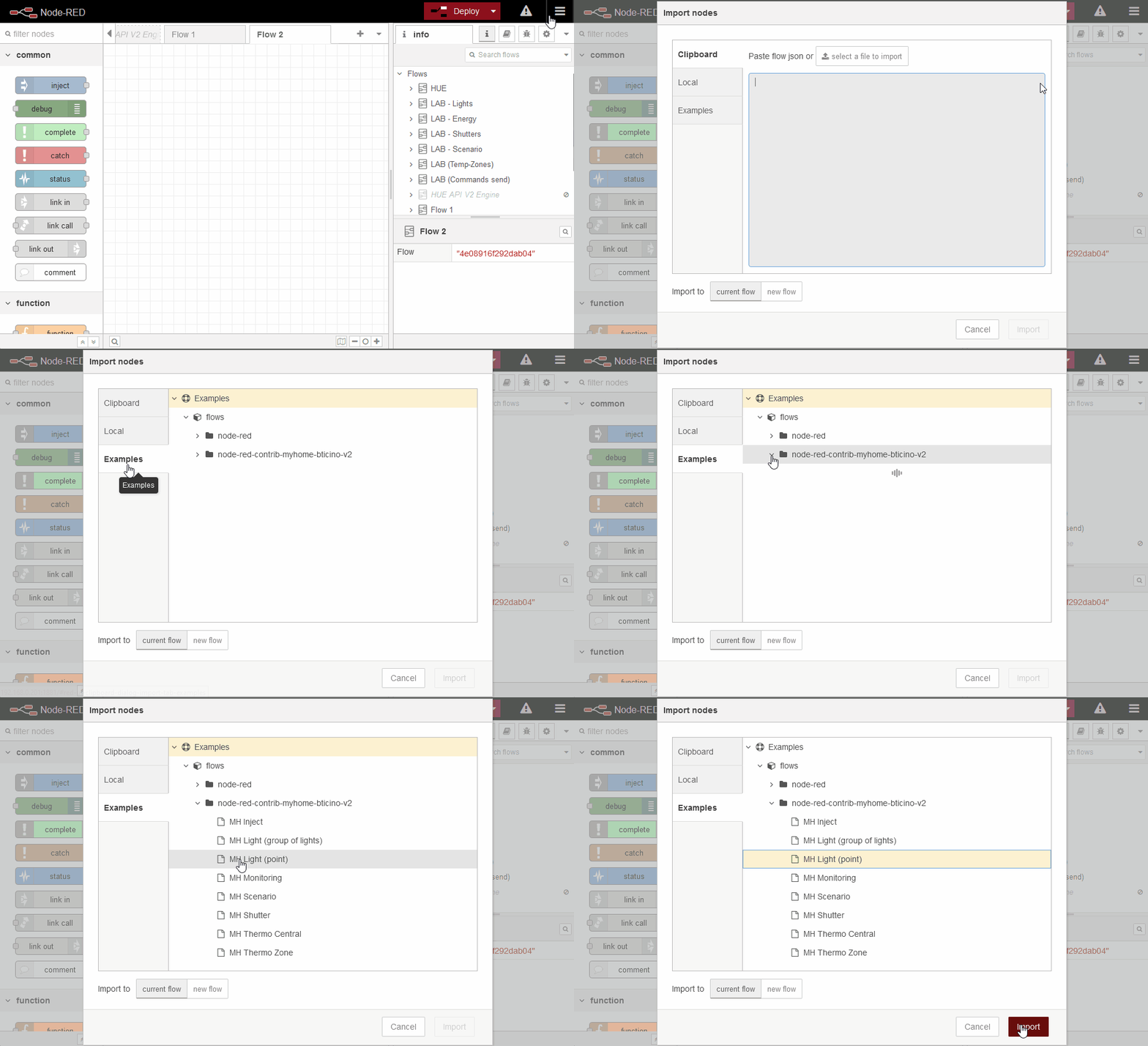
In order to easy starting to test the nodes, best way is to import an example provided with installed content (using node-red menu 'Import' and selecting one listed under 'node-red-contrib-myhome-bticino-v2'in the 'examples' tab). Examples are available for :
- MH Energy
- MH Light (simple point)
- MH Light (group of lights)
- MH Shutter
- MH Scenario (CEN / CEN+)
- MH Temperature Central Unit
- MH Temperature Zone
- MH Inject
- MH Monitoring (discover lights)
You can also directly copy this basic flow in Node-RED selecting Import in the node-red menu, pasting the provided JSON (do not forget to change the IP address in the Gateway configuration and of course the light number in switch node) :
[{"id":"aaec927e.81712","type":"myhome-light","z":"6fa4a1d5.ce7708","lightid":"15","isgroup":false,"topic":"light","gateway":"a4e23617.d0c288","name":"My test light (A=1 / PL=5)","skipevents":false,"isstatusrequest":false,"output2_name":"","output2_type":"boolean","x":450,"y":180,"wires":[["d0e9bd53.eb9a2"],[]]},{"id":"d0e9bd53.eb9a2","type":"debug","z":"6fa4a1d5.ce7708","name":"","active":true,"tosidebar":true,"console":false,"tostatus":false,"complete":"false","statusVal":"","statusType":"auto","x":650,"y":140,"wires":[]},{"id":"64655a39.b6822c","type":"inject","z":"6fa4a1d5.ce7708","name":"ON","props":[{"p":"payload"},{"p":"topic","vt":"str"}],"repeat":"","crontab":"","once":false,"onceDelay":0.1,"topic":"cmd/light","payload":"true","payloadType":"bool","x":190,"y":160,"wires":[["aaec927e.81712"]]},{"id":"ffdb52e3.aa532","type":"inject","z":"6fa4a1d5.ce7708","name":"OFF","props":[{"p":"payload"},{"p":"topic","vt":"str"}],"repeat":"","crontab":"","once":false,"onceDelay":0.1,"topic":"cmd/light","payload":"false","payloadType":"bool","x":190,"y":200,"wires":[["aaec927e.81712"]]},{"id":"9fa0e5b6.9a17f","type":"myhome-eventsession","z":"6fa4a1d5.ce7708","gateway":"a4e23617.d0c288","name":"Discover number","own_lights":true,"own_shutters":true,"own_temperature":false,"own_energy":false,"own_others":false,"x":480,"y":260,"wires":[["193b7155.0724e7"]]},{"id":"193b7155.0724e7","type":"debug","z":"6fa4a1d5.ce7708","name":"","active":true,"tosidebar":true,"console":false,"tostatus":false,"complete":"false","statusVal":"","statusType":"auto","x":690,"y":260,"wires":[]},{"id":"a4e23617.d0c288","type":"myhome-gateway","name":"F-455","host":"192.168.0.210","port":"20000","pass":"12345","timeout":"600","log_in_lights":false,"log_in_shutters":false,"log_in_temperature":false,"log_in_energy":false,"log_in_others":false,"log_out_cmd":false}]
4.2 SCS BUS addresses
When adding nodes, you have to provide the BUS address (known as 'A/PL' in MyHome). The references used in nodes are to be set as a single value : A=1 PL=5 becomes 15, also be aware that, when A>9 or PL>9, the format becomes 4 digits, e.g. A=11 PL=5 becomes 1105, A=1 PL=15 becomes 0115.
4.3 Tips : How to discover device A/PL
Import the provided example node 'MH Monitoring (discover lights)' and follow info and comments :-)
5. Bticino Gateway & OpenWebNet
BTicino is using a proprietary protocol (SCS) to communicate from/to the devices in MyHome network system. There are a many gateways able to convert SCS protocol to OpenWebNet protocol that is well documented (follow this link for more details) and quite easy to use. Based on previous authors comments and my own experience when testing/extending these nodes, these are the gateways it supports :
| Gateway | Authentication (tested) | Lights | Shutters | Scenario | Temperature | Energy |
|---|---|---|---|---|---|---|
| MH201 * | IP, OPEN pwd | OK [1] | OK | ? | ? | ? |
| MH202 | OPEN pwd | OK | OK | OK | OK [3][4] | OK |
| F455 | IP, OPEN pwd, HMAC (SHA-1) pwd [2] | OK | OK | OK | OK [4] | OK [6] |
| F459 | IP, OPEN pwd, HMAC (SHA-2) pwd | OK | OK | OK | OK | OK |
| myHOMEServer1 | HMAC (SHA-2) pwd | OK | OK | OK | OK [5] | OK |
*based on Fabio Bui feedback
[1] MH201 gateway does not 'respond' to light status request (on update or in read-only mode), but the response itself is sent on the BUS and can be read/used through another flow if necessary. See more info on GitHub issue 11
[2] F455 gateway closes the monitoring connection after 1 hour of inactivity. The connector will auto-reconnect but it is best to use 'keep alive' enabled every 10-15 minutes to avoid connection drops.
[3] MH202 gateway returns the temperature set-point without taking the local offset into account
[4] MH202 & F455 gateways will only send status of first zone's actuator (asking for all fails)
[5] myHOMEServer1 does not allow switching a zone to manual heating (specifying a manual temperature set point)
[6] F455 returns -very- unstable/awkward results for hourly and daily calls. Nodes caching must be enabled to correct most of them when nodes are running for a while...
6. Contact me
If you have questions, remarks, issues,... please add your input using GitHub for this project (either issues or discussions)
