node-red-contrib-homie-home-assistant-discovery 1.0.10
Node-RED node that publishes Home Assistant MQTT discovery from Homie MQTT metadata.
Node-RED Contrib Homie Home Assistant Discovery








Use this Node-RED node to publish Home Assistant MQTT discovery for Homie MQTT devices.
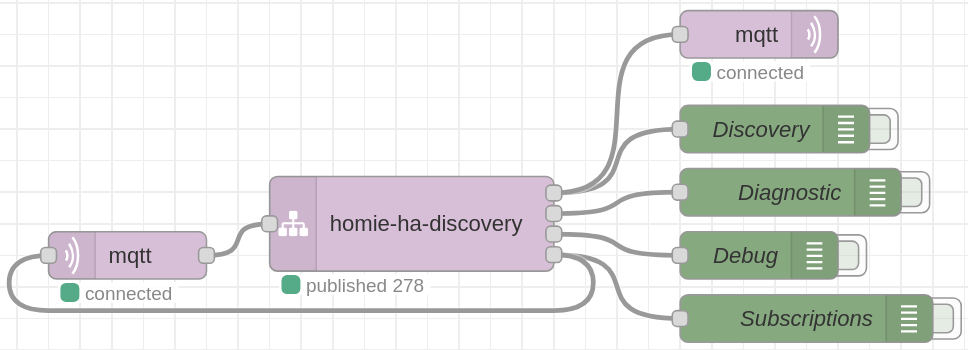
The node fits the normal Node-RED MQTT flow: put it between the built-in
mqtt in and mqtt out nodes. It reads Homie metadata from MQTT, emits
retained Home Assistant discovery messages, and can send subscription-control
messages back to the same mqtt in node.
It does not open its own broker connection. Node-RED's MQTT nodes already handle credentials, TLS, reconnect behavior and broker configuration; this node focuses on Homie parsing, Home Assistant mapping, diagnostics and editor configuration.
Quick Start
- Install from the Node-RED Palette Manager.
- Add an
mqtt innode and point it to the broker used by your Homie devices. - Leave the
mqtt intopic empty if you want dynamic subscriptions, or usehomie/#for a broad manual subscription. - Wire
mqtt inintohomie-ha-discovery. - Wire output 1 of
homie-ha-discoveryinto anmqtt outnode on the same broker. - Optional: wire output 4 back into the same
mqtt innode so the discovery node can manage Homie subscriptions dynamically.
Output 4 is the bottom port so that, in a normal left-to-right flow, the feedback wire can return to the MQTT input without crossing the discovery, diagnostic or debug wires.
Outputs
| Output | Name | Connect it to |
|---|---|---|
| 1 | Discovery | mqtt out, same broker, publishes retained discovery. |
| 2 | Diagnostics | debug, useful warnings and lifecycle logs. |
| 3 | Debug | debug, original input passthrough for inspection. |
| 4 | Subscriptions | the same mqtt in, for dynamic subscriptions. |
Discovery messages already contain topic, payload, qos and retain, so
the mqtt out node can publish them directly.
Basic Configuration
For most installations, start with the defaults:
- Home Assistant prefix:
homeassistant - Homie v5:
homie - Homie v3/v4:
homie - Versions: v3, v4 and v5 enabled
- Subscriptions: enabled
- Boolean mapping:
Auto
Use Auto unless you want to force one fallback. It maps clear light and fan
names/types, then falls back to switch for generic commandable booleans.
Read-only booleans are always binary_sensor.
What Gets Discovered
The mapper uses Homie metadata first:
- read-only booleans become
binary_sensor; - commandable booleans become
switch,lightorfan; - commandable numbers become
number; - commandable enums become
selectwhen options are available; - commandable strings and similar values become
text; - read-only values become
sensor; - Homie lifecycle and optional v5 attributes become diagnostic entities.
The mapper is conservative. It will not invent climate, cover, lock,
vacuum, alarm panels or other complex Home Assistant domains from generic
Homie metadata alone. Use overrides when you know the real device semantics.
Practical Overrides
Start without overrides. Add them only when Home Assistant needs clearer names, stable historical IDs, a different platform for one property or additional MQTT discovery fields.
A common pattern is a device with many nodes, each exposing a boolean state
property. This example maps named state entities to lights, except one fan:
{
  // Shared identity for discovered Home Assistant devices.
  "deviceDefaults": {
    // Generates predictable device discovery object IDs.
    "objectId": "home_{deviceId}",

    // Keeps the Home Assistant device identity stable.
    "identifiers": ["homie:{baseTopic}"],
  },

  // Shortcut: listed node/state entities are lights by default.
  "namedNodeState": {
    "platform": "light",
    "objectId": "home_{deviceId}_{nodeId}",
  },

  // Device-specific names and exceptions.
  "devices": {
    "homie/5/kitchen-board": {
      "name": "Kitchen board",
      "nodeNames": {
        "ceiling": "Ceiling light",
        "extractor": {
          "name": "Extractor fan",
          "platform": "fan",
          "icon": "mdi:fan",
        },
      },
    },
  },
}
The Overrides field accepts strict JSON, not JSON with comments. Use the commented example to understand the shape, then paste a comment-free version:
{
  "deviceDefaults": {
    "objectId": "home_{deviceId}",
    "identifiers": ["homie:{baseTopic}"]
  },
  "namedNodeState": {
    "platform": "light",
    "objectId": "home_{deviceId}_{nodeId}"
  },
  "devices": {
    "homie/5/kitchen-board": {
      "name": "Kitchen board",
      "nodeNames": {
        "ceiling": "Ceiling light",
        "extractor": {
          "name": "Extractor fan",
          "platform": "fan",
          "icon": "mdi:fan"
        }
      }
    }
  }
}
Exact device, node and property overrides take precedence over broad rules. That lets you set a shared default for a fleet, then make one entity a fan, switch, renamed sensor or disabled diagnostic without changing the shared configuration.
Documentation
The full documentation map is in DOCS.md. Start there for Node-RED wiring, dynamic subscriptions, entity mapping, overrides and Homie compatibility.
Core Package
This package wraps
homie-home-assistant-discovery.
The shared core provides Homie parsing and Home Assistant mapping. This Node-RED
package provides the editor UI, runtime status, diagnostics and Node-RED message
wiring.
Local Development
npm ci
npm run check
For sibling-repository development, keep the core
homie-home-assistant-discovery package built locally before running the
wrapper checks. Published installs resolve the same dependency from npm.
License
Apache-2.0. See LICENSE.
