@theotherwillembotha/node-red-telemetry 0.4.7
Node-RED nodes for structured logging and metrics, built on node-red-plugincore.
@theotherwillembotha/node-red-telemetry
Node-RED nodes for structured logging and metrics. Built on @theotherwillembotha/node-red-plugincore.
Usage in Node-RED
Installation
Either use the Manage Palette option in the Node-RED editor, or run the following command in your Node-RED user directory (typically ~/.node-red):
npm install @theotherwillembotha/node-red-telemetry
[!NOTE] This plugin is self-contained -
node-red-plugincoreis bundled inline and does not need to be installed separately.
Nodes
Logging
Logger Node
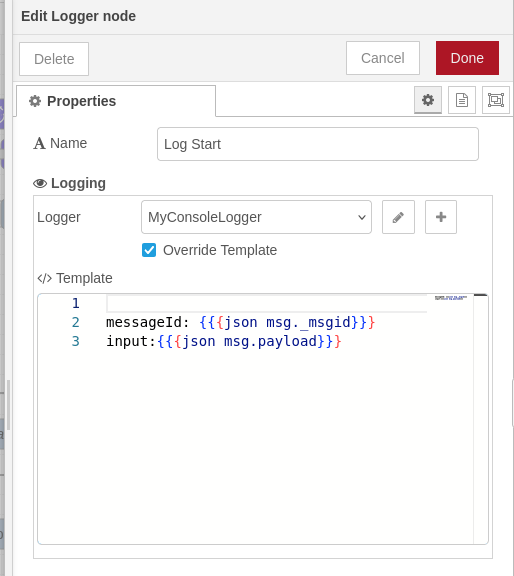
Logs the incoming message to a configured logging backend and passes it through unchanged.
Select a logger config node (Console Logger, REST Logger, or Loki Logger) to control the destination. When Override Template is checked, the node uses its own Handlebars template instead of the one defined on the logger config node - useful when different Logger nodes in the same flow need different output formats.
Metrics
Counter Metric Node
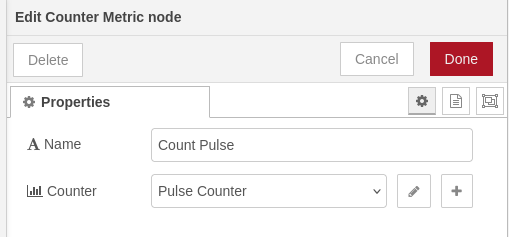
Increments a counter by 1 each time a message is received. The current counter value is displayed on the node status. The message payload is not read - the counter is always incremented by 1.
Gauge Metric Node
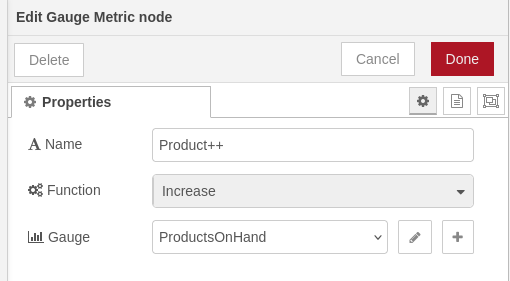
Increases or decreases a gauge by 1 each time a message is received. The current gauge value is displayed on the node status.
Function controls the direction:
- Increase - increments the gauge by 1
- Decrease - decrements the gauge by 1
Timer Metric Node
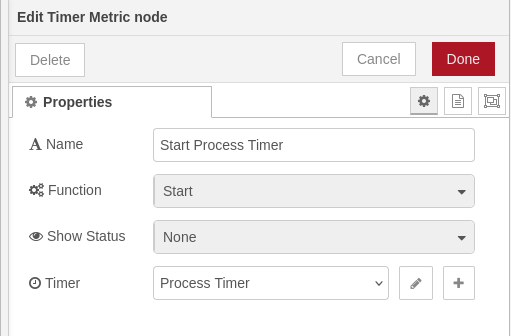
Records timing observations to a histogram or summary. Three nodes are typically chained in a flow - one set to Start, one to Stop - to measure the duration of operations across multiple steps.
Function controls the operation performed on each message:
- Start - records the current timestamp (in milliseconds) into
msg._timerand passes the message on. - Stop - reads the timestamp stored by a preceding Start node, calculates the elapsed time in milliseconds, and records the observation. If no timestamp is found the message is still passed through with no observation recorded.
- Observe - reads a pre-calculated value from
msg._timerand records it as an observation directly. Useful when the elapsed time is calculated externally.
Show Status controls what is displayed on the node in the flow canvas:
- None - no status is displayed.
- Average - displays the running average of all observations in milliseconds.
Config nodes
These config nodes are shared across all plugins built on the framework.
| Config node | Provided by | Purpose |
|---|---|---|
| Console Logger | node-red-logging |
Writes log output to stdout |
| REST Logger | node-red-logging |
Ships log entries to an HTTP endpoint |
| Loki Logger | node-red-loki |
Ships log entries to Grafana Loki - install separately |
| Counter Metric | node-red-prometheus |
Counter metric definition |
| Gauge Metric | node-red-prometheus |
Gauge metric definition |
| Timer Metric | node-red-prometheus |
Histogram / summary metric definition |
Examples
Metrics Example
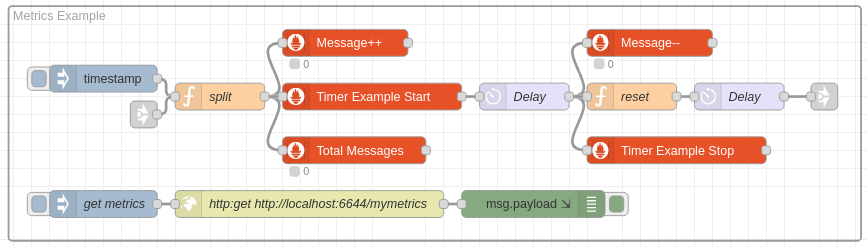
A timestamp trigger feeds a message into three nodes simultaneously:
- Metrics ++ - a gauge that increments on every message.
- Total Messages - a counter that increments on every message.
- Timer Example Start - a timer node that starts a timer and injects a reference into the message payload so it can be correlated later.
The message is then delayed by a few seconds before being handed off to two further nodes:
- Metrics -- - the same gauge used by Metrics ++, this time decrementing it.
- Timer Example Stop - stops the timer that was started by Timer Example Start and records the observation.
The Get Metrics injection polls the metrics endpoint directly, retrieving the current state of all registered metrics.
Example scrape output:
# HELP counter_50f031bdf8f60f85 an example couter
# TYPE counter_50f031bdf8f60f85 counter
counter_50f031bdf8f60f85{flow="undefined",type="CounterMetricConfigNode",name="My Counter",id="50f031bdf8f60f85",metric="My Counter"} 6

# HELP summary_6a528fb7faa12ba3 an example timer
# TYPE summary_6a528fb7faa12ba3 summary
summary_6a528fb7faa12ba3{quantile="0.01",flow="undefined",type="TimerMetricConfigNode",name="Timer Example",id="6a528fb7faa12ba3",metric="Timer Example"} 1013.7
summary_6a528fb7faa12ba3{quantile="0.1",flow="undefined",type="TimerMetricConfigNode",name="Timer Example",id="6a528fb7faa12ba3",metric="Timer Example"} 1097
summary_6a528fb7faa12ba3{quantile="0.9",flow="undefined",type="TimerMetricConfigNode",name="Timer Example",id="6a528fb7faa12ba3",metric="Timer Example"} 2847
summary_6a528fb7faa12ba3{quantile="0.99",flow="undefined",type="TimerMetricConfigNode",name="Timer Example",id="6a528fb7faa12ba3",metric="Timer Example"} 2991.45
summary_6a528fb7faa12ba3_sum{flow="undefined",type="TimerMetricConfigNode",name="Timer Example",id="6a528fb7faa12ba3",metric="Timer Example"} 184628
summary_6a528fb7faa12ba3_count{flow="undefined",type="TimerMetricConfigNode",name="Timer Example",id="6a528fb7faa12ba3",metric="Timer Example"} 95

# HELP gauge_a90b1d118eeefaee an example gauge
# TYPE gauge_a90b1d118eeefaee gauge
gauge_a90b1d118eeefaee{flow="undefined",type="GaugeMetricConfigNode",name="Messages being processed",id="a90b1d118eeefaee",metric="Messages being processed"} 1
Logger Example

A simple flow demonstrating structured logging across a processing step:
- An Inject node triggers the flow with the payload
"hello world". - Log Start - a Logger node that logs the message id and payload at the start of the sequence.
- Do Something - a Function node that reverses the payload string.
- Log End - a Logger node that logs the message id and the transformed payload at the end of the sequence.
Both Logger nodes use a Console Logger config node with the following Handlebars template:
messageId: {{{json msg._msgid}}}
input:{{{json msg.payload}}}
The
{{{json ...}}}helper serializes the value as a JSON string. Triple braces are used to prevent HTML escaping.
Running the flow produces the following output on the console:
2026-09-11T21:39:18.057Z 9f05d23146d16f67 INFO {
  id: '9f05d23146d16f67',
  node: 'Log Start',
  type: 'LoggerNode',
  flow: 'Flow 1',
  instance: '172.21.0.2'
}
messageId: "fb46bfbabd46de37"
input:"hello world"

2026-09-11T21:39:18.058Z 0551864117ea9c90 INFO {
  id: '0551864117ea9c90',
  node: 'Log End',
  type: 'LoggerNode',
  flow: 'Flow 1',
  instance: '172.21.0.2'
}
messageId:"fb46bfbabd46de37"
output:"dlrow olleh"
Each log entry has a structured header - the ID and name of the Logger node that emitted it, its type, the flow it belongs to, and the Node-RED instance address. The instance field is particularly useful when a log aggregator (such as Loki) is collecting from multiple Node-RED instances.
Repository
- Source: github.com/theotherwillembotha/nodered_telemetry
- Issues: github.com/theotherwillembotha/nodered_telemetry/issues
