@theotherwillembotha/node-red-nginxproxymanager 0.4.6
Node-RED nodes for managing Nginx Proxy Manager hosts, built on node-red-plugincore.
@theotherwillembotha/node-red-nginxproxymanager
Node-RED nodes for managing Nginx Proxy Manager hosts directly from your flows. Built on @theotherwillembotha/node-red-plugincore.
[!IMPORTANT] This plugin requires
@theotherwillembotha/node-red-plugincoreto be installed.
node-red-plugincoreis declared as a dependency and npm will install it automatically alongside this package. However, due to a known Node-RED limitation, packages that arrive as transitive npm dependencies are only discovered by the Node-RED runtime on the next startup.You have two options:
- Install
@theotherwillembotha/node-red-plugincorevia the palette manager ornpm installfirst, then install this plugin — both will be available immediately without a restart.- Install this plugin directly —
node-red-plugincorewill be installed automatically alongside it. Restart Node-RED once and both packages will be fully loaded.
Installation
Either use the Manage Palette option in the Node-RED editor, or run the following in your Node-RED user directory (typically ~/.node-red):
npm install @theotherwillembotha/node-red-nginxproxymanager
Nodes
Nginx Proxy Manager Config
A config node that holds the connection details for an Nginx Proxy Manager instance. Referenced by all other nodes in this plugin.
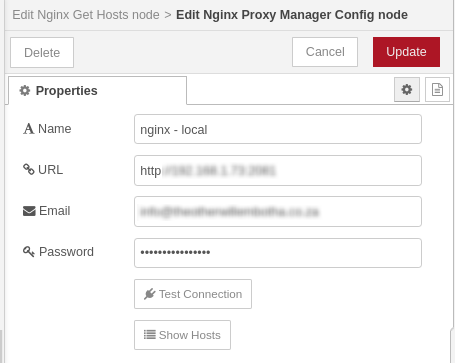
| Field | Description |
|---|---|
| Name | A descriptive label for this connection. |
| URL | The base URL of the Nginx Proxy Manager admin API, including port (e.g. http://192.168.1.10:81). |
| The email address used to authenticate with Nginx Proxy Manager. | |
| Password | The password for the above account. |
This config node registers itself as a
ReverseProxyTypein the plugincore tag system. This means it will automatically appear in the reverse proxy selector of any webhook node that uses theWebhookTemplatefromnode-red-plugincore.
Nginx Update Host
Creates or updates a proxy host entry in Nginx Proxy Manager. The operation is determined by the presence of an id field in msg.payload:
- No
id— creates a new proxy host. - With
id— updates the existing proxy host with that ID.
Inputs
: msg.payload (object) : The host configuration to create or update. See the payload schema below.
Outputs
: msg (object) : The original message, passed through unchanged after the operation completes.
Payload schema
Create a new host — all required fields must be present:
{
    domainNames: string[],        // The domain names to forward (each must be unique and not yet registered).
    scheme: "http" | "https",     // The forwarding scheme.
    forwardHost: string,          // The target host to forward requests to.
    forwardPort: number,          // The target port to forward requests to.
    accessList: string,           // The access list to bind to this host.
    cacheAssets: boolean,         // Optional: whether to cache assets.
    blockCommonExploits: boolean, // Optional: whether to block common exploits.
    websocketSupport: boolean,    // Optional: whether to enable WebSocket support.
}
Update an existing host — only include fields that should change:
{
    id: number,                   // Required: the ID of the proxy host to update.
    domainNames: string[],        // Optional.
    scheme: "http" | "https",     // Optional.
    forwardHost: string,          // Optional.
    forwardPort: number,          // Optional.
    accessList: string,           // Optional.
    cacheAssets: boolean,         // Optional.
    blockCommonExploits: boolean, // Optional.
    websocketSupport: boolean,    // Optional.
}
Example
{
    "domainNames": ["myservice.example.com"],
    "scheme": "http",
    "forwardHost": "192.168.1.35",
    "forwardPort": 8080,
    "blockCommonExploits": true,
    "websocketSupport": true
}
Nginx Get Hosts
Retrieves the full list of proxy hosts from Nginx Proxy Manager and writes them to a configurable property on the message.
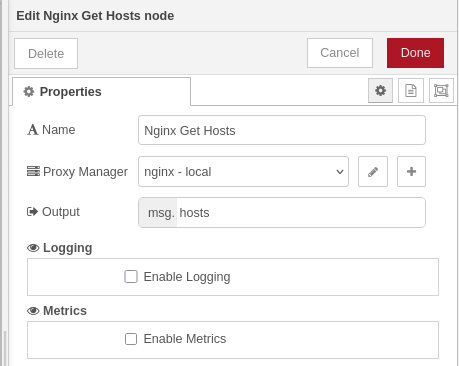
Properties
| Field | Description |
|---|---|
| Name | A descriptive label for the node. |
| Proxy Manager | The Nginx Proxy Manager config node to use. |
| Output | The message property to write the hosts array to. Defaults to msg.payload. |
Inputs
: msg (object) : Any message. The payload is not used; the output property is set on the incoming message and forwarded.
Outputs
: msg (object) : The original message with the specified output property set to an array of proxy host objects.
Output schema
[
    {
        id:          number,    // proxy host ID
        domainNames: string[],  // domain names served by this host
        scheme:      string,    // forwarding scheme: "http" or "https"
        forwardHost: string,    // target host
        forwardPort: number,    // target port
    }
]
Integration with node-red-plugincore
This plugin is built on @theotherwillembotha/node-red-plugincore and integrates with its subsystems:
- Logging — all action nodes (Nginx Update Host, Nginx Get Hosts) accept a logger config node via the
LoggerTemplatesection in their editors, enabling structured log output to Console, REST, or Loki backends. - Metrics — all action nodes track request counts via the
MetricsTemplatesection, publishing Prometheus counters that can be scraped from the metrics endpoint. - Reverse Proxy — the Nginx Proxy Manager Config node registers itself as a
ReverseProxyType. Any webhook node usingWebhookTemplatewill automatically list this config node in its reverse proxy selector, allowing Node-RED webhooks to be registered directly in Nginx Proxy Manager via a flow.
