@theotherwillembotha/node-red-cluster 0.4.6
Node-RED clustering plugin - connect multiple Node-RED instances into a coordinated cluster using NATS JetStream for message transport and NATS KV for shared state.
@theotherwillembotha/node-red-cluster
Connect multiple Node-RED instances into a coordinated cluster. Instances discover each other, publish messages on named subjects, and subscribe to messages from other instances - with full delivery guarantees even when nodes are temporarily offline. Built on @theotherwillembotha/node-red-plugincore and powered by NATS JetStream.
What it does
Each Node-RED instance in the cluster connects to a NATS server. A Cluster Publish node sends a message onto a named subject; any other instance with a matching Cluster Subscribe node receives it. Subjects are automatically namespaced by instance, so you can subscribe to field-a.sensors.temperature for data from one specific instance, or *.sensors.temperature to receive it from all of them simultaneously.
Messages published in Durable mode are stored in NATS JetStream. If a subscriber is offline when the message is sent, it will be delivered when the subscriber comes back - nothing is lost. Ephemeral mode is fire-and-forget with a configurable TTL, useful for time-sensitive data that becomes irrelevant if not consumed quickly.
NATS - what it is and why you need it
NATS is a lightweight, high-performance messaging server. Think of it as the backbone that all your Node-RED instances connect to: when one instance publishes a message, NATS routes it to all the instances that have subscribed to that subject.
You do not need to understand NATS deeply to use this plugin. You just need a NATS server running somewhere that all your Node-RED instances can reach. The sections below show you exactly how to do that.
JetStream
JetStream is NATS's persistence layer. Without it, messages are delivered only if a subscriber is listening at the exact moment the message is sent. With JetStream, messages are written to disk and replayed to subscribers when they reconnect. This plugin uses JetStream for all Durable-mode messages, so JetStream must be enabled on your NATS server.
Setting up NATS
Option 1 - Single server (simplest, good for getting started)
A single NATS server is the easiest way to get going. It has no redundancy - if NATS goes down, all cluster communication stops until it restarts - but it is perfectly adequate for development and non-critical deployments.
nats.conf
listen=0.0.0.0:4222
http=0.0.0.0:8222

jetstream {
  store_dir=/data/storage
}

accounts {
  APP {
    jetstream: enabled
    users: [
      { user: "nodered", password: "your_password_here" }
    ]
  }
  $SYS {}
}
To generate a bcrypt-hashed password (recommended for anything beyond local dev):
docker run --rm nats nats-server --mkpasswd
docker-compose.yml
version: "3.5"
services:
  nats:
    image: nats
    hostname: nats
    command: "-config /data/nats.conf"
    ports:
      - "4222:4222"   # client connections
      - "8222:8222"   # monitoring dashboard → http://localhost:8222
    volumes:
      - ./nats:/data
Start it:
docker compose up -d
In your Cluster Config node, set the NATS Address to localhost:4222 and enter the username and password from your config.
Option 2 - Three-server cluster (high availability)
A clustered NATS setup runs multiple servers that synchronise with each other. If one server goes down, the others keep routing messages. Node-RED instances can connect to any server in the cluster - NATS handles the routing internally.
Each server needs its own config file. The only differences between them are the server_name and the routes list (each server points to the other two).
nats/server1/nats.conf
server_name=nats_server1
listen=0.0.0.0:4222
http=0.0.0.0:8222

jetstream {
  store_dir=/data/storage
}

accounts {
  APP {
    jetstream: enabled
    users: [
      { user: "nodered", password: "your_password_here" }
    ]
  }
  $SYS {}
}

cluster {
  name: NATS
  listen: 0.0.0.0:6222

  # Credentials required from peer servers connecting to this server's route port.
  authorization {
    user: route_user
    password: "route_secret"
    timeout: 2
  }

  routes: [
    nats://route_user:route_secret@nats_server2:6222
    nats://route_user:route_secret@nats_server3:6222
  ]
}
For server2 and server3, use identical configs but change server_name and swap the route URLs so each server points to its two peers.
nats-compose.yml
version: "3.5"
services:
  nats_server1:
    image: nats
    hostname: nats_server1
    command: "-config /data/nats.conf"
    ports:
      - "4222:4222"
      - "8222:8222"
    volumes:
      - ./nats/server1:/data

  nats_server2:
    image: nats
    hostname: nats_server2
    command: "-config /data/nats.conf"
    ports:
      - "4223:4222"
      - "8223:8222"
    volumes:
      - ./nats/server2:/data
    depends_on: ["nats_server1"]

  nats_server3:
    image: nats
    hostname: nats_server3
    command: "-config /data/nats.conf"
    ports:
      - "4224:4222"
      - "8224:8222"
    volumes:
      - ./nats/server3:/data
    depends_on: ["nats_server1"]
Start it:
docker compose -f nats-compose.yml up -d
Each server is reachable on a different host port (4222, 4223, 4224) - connect any Node-RED instance to whichever one is nearest or most reliable. The NATS cluster handles message routing between them transparently.
A ready-to-run three-server cluster configuration matching this layout is included in the
nats/andnats-compose.ymlfiles in this repository.
Installation
In your Node-RED user directory (typically ~/.node-red):
npm install @theotherwillembotha/node-red-cluster
Or via the Node-RED Manage Palette - search for node-red-cluster.
Nodes
Cluster Config
Defines a cluster connection. Add one per cluster per Node-RED instance. All Publish and Subscribe nodes reference a config node to know which cluster they belong to.
A single Node-RED instance can participate in more than one cluster simultaneously by adding multiple config nodes with different Root Paths.
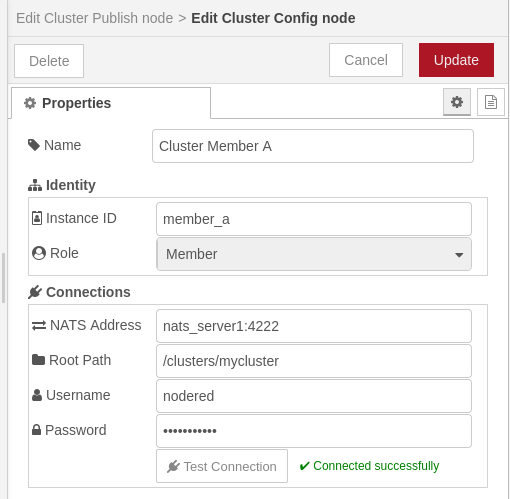
| Property | Description |
|---|---|
| Name | Display label for this config node. |
| Instance ID | Unique name for this Node-RED instance within the cluster - e.g. field-a or control-center. Must be unique across all nodes sharing the same Root Path. |
| Role | Member - full participation; can publish and subscribe. Observer - subscribe only; all Cluster Publish nodes linked to this config are silently disabled at runtime. |
| NATS Address | host:port of your NATS server or cluster entry point. Default: localhost:4222. |
| Root Path | Path prefix that identifies this cluster - e.g. /nodered-cluster. All instances in the same cluster must use the same value. Multiple independent clusters can share a NATS server by using different Root Paths. |
| Username / Password | NATS credentials. Leave blank for unauthenticated servers. |
The Test Connection button verifies NATS connectivity using the address and credentials currently entered in the form - before saving.
Cluster Publish
Publishes the incoming Node-RED message to the cluster when triggered. Other instances with a matching Cluster Subscribe pattern will receive it.
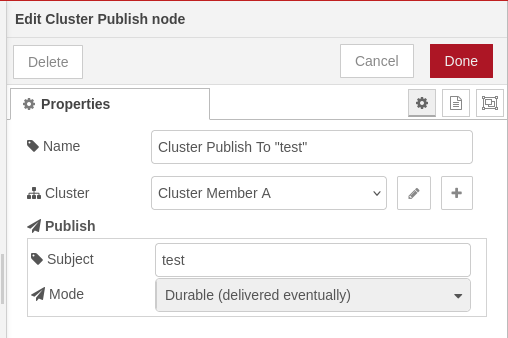
| Property | Description |
|---|---|
| Cluster | The Cluster Config node that defines which cluster to publish to. |
| Subject | Subject identifier for this publisher - e.g. commands.opengate or sensors.temperature. Dot-notation is supported for hierarchy. |
| Mode | Durable - message is persisted in JetStream and delivered even if the subscriber is offline at the time of publishing. Ephemeral - message is discarded if not consumed within the TTL window; use for data that becomes stale quickly. |
| TTL | Ephemeral mode only. Seconds before an undelivered message is discarded. Default: 30. |
The full NATS subject is composed automatically:
<root-path>.<instance-id>.<subject>
For example: Root Path /nodered-cluster, Instance ID field-a, Subject commands.opengate → nodered-cluster.field-a.commands.opengate
If the linked Cluster Config is set to Observer role, the node displays a warning in the editor and silently discards all messages at runtime.
Input
| Property | Description |
|---|---|
msg.payload |
Serialised as JSON and published to the cluster subject. |
Cluster Subscribe
Subscribes to one or more cluster subjects and emits a Node-RED message each time a matching message arrives from any instance in the cluster.
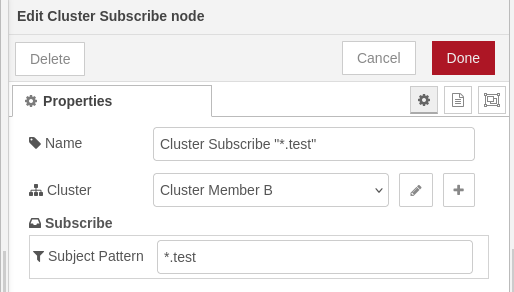
| Property | Description |
|---|---|
| Cluster | The Cluster Config node that defines which cluster to subscribe to. |
| Subject Pattern | One or more subject patterns, comma-separated. Supports NATS wildcards. |
Output
| Property | Description |
|---|---|
msg.payload |
The payload published by the remote Cluster Publish node. |
msg.topic |
The full NATS subject the message arrived on - useful for identifying which instance sent it. |
Subject pattern syntax
Patterns are scoped to the cluster's Root Path automatically. You only write the part after the root:
| Pattern | Matches |
|---|---|
*.commands.opengate |
Open-gate commands from any instance |
field-a.sensors.temperature |
Temperature readings from field-a only |
field-a.> |
All messages from field-a |
> |
Every message in the cluster |
*.commands.opengate, *.commands.closegate |
Both gate commands from any instance (two subscriptions) |
Live autocomplete
When the editor panel opens, the Cluster Subscribe node fetches a live list of all currently connected instances and the subjects they are publishing. Start typing in the Subject Pattern field - the dropdown shows matching suggestions grouped by specificity:
>- match everything*.subject- any instance, specific subjectinstance-id.>- all subjects from one instanceinstance-id.subject- exact match
Use arrow keys to navigate, Enter or Tab to select. After selecting a suggestion, type , to add a second pattern.
Example flows
Publishing sensor data
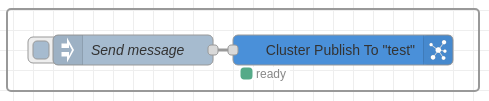
An Inject node sends a payload on activation to the subject test in Durable mode. The message is stored in NATS JetStream under <clustername>.<memberid>.test and delivered to any subscriber that matches.
Subscribing to sensor data

A Cluster Subscribe node with pattern *.test receives all messages from all instances in the cluster that contains the subject test. The subject pattern *.test expands to *.*.test.heartbeat at runtime - the * wildcard matches any single token, so messages from memberA, memberB, and any other instance are all delivered to this one node.
Subject routing reference
Published as:   nodered-cluster . memberA . test
                └── root path ──┘ └─ id ─┘ └ subject ┘

Subscribe with: nodered-cluster . *       . test   ← any instance
                nodered-cluster . memberA . >                       ← all from memberA
                nodered-cluster . >                                  ← everything
