Image Segmentation
Image Segmenter Deep Learning model in Action
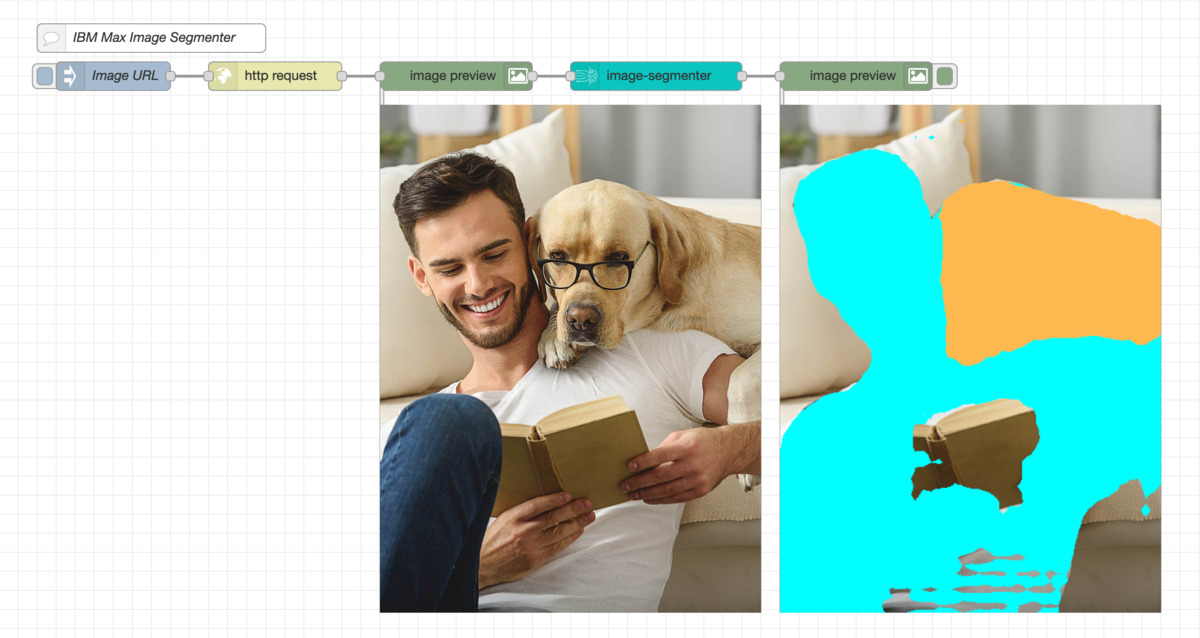
This flow uses the max image-segmenter deep learning model from the IBM Model Asset Exchange to identify objects in an image, additionally assigning each pixel of the image to a particular object.
Requirements
[{"id":"849b1ecc.389bd","type":"tab","label":"Image Segmentation","disabled":false,"info":"This flow uses the [max image-segmenter](https://developer.ibm.com/exchanges/models/all/max-image-segmenter/) deep learning model from the IBM Model Asset Exchange to identify objects in an image, additionally assigning each pixel of the image to a particular object.\n\n## Requirements\n - [node-red-contrib-model-asset-exchange](https://www.npmjs.com/package/node-red-contrib-model-asset-exchange)\n - [node-red-contrib-image-output](https://www.npmjs.com/package/node-red-contrib-image-output)\n "},{"id":"6c4ac11b.a8dda","type":"comment","z":"849b1ecc.389bd","name":"IBM Max Image Segmenter","info":"[IBM Max Image Segmenter](https://developer.ibm.com/exchanges/models/all/max-image-segmenter)","x":160,"y":60,"wires":[]},{"id":"f247d5c8.4d552","type":"image-segmenter","z":"849b1ecc.389bd","service":"838ecb73.87ae08","method":"predict","passthrough":false,"annotated_input":true,"predict_image":"","predict_imageType":"str","name":"","x":690,"y":100,"wires":[["c4a79125.6c791"]]},{"id":"18dec333.d48dd5","type":"inject","z":"849b1ecc.389bd","name":"Image URL","topic":"","payload":"https://magazineen-ed3b.kxcdn.com/wp-content/uploads/2019/05/single-man-dog.jpg","payloadType":"str","repeat":"","crontab":"","once":false,"onceDelay":0.1,"x":120,"y":100,"wires":[["130221d6.12b176"]]},{"id":"130221d6.12b176","type":"http request","z":"849b1ecc.389bd","name":"","method":"GET","ret":"bin","paytoqs":false,"url":"{{{payload}}}","tls":"","persist":false,"proxy":"","authType":"","x":290,"y":100,"wires":[["42422c77.c42084"]]},{"id":"42422c77.c42084","type":"image","z":"849b1ecc.389bd","name":"","width":"400","data":"payload","dataType":"msg","thumbnail":false,"active":true,"pass":true,"outputs":1,"x":480,"y":100,"wires":[["f247d5c8.4d552"]]},{"id":"c4a79125.6c791","type":"image","z":"849b1ecc.389bd","name":"","width":"400","data":"annotatedInput","dataType":"msg","thumbnail":false,"active":true,"pass":false,"outputs":0,"x":900,"y":100,"wires":[]},{"id":"838ecb73.87ae08","type":"image-segmenter-service","z":"","host":"https://max-image-segmenter.codait-prod-41208c73af8fca213512856c7a09db52-0000.us-east.containers.appdomain.cloud","name":"cloud"}]
