node-red-contrib-pixelit 0.5.3
PixelIt Project
node-red-contrib-pixelit



Node-RED nodes to control the PixelIt easily and comfortably.
Requirements and installation
Use Node.js 22 or newer and Node-RED 2 or newer. Install node-red-contrib-pixelit
through Manage palette → Install, then restart Node-RED. Alternatively, run
this in your Node-RED user directory (usually ~/.node-red):
npm install node-red-contrib-pixelit
Quick start
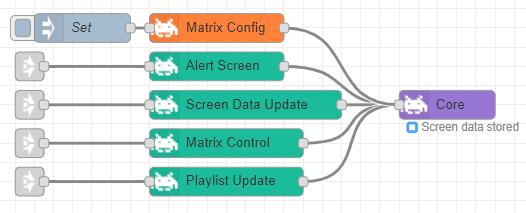
Import examples/quick-start.json through the Node-RED Import dialog. Set your PixelIt device's IP address in the Core node, deploy, and click Display text. This sends a five-second text alert through HTTP. The Debug node shows the outgoing MQTT message.
For MQTT, connect Core's output to an MQTT Out node configured to use
msg.topic, and set Core's Master-Topic to the topic configured on your PixelIt.
The IP address is optional when using MQTT only. Both transports are used when
an IP and an MQTT output connection are configured. Enter your PixelIt UUID in
Core when downloading bitmap IDs from the bitmap API.
Text fields that support message references accept values such as
{{msg.payload}} or {{msg.payload.seconds}}.
To rotate screens, use Screen Init → Text/Clock/Bitmap → Screen Data Update →
Core to store each named screen. Then send an array such as
[{"screenName":"weather"},{"screenName":"clock"}] through Playlist Update →
Core. An empty array stops rotation. Each screen needs a positive duration in
seconds, at most 2147483. Invalid playlists are rejected without replacing the
current playlist. Alerts temporarily interrupt rotation; sleep mode pauses it.
Example flows
Find these in Import → Examples → node-red-contrib-pixelit or import the JSON files directly. Every package node is demonstrated, using only this package and built-in Node-RED nodes:
- quick-start.json: Screen Init, Text, Alert Screen and Core.
- playlist.json: Clock, Bitmap, Screen Data Update and Playlist Update. Store both screens before starting playback; an empty playlist stops rotation.
- animations.json: Bitmap Animation and Switch Animation, using inline frames without API downloads.
- controls.json: Matrix Control, Sound, GPIO Control and Matrix Config. Review the GPIO pin, audio hardware and all configuration fields before sending to a device. Debug is disabled because configuration messages can contain credentials.
All Inject nodes are manual. Core starts without a device IP so importing and
deploying only prepares the examples. Set an IP for HTTP or connect an MQTT Out
node using msg.topic to control a device. npm run check checks JSON, wire
references and coverage of all registered non-config node types, including nested
example directories.
Existing MQTT passwords
Matrix Config now stores its MQTT password using Node-RED credentials. Existing flows continue to work using their legacy password. Open each existing Matrix Config node, save it with Done, and deploy to move its password out of the normal flow properties into credentials. Previously exported flows and backups may still contain the old password. Keep Node-RED's credential secret and credential store with your deployment backup; ordinary flow exports do not include the credential password.
Matrix Config must still send the password to the device when applying its MQTT configuration. Its output messages therefore contain the password: avoid logging or exporting those messages.
HTTP requests and bitmap caching
Core caches up to 100 bitmaps (1 MiB total), removing least recently used entries first. New screen commands cancel outdated requests. HTTP requests time out after one second; failures appear in the node status and Node-RED log.
Development
npm ci
npm run check
npm test
Checks cover runtime/editor JavaScript syntax and example JSON. Regression tests use an isolated Node-RED stub, fake timers and mocked HTTP calls to exercise playlist validation, shutdown, failed bitmap downloads, message references and credential migration. CI runs them on Node.js 22 and 24, and the release workflow runs them before publishing. Hardware and editor integration should also be checked in a real Node-RED installation before release.
Example
Publishing releases
The release.yml workflow publishes through npm Trusted Publishing (GitHub
OIDC), without an NPM_TOKEN secret. The npm package's trusted publisher must
allow npm publish for pixelit-project/node-red-contrib-pixelit and workflow
filename release.yml, with no environment name.
Bump the version in package.json and package-lock.json, commit and push the
changes, then publish a GitHub release whose tag matches that version (for
example v0.4.1). Draft releases do not publish. The workflow verifies the tag,
installs dependencies, runs checks and tests, and publishes using Node.js 24 and
npm 11. The first successful publish validates the npm trusted publisher; remove
unused legacy publishing tokens after confirming that it succeeded.
Changelog
0.5.3 (2026-10-31)
- (o0shojo0o) Automatically detect 8×8 and 32×8 bitmap animation dimensions in Core from the pixels per frame, including gallery downloads and cached animations. No manual size configuration is needed.
0.5.2 (2026-10-28)
- (o0shojo0o) Keep PixelIt HTTP failures visible in node status without repeated debug warnings; log each outage and recovery once per screen/config endpoint. Bitmap errors remain warnings. Fixes #90.
0.5.1 (2026-10-28)
- (o0shojo0o) Bound the bitmap cache to 100 entries / 1 MiB with least-recently-used eviction.
- (o0shojo0o) Cancel superseded screen requests and discard stale responses and error statuses.
- (o0shojo0o) Distinguish HTTP errors, timeouts, connection failures and invalid bitmap responses in node status and logs.
- (o0shojo0o) Add example flows covering all 14 nodes and validate example coverage automatically.
0.5.0 (2026-10-28)
Requires Node.js 22 or newer. Existing Matrix Config nodes should be opened, saved and deployed to migrate MQTT passwords to credentials.
- (o0shojo0o) Replace Axios with native fetch; abort HTTP requests after one second or on node close.
- (o0shojo0o) Stop playlist timers and suppress late sends when Core is closed.
- (o0shojo0o) Validate playlists and durations; allow an empty playlist to stop rotation.
- (o0shojo0o) Fix dynamic Clock/Sound values and bitmap download error handling.
- (o0shojo0o) Store Matrix Config MQTT passwords in Node-RED credentials with legacy migration.
- (o0shojo0o) Require Node.js 22+, add regression tests, CI checks and an importable example.
0.4.0 (2024-10-07)
- (o0shojo0o) added PixelIt UUID to Core-Node (is necessary in the future to use the API)
- (o0shojo0o) update dependencies
0.3.14 (2022-08-16)
- (o0shojo0o) better JSON error handling
0.3.13 (2022-08-13)
- (o0shojo0o) update URLs
0.3.12 (2022-02-06)
- (o0shojo0o) fix Typos
0.3.11 (2022-02-06)
- (o0shojo0o) added HexColor to Clock Node
- (o0shojo0o) added HexColor to Text Node
- (o0shojo0o) added Zig Zag Wipe to SwitchAnimation Node
- (o0shojo0o) added Bitmap Wipe to SwitchAnimation Node
- (o0shojo0o) added Random to SwitchAnimation Node
0.3.10 (2021-12-03)
- (o0shojo0o) added better error handling
0.3.9 (2021-05-26)
- (o0shojo0o) added GPIO Control
0.3.8 (2021-04-07)
- (o0shojo0o) bugfix 'Text.Scroll' -> on
0.3.7 (2021-03-27)
- (o0shojo0o) bugfix SleepMode brightness
- (o0shojo0o) bugfix Brightness
0.3.6 (2021-03-24)
- (o0shojo0o) bugfix 'Text.Scroll'
0.3.5 (2021-03-22)
- (o0shojo0o) bugfix 'SleepMode'
0.3.4 (2021-03-21)
- (o0shojo0o) bugfix 'Alert Screen'
0.3.3 (2021-03-20)
- (o0shojo0o) code refactor
- (o0shojo0o) removed old references and adjusted the code
- (o0shojo0o) request replaced by axios
- (o0shojo0o) fix axios exceptions
0.3.2 (2020-06-10)
- (o0shojo0o) New API address
0.3.1 (2019-12-27)
- (o0shojo0o) Bugfix undefined exception
0.3.0 (2019-12-26)
- (o0shojo0o) Added support für new sound feature of Pixel It v. 1912182240
