node-red-contrib-oracledb-mod 1.0.0
Node-RED oracle database nodes


node-red-contrib-oracledb-mod
Robust, modern, and easy-to-use Node-RED nodes for interacting with Oracle Database.
This module provides a stable connection to Oracle, supporting queries, DML, stored procedures, and advanced data binding, all handled through a resilient connection pool.
What's new in 1.0.0
Optional Dual Output Ports (Success vs. Error) — toggle separate error output on the node. Port 1 emits successful query results while Port 2 emits query errors with
msg.error, allowing direct routing to retry, fallback, or alerting flows without requiring a separate Catch node.Sequential Multi-Statement Queries — pass an array of SQL statements in
msg.queryto execute multiple queries sequentially within a single round-trip, returning an array of results inmsg.payload.Live SQL Bind Auto-Detection — real-time bind parameter badge in the query editor displays detected
:paramnames as you type.Multi-Node Transaction Management — atomic transactions across multiple flow nodes (
Begin,Continue,Commit,Rollback) with auto-rollback safety timeout.Oracle 23ai / 26ai Native Vector Search — automatic binding of JavaScript
Float32Array/Float64Arrayas nativeDB_TYPE_VECTORfor AI similarity search.Interactive Schema & Field Explorer — database hierarchy browser (Database → Schema → Object Type → Table/View → Columns) with smart
SELECT *,SELECT cols, andINSERT templateSQL generators.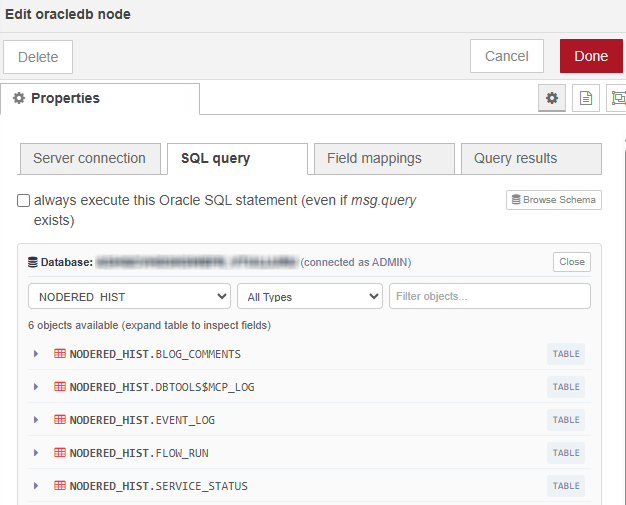
What's new in 0.9.0
- oracledb 7.0.1 — upgraded the core Oracle driver to version 7, verified with Oracle Database 26ai and OCI Autonomous Database (Thin mode).
- TypeScript 7 Native Port — modern build pipeline compiling directly with TypeScript 7 native CLI, dropping build times from
7.5s to ~1.3s (80% speedup). - Modernized Dev Toolchain — ESLint 10 with flat configuration (
eslint.config.mjs), Mocha 12, Chai 6, and modern@types/jquery. - Zero Package Vulnerabilities — retired legacy gulp build streaming packages (
gulp-typescript,gulp-sourcemaps,gulp-spawn-mocha), eliminating all 13 package security advisories. - Continuous Integration — automated GitHub Actions CI matrix running build, linting, and unit tests on Node 20 and Node 22 for all pull requests and pushes.
- Node Engine — engines updated to Node ≥ 20.
What's new in 0.8.0
- Thin mode is now the default — no Oracle Instant Client install required for most users (Oracle 12.1+, Autonomous Database, wallets all work). Existing configs that had an Instant Client path keep running in thick mode for backwards compatibility, with a one-time migration warning.
- First-class wallet / Autonomous Database support — Wallet / TNS_ADMIN, Wallet Location, Wallet Password are now config fields. TNS_ADMIN env var is auto-detected and pre-fills the dialog.
- TNS Name dropdown — aliases are parsed from your wallet's
tnsnames.oraand offered as a combo box. - Test Connection button — one-click verification with rich output (server host, service, database, user, current schema, accessible schemas, wallet aliases, connect + total timing).
- Pool Stats panel — live
connectionsInUse / connectionsOpen, queue length, peak in-use and peak queued high-water marks since the pool started. Refreshes every 2 s while open and surfaces sizing hints (e.g. "consider raising Max Connections" when peak hitspoolMax). - Pool-pressure visibility — query nodes show
waiting for pool slot... (4/4)whengetConnection()blocks; NJS-040 errors now readpool exhausted: 4/4 in use, 3 queued, waited 60000msinstead of the bare timeout. - executeMany batch mode — insert thousands of rows per round-trip via a new "Batch mode" checkbox or
msg.executeMany = true. - Automatic retry on transient errors — NJS-003/040, ORA-03113/03114/12170/12541/12537/12514 are retried with exponential backoff. Tunable per server config.
- Richer pool tuning —
poolIncrement,queueTimeout,stmtCacheSizeexposed in the UI. msg.oraclestats sidecar — every result message carries{ durationMs, mode, rows, rowsAffected }. Streamed (multi) results also includechunkIndex/totalRowsSoFar.- Node status badges — successful queries briefly show
N rows · 23ms; errors stay red for 5s. - Engines bumped to Node ≥ 18. CI now runs the full test suite on Node 18/20/22 before publish.
Driver Modes (Thin vs Thick)
| Use case | Mode |
|---|---|
| Oracle 12.1+, including Autonomous Database | Thin (default) — no install needed |
| Oracle 11g servers | Thick |
| Advanced Queuing (AQ), Continuous Query Notification (CQN), sharding | Thick |
Switch via the Driver Mode dropdown in the oracle-server config. Only one mode can be active per Node-RED process, and switching from thin → thick requires a process restart.
Wallet / Autonomous Database
For OCI Autonomous Database:
- Download the wallet zip from the OCI console.
- Unzip it on the host (e.g.
/opt/oracle/network/admin). - In the config node, set TNS_ADMIN to that directory — or just set the
TNS_ADMINenvironment variable and leave the field blank; the dialog auto-detects it. - The TNS Name dropdown will populate from the wallet's
tnsnames.ora. Pick one (e.g.mydb_high). - Fill User + Password on the Security tab. If your wallet is the standard ADB wallet with an SSO file, leave Wallet Password blank.
Click Test Connection to verify before deploying.
Connection Pool Tuning
All settings are on the Connection tab of the oracle-server config:
| Field | Default | What it does |
|---|---|---|
| Min / Max Connections | 0 / 4 | Pool bounds |
| Pool Increment | 1 | New connections opened when pool grows |
| Idle Timeout (s) | 60 | Idle connection lifetime |
| Queue Timeout (ms) | 60000 | How long a query waits for a free connection before failing with NJS-040 |
| Stmt Cache Size | 30 | Prepared statements cached per connection |
Retry on Transient Errors
The node automatically retries failed getConnection / execute calls when the error is transient (network blip, ADB warming up, listener restart). Configurable per server config:
- Max Retries (default 3, set 0 to disable)
- Initial Delay (ms) (default 1000) — doubled each attempt, capped at 10s
Errors that are not retried (syntax, permissions, ORA-01017, etc.) surface immediately.
Batch Mode (executeMany)
For high-volume inserts/updates, enable Batch mode on the oracledb (query) node and send an array payload:
msg.payload = [
  { id: 1, name: "alice" },
  { id: 2, name: "bob" },
  // ... thousands of rows
];
// query: INSERT INTO t (id, name) VALUES (:id, :name)
The node returns one message with msg.payload = { rowsAffected, outBinds, batchErrors }. You can also enable batch mode dynamically via msg.executeMany = true.
msg.oracle stats sidecar
Every successful result message carries a metadata sidecar that doesn't disturb msg.payload:
msg.oracle = {
  durationMs: 23,
  mode: "single",            // or "multi" | "single-meta" | "batch" | "none"
  statementKind: "query",    // "query" | "ddl" | "plsql" | "insert" | "update" | "delete" | ...
  rows: 1,                   // when applicable
  rowsAffected: 5            // when applicable (DML, executeMany)
}
For streamed multi results, each chunk message also gets chunkIndex and totalRowsSoFar so downstream nodes can detect "last chunk". DDL statements (CREATE/DROP/ALTER/...) produce a <verb> ok · Xms status badge instead of the ambiguous 0 affected.
Prerequisites
Thin mode users (most people): no prerequisites —
npm installis enough. Skip to the Configuration section.
The rest of this section applies only if you need Thick mode (Oracle 11g, AQ, CQN, sharding). You must have the Oracle Instant Client libraries installed on the same machine that is running Node-RED.
Download: Get the Instant Client "Basic" or "Basic Light" package for your operating system from the Oracle Instant Client Downloads Page.
Install: Unzip the package to a permanent location on your system (e.g.,
/opt/oracle/instantclient_21_13on Linux,C:\oracle\instantclient_21_13on Windows).Configure Environment: Node.js needs to know where to find these libraries.
Linux: Add the path to the
LD_LIBRARY_PATHenvironment variable.Windows: Add the path to the
PATHsystem environment variable.macOS: Add the path to the
DYLD_LIBRARY_PATHenvironment variable.
- In the node's configuration, you must provide the path to this directory in the Instant Client Path field. This directly addresses GitHub issue #52.
Installation
Install via the Node-RED Palette Manager or run the following command in your Node-RED user directory (typically ~/.node-red):
npm install node-red-contrib-oracledb-mod
Features
Resilient Connection Pooling: Automatically manages a pool of connections to handle idle timeouts, network disconnects, and database restarts, ensuring your flows are always ready.
Execute SQL and PL/SQL: Run
SELECT,INSERT,UPDATE,DELETE, and anonymous PL/SQL blocks.Stored Procedures & Functions: Full support for calling stored procedures and functions with
IN,OUT, andINOUTparameters usingmsg.bindVars.Flexible Result Handling: Choose whether to get all rows at once, stream large result sets, or get metadata like the number of rows affected by a DML statement.
Configurable Connections: Connect using Classic (
host:port/db) or TNS Name, with configurable connection pool settings.Built-in Examples: Comes with an importable example flow for calling stored procedures.
Node Usage
1. oracle-server (Configuration Node)
This node configures the connection to your database. Using the Connection Pool is highly recommended for all use cases.
Connection Type: Choose "Classic" for host/port/db or "TNS Name" for using a
tnsnames.oraentry.Instant Client Path: The local filesystem path to your Oracle Instant Client installation.
Connection Pool:
Min/Max Connections: Control the size of the connection pool.
Idle Timeout (s): How long an idle connection can live in the pool before being terminated. This is key to preventing errors from firewalls closing idle connections.
2. oracledb (Query Node)
This node executes the query and sends the results.
Common Use Cases
Use Case 1: Simple SELECT Query
Set
msg.querytoSELECT * FROM employees WHERE department_id = :1.Set
msg.payloadto[50].Set the Action to
send single query result message.Output:
msg.payloadwill be an array of employee objects.
Use Case 2: INSERT or UPDATE and Get Rows Affected
Set
msg.querytoUPDATE employees SET salary = salary * 1.1 WHERE department_id = :1.Set
msg.payloadto[50].Set the Action to
send single message with metadata.Output:
msg.payloadwill be an object like{ rowsAffected: 10, ... }. This addresses GitHub issues #3, #53, and #35.
Use Case 3: Calling a Stored Procedure with an OUT Parameter
Set
msg.querytoBEGIN get_employee_name(:emp_id, :emp_name); END;.Set
msg.bindVarsas shown below.Set the Action to
send single message with metadata.Output:
msg.payload.outBinds.emp_namewill contain the returned name. This addresses GitHub issue #6 and #34.
// Example for msg.bindVars

msg.bindVars = {

emp_id: { dir:  "BIND_IN", val:  101, type:  "NUMBER" },

emp_name: { dir:  "BIND_OUT", type:  "STRING" }

};
For a full list of bind parameter types and directions, see the official node-oracledb documentation.
Executing Multiple Statements (Scripts)
The Oracle driver executes one SQL statement or one PL/SQL block at a time. You cannot send a script with multiple statements separated by semicolons (;) in a single query. This will result in an ORA-00933 error.
There are two recommended ways to run multiple commands:
1. For Transactional Scripts (INSERT, UPDATE, DELETE)
The best practice is to wrap your statements in a single PL/SQL BEGIN...END; block. This ensures all commands are executed together as a single, atomic transaction.
Example:
BEGIN

UPDATE inventory SET quantity = quantity - 1  WHERE product_id = :p_id;

INSERT INTO order_log (product_id, log_date) VALUES (:p_id, SYSDATE);

END;
2. For Sequential Queries
If you need to run multiple independent queries, especially SELECT statements, the standard Node-RED approach is to chain multiple oracledb nodes in your flow.
Example Flow:
Inject → [ oracledb (SELECT from table A) ] → [ oracledb (SELECT from table B) ] → ...
Troubleshooting
ORA-06550 Error with BEGIN/END Blocks
Problem: ORA-06550: line 1, column X: PLS-00103: Encountered the symbol "END" when expecting...
Solution: Fixed in version 0.7.6+. The module now intelligently detects PL/SQL blocks and preserves their required semicolons.
Examples that now work correctly:
-- ✅ Simple anonymous PL/SQL block
BEGIN
    DBMS_OUTPUT.PUT_LINE('Hello World');
END;

-- ✅ PL/SQL block with variables
DECLARE
    v_count NUMBER;
BEGIN
    SELECT COUNT(*) INTO v_count FROM dual;
    DBMS_OUTPUT.PUT_LINE('Count: ' || v_count);
END;

-- ✅ PL/SQL block with bind variables
BEGIN
    :result := 'Success';
END;
Best Practices:
- Always include semicolons with PL/SQL blocks:
BEGIN...END; - Use
"single-meta"result action for blocks with OUT parameters - Ensure proper bind variable configuration for IN/OUT parameters
Other Common Issues
ORA-00933: SQL command not properly ended
- This affects regular SQL statements, not PL/SQL blocks
- The module automatically handles this for SQL statements
ORA-01036: Illegal variable name/number
- Check your bind variable names match those in your query
- Ensure bind variables are properly formatted in
msg.bindVars
Connection Issues
- Verify Oracle Instant Client is properly installed and configured
- Check connection pool settings in the oracle-server node
- Ensure your Oracle user has necessary privileges
What's New
Version 1.0.0
- Feature: Optional Dual Output Ports (
splitoutputs) for direct separation of Success vs Error messages without a Catch node. - Feature: Sequential multi-query execution via
msg.queryarray with unified results. - Feature: Real-time SQL bind parameter auto-detection in the editor.
- Feature: Multi-node atomic transaction management (
Begin,Continue,Commit,Rollback) with auto-rollback safety timer. - Feature: Native Vector & Embedding binding (
DB_TYPE_VECTOR) for Oracle AI Database 23ai / 26ai vector similarity search. - Feature: Dynamic session tracing (
action,module,clientInfo) into OracleV$SESSION/SYS_CONTEXTandmsg.oraclestats. - Feature: In-dialog Interactive Database, Schema, and Field Explorer with smart SQL template generation.
Version 0.9.0
- Upgraded:
oracledbbumped to^7.0.1with verified Thin mode and OCI ADB support. - Performance: Migrated build pipeline to TypeScript 7 native execution, improving build times by >80%.
- Security: Resolved all 13 security vulnerabilities across dependencies (0 audit vulnerabilities).
- Tooling: Migrated ESLint to v10 flat config (
eslint.config.mjs) and test suite to Mocha 12 + Chai 6. - CI/CD: Added automated CI workflow across Node 20 and 22.
- Engines: Node runtime requirements updated to Node ≥ 20.
Version 0.8.0
- Feature: Thin mode set as default driver mode (no Instant Client needed for Oracle 12.1+ / ADB).
- Feature: Native OCI Autonomous Database and wallet support (
TNS_ADMIN). - Feature: In-dialog Connection Testing and live Connection Pool Statistics.
- Feature: Batch mode execution via
executeMany.
Version 0.7.6
- Fixed: Resolved ORA-06550 errors when executing PL/SQL blocks with
BEGIN...END;statements. The module now intelligently preserves semicolons for PL/SQL blocks while removing them for regular SQL statements. (Fixes #126). - Enhanced: Added comprehensive test coverage for PL/SQL block execution scenarios.
- Documentation: Added detailed troubleshooting guide for PL/SQL-related issues.
Version 0.7.5
- Fixed: Corrected a critical startup crash (
NJS-007error) that occurred when importing flows with a configured connection pool. Flows are now fully portable. (Fixes #90).
Version 0.7.4
- Feature: Added Smart Named Binding to automatically handle
msg.payloadobjects and preventORA-01036errors. - Feature: Implemented more intelligent and persistent node status feedback for running queries and errors.
- Fixed: Resolved an upgrade issue where existing
oracle-servernodes would be marked as invalid. - Fixed: Corrected a
type_already_registeredstartup error by overhauling the build process.
Version 0.7.3
This is a major stability and modernization release.
Resilient Connections: The node now uses a robust Connection Pool, which resolves numerous issues related to idle timeouts, network disconnects, and stale connections.
Added Metadata Result Option: The "single-meta" action has been re-introduced to get the number of
rowsAffectedfrom DML statements oroutBindsfrom procedures.Improved Error Handling: The entire backend has been refactored to use modern
async/await, providing clearer error messages and preventing Node-RED crashes.UI and Documentation Overhaul: The configuration UI and help text have been significantly improved for clarity and ease of use.
Modernized Tooling: The development toolchain has been upgraded to modern standards.
Added Examples: A built-in example flow for stored procedures is now included.
