node-red-contrib-opcda-recon 0.1.1
Windows OPC DA nodes for Node-RED backed by a native Node-API addon.
node-red-contrib-opcda-recon
Node-RED nodes for Windows OPC DA access through a native COM/DCOM addon.
This package provides discovery, status, browse, sync/async read, batch sync read, sync/async write, and OPC DA data-change subscriptions.
Screenshots
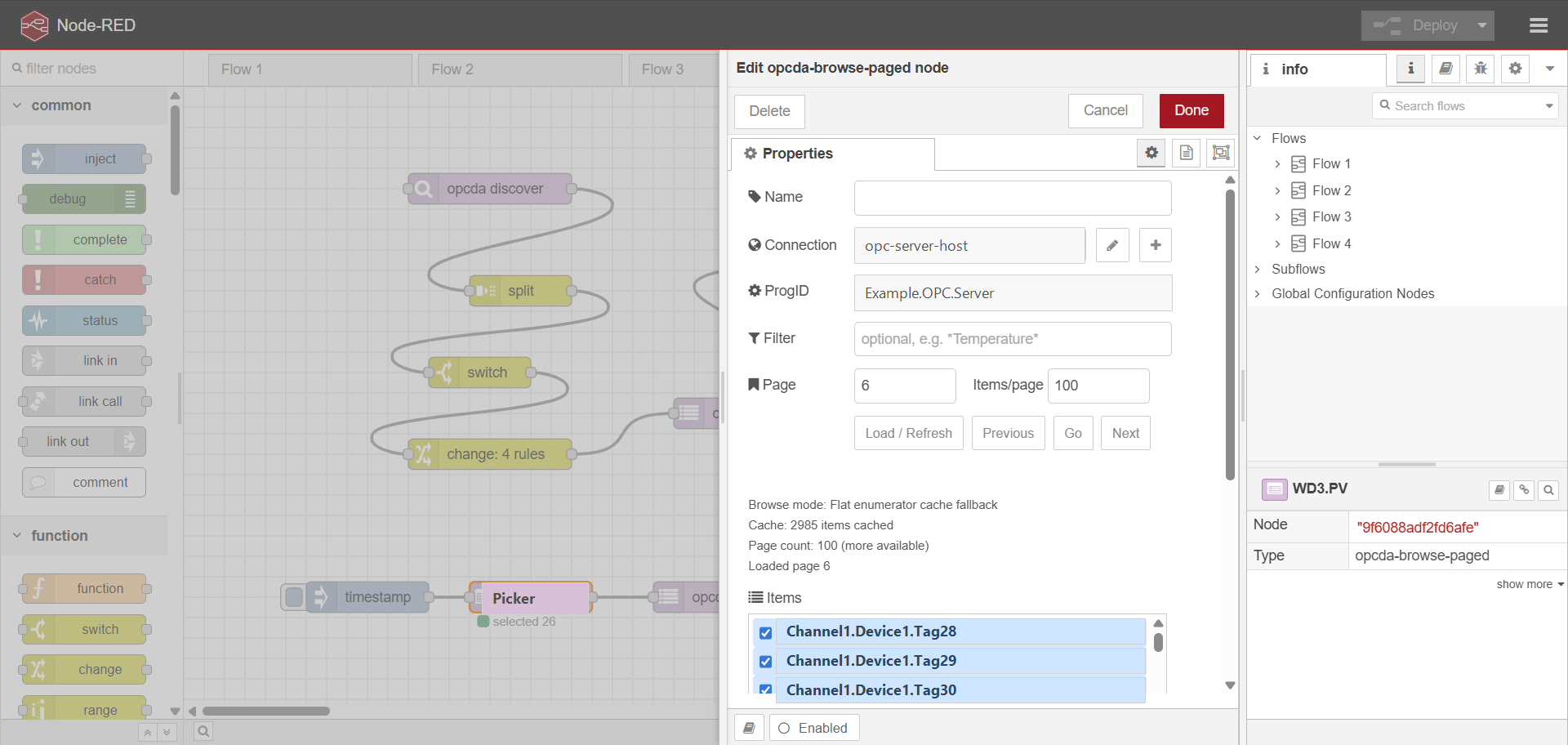
Paged OPC item browser with multi-select support:
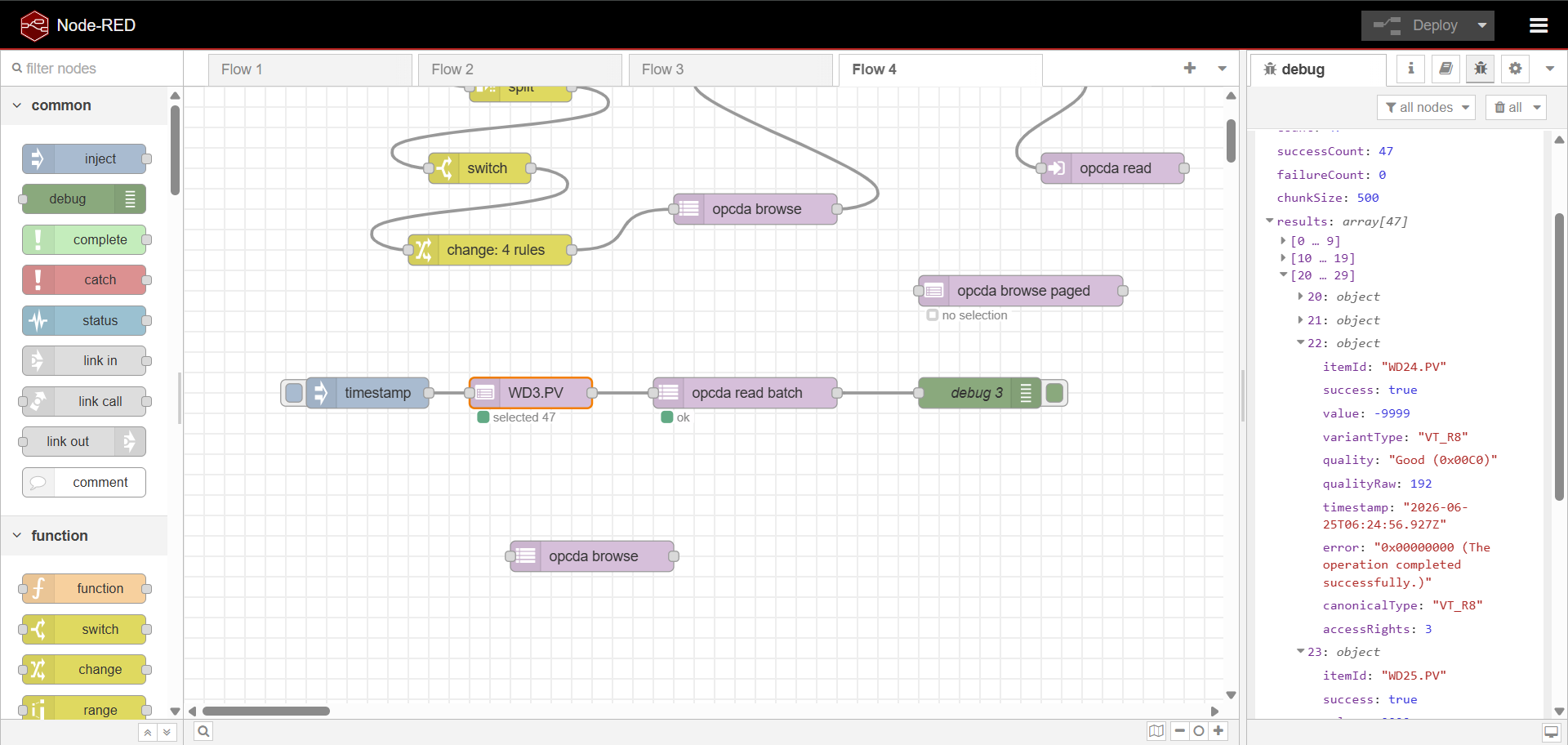
Node-RED flow using OPC DA browse/read nodes:
Current scope
- Windows only
- x64 and x86/ia32
- Native raw Node-API addon
- No
node-addon-apidependency - No shelling out to
opcclient-recon.exe - OPC DA 2.0 style COM/DCOM access
Nodes
opcda connection: shared endpoint config and optional credentialsopcda discover: lists OPC DA servers from OPCEnumopcda status: callsIOPCServer::GetStatusopcda browse: browses item IDsopcda browse paged: editor-side paged item picker for long flat item listsopcda read: reads one item IDopcda read batch: synchronously reads many item IDs in chunksopcda subscribe: emits OPC DA data changesopcda write: writes one item value
The write node has a two-key safety guard:
- The editor checkbox
Enable writesmust be enabled. - The incoming message must set
msg.allowWrite === true.
Build
From this package directory:
npm install
npm run build
npm run build builds for the active Node.js process architecture. Native Node.js addons must match the Node.js runtime that loads them: 64-bit Node-RED needs an x64 build, and 32-bit Node-RED needs an ia32 build.
To build explicitly for one architecture:
npm run build:x64
npm run build:x86
With nvm-windows, switch to a 32-bit Node.js runtime before testing the x86 build:
nvm use 22.20.0 32
node -p "process.version + ' ' + process.platform + ' ' + process.arch"
npm run build:x86
npm run test:native
The architecture check should print win32 ia32. If it prints win32 x64, the process will not be able to load a 32-bit .node addon.
The build expects the OPC Foundation headers in the usual OPC Core Components Redistributable path:
C:\Program Files (x86)\Common Files\OPC Foundation\Include
If your headers are elsewhere, update binding.gyp.
Local Node-RED usage
From your Node-RED local directory:
cd <node-red-user-dir>
npm install <path-to-node-red-contrib-opcda-recon>
Because this package contains binding.gyp, npm runs the default native addon install lifecycle during local path installs:
node-gyp rebuild
That rebuild uses the Node.js runtime that is running npm from the Node-RED user directory. If Node-RED is running on 32-bit Node.js, install from that same 32-bit environment so npm builds an ia32 addon. If it is running on 64-bit Node.js, install from the 64-bit environment so npm builds an x64 addon.
To install the package without rebuilding the native addon, disable lifecycle scripts:
npm install --ignore-scripts <path-to-node-red-contrib-opcda-recon>
Only use --ignore-scripts when build\Release\opcda_recon.node already exists for the same architecture as the Node-RED runtime. Local path installs can link back to the source checkout, so rebuilding from different x86 and x64 Node-RED environments may overwrite the same build folder; the last rebuild wins.
Then restart Node-RED and look for the OPC DA Recon nodes in the palette.
Message shapes
Most node settings can be overridden by message properties.
Discover
msg.host = "opc-server-host"; // optional; defaults to localhost
Returns:
msg.payload = {
  host,
  servers: [
    { progId, clsid, description }
  ]
};
Status
msg.progId = "Kepware.KEPServerEX.V6";
Returns server state, vendor info, timestamps, group count, and bandwidth where available.
Browse
msg.progId = "Kepware.KEPServerEX.V6";
msg.limit = 50; // optional
Returns:
msg.payload = {
  host,
  progId,
  namespaceType,
  items: ["Channel1.Device1.Tag1"]
};
Paged browse picker
Use opcda browse paged when a server has thousands of flat item IDs.
In the node editor:
- choose a deployed OPC DA connection
- enter the ProgID
- optionally enter a server-side item-name filter
- choose page number and items per page
- click
Load / Refresh,Previous,Go, orNext - check one or more items to select them across pages
- use
Clear Selectionto de-select everything selected so far
The editor shows the native browse strategy:
IOPCBrowse continuation pagingwhen the server supportsIOPCBrowseFlat enumerator cache fallbackwhen the plugin falls back to enumerating and caching the flat list
On input, the selected items are emitted:
msg.progId = "Kepware.KEPServerEX.V6";
msg.itemIds = [
  "Channel1.Device1.Tag1",
  "Channel1.Device1.Tag2"
];
msg.payload = {
  progId: "Kepware.KEPServerEX.V6",
  itemIds: [
    "Channel1.Device1.Tag1",
    "Channel1.Device1.Tag2"
  ]
};
The first selected item is also emitted as msg.itemId for older single-read flows.
Read
msg.progId = "Kepware.KEPServerEX.V6";
msg.itemId = "Channel1.Device1.Tag1";
msg.mode = "sync"; // or "async"
Returns one result with value, quality, timestamp, access rights, and data type metadata.
Batch sync read
opcda read batch reads many item IDs using one OPC group and one synchronous IOPCSyncIO::Read call per chunk.
msg.progId = "Kepware.KEPServerEX.V6";
msg.itemIds = [
  "Channel1.Device1.Tag1",
  "Channel1.Device1.Tag2"
];
msg.chunkSize = 500; // optional, native addon clamps to 1..1000
Returns:
msg.payload = {
  host,
  progId,
  count,
  successCount,
  failureCount,
  chunkSize,
  results: [
    {
      itemId,
      success,
      value,
      variantType,
      quality,
      qualityRaw,
      timestamp,
      error,
      canonicalType,
      accessRights
    }
  ]
};
Result order matches the input itemIds order. Invalid item IDs are reported as failed result rows when the server returns per-item errors.
Subscribe
The subscribe node is a source node. It starts when the flow is deployed and stops on redeploy or shutdown.
Configure:
ProgID: Kepware.KEPServerEX.V6
Item IDs:
  Channel1.Device1.Tag1
  Channel1.Device1.Tag2
Update ms: 1000
Each changed item emits:
msg.topic = "Channel1.Device1.Tag1";
msg.payload = value;
msg.opcda = {
  host,
  progId,
  itemId,
  value,
  variantType,
  quality,
  qualityRaw,
  timestamp,
  error,
  success,
  revisedUpdateRateMs
};
Subscriptions require reverse DCOM callback access from the OPC server back to the Node-RED host. If the node reports Advise(IOPCDataCallback) errors such as 0x80070533, discovery/read may still work because they only require outbound DCOM, but subscriptions will need target/client DCOM callback security fixed.
Write
msg.progId = "Kepware.KEPServerEX.V6";
msg.itemId = "Channel1.Device1.Tag1";
msg.value = 123;
msg.mode = "sync"; // or "async"
msg.allowWrite = true;
The node will reject the message unless allowWrite is exactly true and the node's Enable writes checkbox is checked.
Quick load test
After building:
npm run test:load
This only checks that the native addon loads and exports the expected functions.
Native direct tests
These tests call build\Release\opcda_recon.node directly from Node.js and bypass the Node-RED runtime/UI.
Fast validation tests do not require a live OPC server:
npm run test:native:validation
Run load + validation together:
npm run test:native
Run the simple native runtime-argument example:
npm run test:hello -- xxx
This calls addon.helloWorld("xxx") and expects Hello World xxx.
Live OPC/DCOM smoke tests require environment variables:
$env:OPCDA_TEST_HOST = "192.0.2.10"
$env:OPCDA_TEST_DOMAIN = "DOMAIN"
$env:OPCDA_TEST_USERNAME = "username"
$env:OPCDA_TEST_PASSWORD = "password"
$env:OPCDA_TEST_PROGID = "Kepware.KEPServerEX.V6"
$env:OPCDA_TEST_ITEM1 = "Channel1.Device1.Tag1"
$env:OPCDA_TEST_ITEM2 = "Channel1.Device1._System._ScanRateMs"

npm run test:native:live
The live test covers validateConnection, discover, status, browse, browsePage, sync read, and readBatch. It also checks that flat browse cache is reused when Items/page changes.
Optional tests are disabled unless explicitly enabled:
$env:OPCDA_TEST_ASYNC = "1"
$env:OPCDA_TEST_SUBSCRIBE = "1"

$env:OPCDA_TEST_WRITE = "1"
$env:OPCDA_TEST_WRITE_ITEM = "safe.writable.test.tag"
$env:OPCDA_TEST_WRITE_TYPE = "i4"
$env:OPCDA_TEST_WRITE_VALUE = "123"
Only enable write tests against a safe writable test tag.
