node-red-contrib-ntrip 0.2.11
Node for ntrip and rtcm handling.
NTRIP nodes for node-red








 ...
...
Thanks for your donation
If you want to support this free project. Any help is welcome. You can donate by clicking one of the following links:



This package contains nodes for connecting to a NTRIP server.
Installation

You can install the nodes using node-red's "Manage palette" in the side bar.
Or run the following command in the root directory of your Node-RED installation
npm install node-red-contrib-ntrip --save
Requirements
- Node.js >= 18.0.0 (uses
AggregateErrorand other recent runtime features). - Node-RED >= 0.1.0.
Dependencies
This package depends on the following libraries
Credits
👥 Contributors
Changelog
Changes can be followed here
NTRIP Client Node
This node connects to a NTRIP caster and can be used in two different modes:
- upload
- download
Download Mode
Configuration
For downloading data from a NTRIP caster you need to provide the following information
- host - the IP address or hostname of the NTRIP server (e.g. rtk2go.com)
- port - the Port number of the NTRIP server (usually this is 2101)
- mountpoint - the mountpoint of the stream data at the NTRIP server (enter name without /)
Depending on the version of the NTRIP caster you need to provide
- username - the username (e.g. your e-mail address when using rtk2go.com)
- password - the password (e.g. none)
Some NTRIP casters only send data after the client provided its location via a GGA sentence. In this case you can provide the X Y Z coordinate here or inject it like illustrated in the example flow
- X - the X coordinate
- Y - the Y coordinate
- Z - the Z coordinate
- interval - the interval in milliseconds to transmit the location to the NTRIP server.
Provide Client Location (XYZ) to NTRIP caster
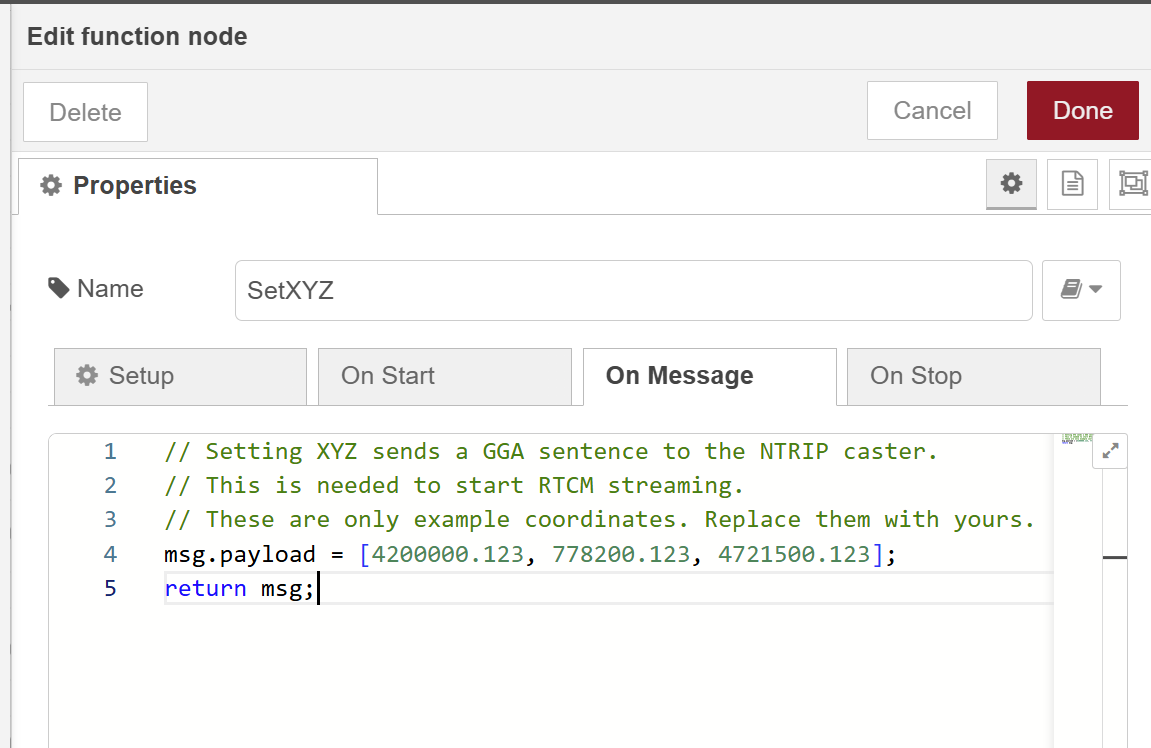
If you want more control about sending your location to the NTRIP server, then you
can inject the values as described in the following example:

The function node simply creates an array of X Y Z coordinates in msg.payload. Sapos NTRIP casters for example only needs one GGA sentence to initiate streaming.
See also example flow SetXYZ flow
Upload Mode
Configuration
The configuation properties are the same as described for the download mode. You need to provide these additional properties:
- Authentication Mode - the mode the NTRIP caster accepts.
- Pass through data - if checked all data is sent to the output for further processing.
Authentication Modes
Legacy
This mode initiates the upload to a mountpoint using plain text.
SOURCE ${mountpoint}\r\n\r\n
or with password and username
SOURCE ${password} /${mountpoint}\r\nSource-Agent: NTRIP ${username}\r\n\r\n
Legacy (Basic Auth)
This hybrid mode initiates the upload to a mountpoint using plain text and Basic Auth.
SOURCE ${mountpoint}\r\nAuthorization: Basic ${authorization}\r\n\r\n
NTRIP V1
This mode initiates the upload to a mountpoint using HTTP with Basic Auth.
POST /${mountpoint} HTTP/1.0\r\nUser-Agent: NTRIP ${userAgent}\r\nAuthorization: Basic ${authorization}\r\nContent-Type: gnss/data\r\n\r\n
NTRIP V2
This mode is equal to NTRIP V1 with some more data.
POST /${mountpoint} HTTP/1.1\r\nHost: ${host}:${port}\r\nUser-Agent: NTRIP ${userAgent}\r\nAuthorization: Basic ${authorization}\r\nNtrip-Version: Ntrip/2.0\r\nContent-Type: gnss/data\r\nConnection: keep-alive\r\n\r\n
RTCM Decoder Node
This node accepts binary RTCM data. A single input message may contain a single RTCM frame or several concatenated frames; each decoded frame is emitted as its own output message. Bytes left over from a partial frame at the end of an input chunk are buffered internally and joined with the next chunk, so frames that straddle TCP packet boundaries are reassembled correctly.
The node has two outputs: decoded frames go to the first output, decode failures to the second.
Successful output:
msg.payload =
{
    rtcm,         // RTCM message number (e.g. 1005, 1077)
    messageType,  // a readable name (e.g. "Stationary", "Msm7Gps")
    message,      // the decoded message object with all fields
    input,        // the raw bytes of this frame
};
Error output:
msg.payload =
{
    error,        // the Error thrown by the decoder
    input,        // the buffer at the point of failure
    inputString,  // String(input) for logging
};
RTCM Encoder Node
Encodes an RtcmMessage instance back into a binary RTCM 3 frame using the
@gnss/rtcm library. The inverse of the RTCM Decoder — useful for re-emitting
a decoded frame after modification (e.g. rewriting a station ID before
forwarding) or for synthesising test fixtures.
The node has two outputs: encoded frames go to the first, failures to the second.
This encoder does not construct an RtcmMessage from plain fields. The
input must already be an instance — typically msg.payload.message from the
RTCM Decoder.
Input shape:
// Direct: pass an RtcmMessage instance
msg.payload = <RtcmMessage instance>;

// Or pipe the decoder's success output straight through:
msg.payload = {
    rtcm,         // number — echoed back
    messageType,  // string — echoed back
    message,      // RtcmMessage instance — what gets encoded
    input         // ignored
};
Successful output:
msg.payload =
{
    rtcmMessage,  // Buffer — the encoded RTCM 3 frame, ready to forward
    rtcm,         // number — the RTCM message type identifier
    messageType,  // string — the constructor name
    input,        // the original input as supplied
};
See also example flow RTCM encode flow.
NMEA Decoder Node
This node accepts NMEA 0183 sentences as a string or Buffer. Multiple
sentences in a single input (delimited by \r\n) are split and decoded
individually; each decoded sentence is emitted as its own output message.
The node has two outputs: decoded sentences go to the first, failures to the second.
Successful output:
msg.payload =
{
    messageType,  // sentence type in upper case (e.g. "GGA", "RMC", "GSV")
    nmeaMessage,  // the decoded sentence object with all fields
    input,        // the raw sentence as it was parsed
};
Error output:
msg.payload =
{
    error,        // the Error thrown by the decoder
    input,        // the original payload as supplied (Buffer if a Buffer was given)
    inputString,  // the utf8 string form of input
};
Errors are routed to the second output only — the node does not call
node.error() for per-sentence decode failures, so wiring binary RTCM through
the NMEA decoder (as the demo flow does) will not flood the Node-RED log.
NMEA Encoder Node
This node is the inverse of the NMEA Decoder. It encodes a NMEA sentence object
back to its textual form using @gnss/nmea. Useful for round-tripping or for
synthesising sentences (e.g. building a GGA fix to feed into an NTRIP
uploader).
The node has two outputs: encoded sentences go to the first, failures to the second.
Input shape:
msg.payload =
{
    messageType, // "GGA", "RMC", "VTG", ... (case-insensitive)
    nmeaMessage, // either a plain field object matching the sentence schema,
                 // or an already-constructed NmeaMessage instance
};
Supported messageType values: DTM, GBS, GGA, GLL, GNS, GRS,
GSA, GST, GSV, RMC, THS, TXT, VHW, VLW, VPW, VTG, ZDA,
plus OBJECT for the generic NmeaMessageUnknown form.
Successful output:
msg.payload =
{
    nmeaMessage,  // the encoded NMEA sentence string (with $ prefix and checksum)
    messageType,  // echoed back as supplied
    input,        // the original input object
};
Unknown messageType values, missing input fields, and encoder exceptions all
surface on the error output.
See also example flow NMEA encode flow.
Notes on usage
A few things that are easy to get wrong:
- Two outputs on the decoders and the encoder. The first output carries successful messages, the second carries decode/encode failures. If you only wire the first output you will silently drop errors.
- NTRIP Client: handshake handling. On the first reply from a caster the
node intercepts the
ICY 200 OK,ICY 406, orSOURCETABLE 200 OKline and uses it to set its status badge (connecting…→ connected / rejected / missing mountpoint). RTCM bytes that happen to share the same TCP segment as theICY 200 OKreply are forwarded; later packets are forwarded verbatim. - NTRIP Client: coordinates. The
X/Y/Zform fields are an ECEF coordinate triple used to synthesise aGGAsentence for the caster. The node only sends aGGAif the triple is finite and not all zero — so(0, 0, 0)is the sentinel for "no location, do not send GGA". Coordinates on a single axis (e.g.(x, 0, 0)) are still sent. - NTRIP Client: dynamic location updates. To stream a moving position into
the caster, inject
msg.payload = [x, y, z](an Array, not a Buffer) into the NTRIP Client. Arrays are routed toclient.setXYZ()and update the position used by the periodicGGA; non-array payloads are written verbatim to the caster. - NTRIP Client: upload pass-through. With Pass through data enabled the bytes written to the caster are also re-emitted on the node output, interleaved with bytes received from the caster. Downstream nodes will see both streams on the same wire — distinguish them with a tag in a function node if you need to.
- NTRIP Client: status badge.
<rate> Rx N Tx Mshows the inbound data rate (sampled over a 1-second window; formatted asbps,kbps, orMbps) followed by the inbound and outbound message counts. Handshake replies do not bump the inbound count. - NTRIP Client: CR/LF in credentials.
mountpoint,username, andpasswordare interpolated into the handshake string. CR/LF in these fields is rejected at startup to prevent header injection. - NTRIP Client: reconnect backoff. When the socket to the caster drops the
client waits
1 s, then2 s,5 s,10 sbefore each successive retry (capped at10 s). The schedule resets to1 sas soon as the caster completes theICY 200 OKhandshake again — so a brief outage restarts at the low end, and a caster that stays down doesn't get hammered. - NMEA Encoder input shape. The encoder expects
msg.payloadto be an object withmessageTypeandnmeaMessageproperties — not a NMEA string. To re-encode the output of the NMEA Decoder you can pipe it straight in; to build a sentence from scratch use a function node:msg.payload = { messageType: "GGA", nmeaMessage: { /* GGA field object */ } }; return msg; - Plaintext transport. NTRIP traffic is unencrypted TCP. Credentials in upload mode use Basic Auth and are observable on the wire. NTRIP-over-TLS is not supported by this package.
Examples
Examples are stored in the examples folder an can be imported from within node-red's sidebar via import.
Download data from NTRIP caster
Consuming Data is straight forward. Connect to a NTRIP caster, select download mode and pass the data to other nodes for further processing: in this example 2 decoder are used. The NMEA node is only to show that the stream can be split. (It is useless as RTK2Go does not send any NMEA strings) See also example flow RTK2Go flow
Provide XYZ dato to NTRIP caster
This example is the same as the RTK2Go one except for the fact that Sapos requires sending a GGA sentence before transmitting RTCM sentences. See also example flow Sapos flow
Consume data from TCP source (RTKBase)
Next to retrieving data from a remote NTRIP caster you can also consume the RTCM stream from a local TCP source like a RTKBase Station (e.g. https://github.com/Stefal/rtkbase). You can upload the data to any NTRIP caster like Onocoy, Centipede, RTKOnline, ... and use the same data on your own. To accomplish this you can use node-red's TCP receiver node. You need to activate a TCP server either on your ESP32 XBee or RTKBase. See also example flow TCP flow
Upload data to NTRIP caster
Uploading is straight forward, however authentication might be tricky. You need to know the mountpoint and credentials before you can initiat an upload. Not all NTRIP casters accept the same way of authentication. You can test with a local demo version of SNIP by creating a raw TCP input stream. (SNIP can be found here https://www.use-snip.com) See also example flow Upload flow
Detect a stalled correction stream
NTRIP casters occasionally stop emitting data without closing the TCP socket
— the NtripClient node stays "connected" but no new frames arrive, and any
downstream rover eventually drops out of RTK-fixed mode without an obvious
cause. This example wires the NtripClient output into a built-in trigger
node configured to fire after 60 seconds of silence (configurable via the
trigger's Duration field). A small function node then acts as a state
tracker: it emits a STALLED notification when the trigger fires and a
RECOVERED notification on the first data frame that arrives after a
stall. Per-frame messages are suppressed — you only see the two transitions.
See also example flow Watchdog flow (closes #4)
License
Author: Karl-Heinz Wind
The MIT License (MIT) Copyright (c) 2025 by Karl-Heinz Wind
Permission is hereby granted, free of charge, to any person obtaining a copy of this software and associated documentation files (the "Software"), to deal in the Software without restriction, including without limitation the rights to use, copy, modify, merge, publish, distribute, sublicense, and/or sell copies of the Software, and to permit persons to whom the Software is furnished to do so, subject to the following conditions:
The above copyright notice and this permission notice shall be included in all copies or substantial portions of the Software.
THE SOFTWARE IS PROVIDED "AS IS", WITHOUT WARRANTY OF ANY KIND, EXPRESS OR IMPLIED, INCLUDING BUT NOT LIMITED TO THE WARRANTIES OF MERCHANTABILITY, FITNESS FOR A PARTICULAR PURPOSE AND NON-INFRINGEMENT. IN NO EVENT SHALL THE AUTHORS OR COPYRIGHT HOLDERS BE LIABLE FOR ANY CLAIM, DAMAGES OR OTHER LIABILITY, WHETHER IN AN ACTION OF CONTRACT, TORT OR OTHERWISE, ARISING FROM, OUT OF OR IN CONNECTION WITH THE SOFTWARE OR THE USE OR OTHER DEALINGS IN THE SOFTWARE.
