node-red-contrib-literal-utils 1.0.2
Node Red Utility Nodes to work with literals and arrays.
Overview
Utility nodes for working with literal values.
Note, we also describe some cases where Out of the Box functionality may also compare.
Array
Nodes to help with working with Arrays.
Pick Array Value
Given an array of objects, picks a value within each object to put inside of an array.
(This works very well with other nodes like node-red-contrib-serial-iterator
For example, we want the following:
[
	 "/services/data/v42.0/sobjects/AcceptedEventRelation",
	 "/services/data/v42.0/sobjects/Account",
	 "/services/data/v42.0/sobjects/AccountChangeEvent",
	 "/services/data/v42.0/sobjects/AccountCleanInfo"
]
From a message like the following:
{
  "payload": {
	"results": {
	  "sobjects": [
		{
		  "name": "AcceptedEventRelation",
		  "urls": {
			"sobject": "/services/data/v42.0/sobjects/AcceptedEventRelation"
		  }
		},
		{
		  "name": "Account",
		  "urls": {
			"sobject": "/services/data/v42.0/sobjects/Account"
		  }
		},
		{
		  "name": "AccountChangeEvent",
		  "urls": {
			"sobject": "/services/data/v42.0/sobjects/AccountChangeEvent"
		  }
		},
		{
		  "name": "AccountCleanInfo",
		  "urls": {
			"sobject": "/services/data/v42.0/sobjects/AccountCleanInfo"
		  }
		}
	  ]
	}
  }
}
We would like a collection of all the 'sobject' values...
If we configure the node with the following
- arrayPath: 'payload.results.sobjects'
- valuePath: 'urls.sobject'
- targetPath: 'payload.objectUrls'
We'll get:
{
   "payload":{
	  "results":{
		 "sobjects":[
			...
		 ]
	  },
	  "objectUrls":[
		 "/services/data/v42.0/sobjects/AcceptedEventRelation",
		 "/services/data/v42.0/sobjects/Account",
		 "/services/data/v42.0/sobjects/AccountChangeEvent",
		 "/services/data/v42.0/sobjects/AccountCleanInfo"
	  ]
   }
}
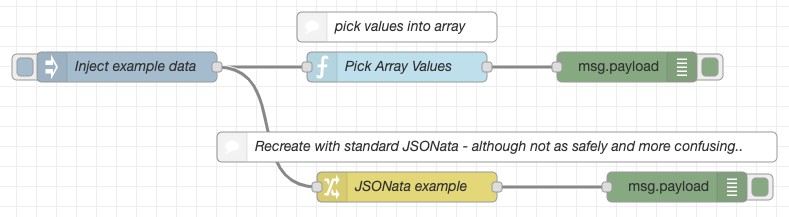
Example Flow
[{"id":"195e7da2.f7e152","type":"tab","label":"Flow 1","disabled":false,"info":""},{"id":"84b77a17.25be68","type":"inject","z":"195e7da2.f7e152","name":"Inject example data","topic":"","payload":"{\"results\":{\"sobjects\":[{\"name\":\"AcceptedEventRelation\",\"urls\":{\"sobject\":\"/services/data/v42.0/sobjects/AcceptedEventRelation\"}},{\"name\":\"Account\",\"urls\":{\"sobject\":\"/services/data/v42.0/sobjects/Account\"}},{\"name\":\"AccountChangeEvent\",\"urls\":{\"sobject\":\"/services/data/v42.0/sobjects/AccountChangeEvent\"}},{\"name\":\"AccountCleanInfo\",\"urls\":{\"sobject\":\"/services/data/v42.0/sobjects/AccountCleanInfo\"}}]}}","payloadType":"json","repeat":"","crontab":"","once":false,"onceDelay":0.1,"x":170,"y":140,"wires":[["f19fef07.d63f1","a03caddb.c460d"]]},{"id":"f19fef07.d63f1","type":"pick-array-value","z":"195e7da2.f7e152","name":"","arrayPath":"payload.results.sobjects","valuePath":"urls.sobject","targetPath":"payload.urls","x":440,"y":140,"wires":[["a896839a.1e206"]]},{"id":"a896839a.1e206","type":"debug","z":"195e7da2.f7e152","name":"","active":true,"tosidebar":true,"console":false,"tostatus":false,"complete":"false","x":670,"y":140,"wires":[]},{"id":"f42689cd.93e158","type":"comment","z":"195e7da2.f7e152","name":"pick values into array","info":"","x":440,"y":100,"wires":[]},{"id":"a03caddb.c460d","type":"change","z":"195e7da2.f7e152","name":"JSONata example","rules":[{"t":"set","p":"payload.urls","pt":"msg","to":"(\t $map(payload.results.sobjects, function($val, $index, $array) {\t $val.urls.sobject\t })\t)","tot":"jsonata"}],"action":"","property":"","from":"","to":"","reg":false,"x":450,"y":260,"wires":[["f8952828.8b4148"]]},{"id":"cc3f35ab.8b7218","type":"comment","z":"195e7da2.f7e152","name":"Recreate with standard JSONata - although not as safely and more confusing..","info":"","x":540,"y":220,"wires":[]},{"id":"f8952828.8b4148","type":"debug","z":"195e7da2.f7e152","name":"","active":true,"tosidebar":true,"console":false,"tostatus":false,"complete":"false","x":720,"y":260,"wires":[]}]
Props
| Name | Description | Value |
|---|---|---|
| Array Path | The path within the message to the Array to iterate over | payload.describe.sobjects |
| Value Path | The path within the array's objects to the value we should collect. | urls.layoutURL |
| Target Path | The path within the message we should put the resulting array of collected values. | payload.layouts |
Extending
Running Tests
- To test the project run
npm run testornpm run test:watchto continuously test.
Running Linter
- To run linters on the project, run
npm run lintornpm run lint:watchto continously lint.
