node-red-contrib-jaeconnect 0.1.2
Node-RED nodes for jaeconnect: live events from your car (charging, locks, location, geo-fences), its status, and remote commands such as lock, climate and charging.
node-red-contrib-jaeconnect
Node-RED nodes for jaeconnect: react to what your car does, read its status, and send it commands from your flows.
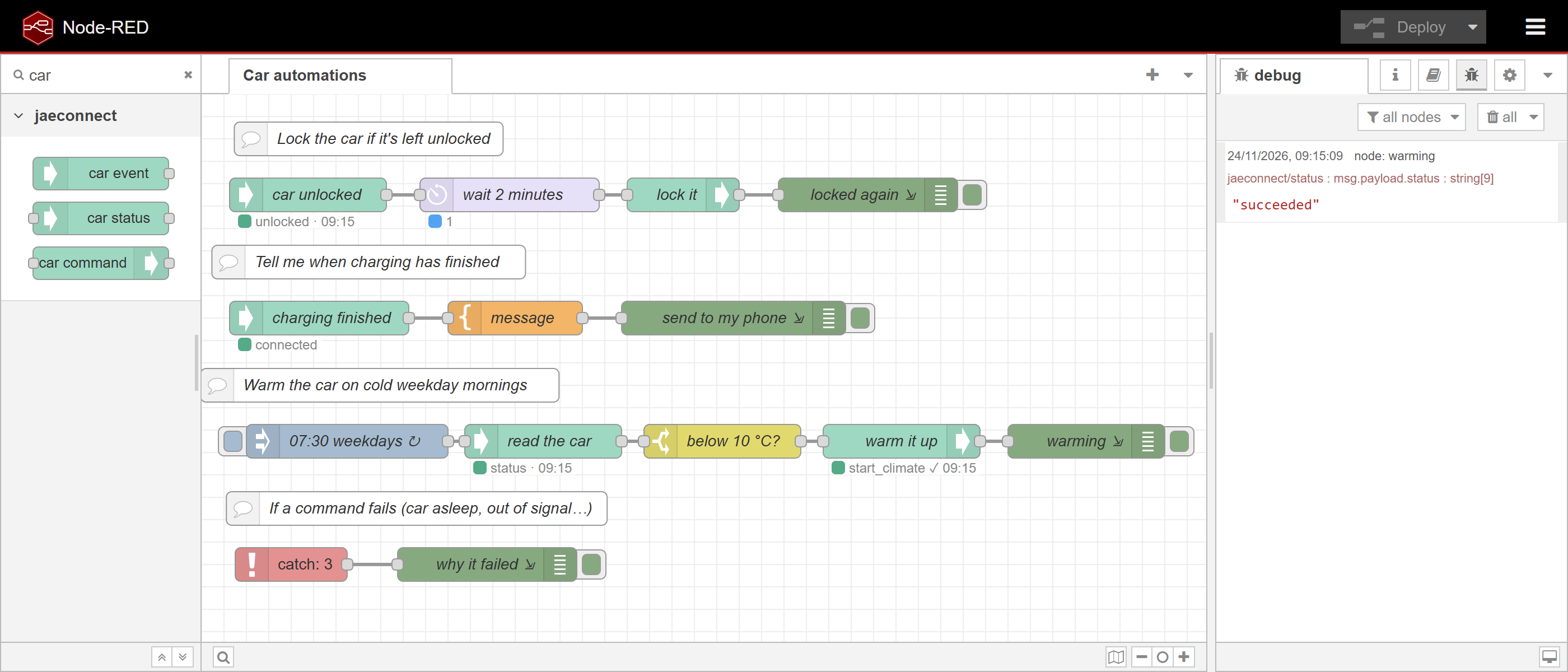
| Node | What it does |
|---|---|
| car event | A message for each event: charging started, stopped or completed, locked, unlocked, status changed, location changed, arrived at or left a geo-fence, a command finished. |
| car status | When a message arrives, reads a car's status (battery, range, charging, locks, doors, windows, climate, seats, tyres), its location, its details or its schedules, or lists your cars. |
| car command | When a message arrives, sends a command (lock, unlock, start climate, start charging, open windows, seat heating…) and waits for the car's answer. |
Events come over one connection that Node-RED opens to jaeconnect, so nothing needs to reach your Node-RED from the internet: no port forwarding, tunnel or public address, unlike a webhook. If the connection drops, it reconnects and picks up the events it missed (jaeconnect keeps the last 15 minutes).
Install
In Node-RED, open Manage palette → Install, search for node-red-contrib-jaeconnect and install it. Or, in your
Node-RED folder (usually ~/.node-red):
npm install node-red-contrib-jaeconnect
It needs Node-RED 3.0 or later and Node.js 18 or later.
Set up
- On jaeconnect, open Apps and tokens and create a personal access token. Give it only what your flows need: read for events and status, location for positions and geo-fences, control for commands. You can limit it to one car.
- Drag a car event node onto a flow, open it, and add an account: paste the token and press Check the token. It lists the cars the token can see.
- Choose a car and the events you want, wire it to a debug node, and deploy.
Import → Examples → node-red-contrib-jaeconnect → Getting started has a flow showing all three nodes, including how to catch a failed command.
Messages
car event sends:
| Property | |
|---|---|
msg.topic |
The event type, e.g. vehicle.charging_started. Route on it with a switch node. |
msg.payload |
What the event carries: the car's status for status, charging and lock events; the position for vehicle.location_changed; the geo-fence for arrivals and departures; the command for command.completed. |
msg.vehicle_id |
The car (null for billing.* events, which apply to the whole account). |
msg.event |
The whole event: id, type, created_at, vehicle_id, data. |
car status and car command take, when the node doesn't set them:
| Property | |
|---|---|
msg.vehicle_id |
The car. With no car in the node or the message, a token that sees one car uses it. |
msg.command |
(command) The command, e.g. lock or start_climate. |
msg.payload |
(command) Options: temperature_c, duration_minutes, seat (driver, passenger, rear_left, rear_right) and level (0 to 3). Only the options the command takes are sent. |
msg.refresh |
(status) true asks the car service now instead of using the last reading. |
They send what jaeconnect returned in msg.payload.
When something goes wrong
A failed call or command goes to a catch node rather than the output. msg.problem.code says why, for example:
code |
|
|---|---|
vehicle_unreachable |
The car didn't answer in time. |
command_not_supported |
That car doesn't have that command. |
close_sunroof_first |
This car's sunroof must close between vented and fully open. |
location_sharing_off |
Location sharing is off for the car in jaeconnect. |
scope_missing |
The token doesn't have the access the node needs. |
subscription_required |
The account has no active subscription. |
The developer docs list every command, event and error: sign in to jaeconnect, then open Developers.
Issues
Report a problem or ask for a feature in Issues, or email [email protected].
Licence
MIT
