node-red-contrib-hik-media-buffer 1.2.12
Ottiene buffer video e immagine da camere Hikvision via ISAPI
NODE-RED-CONTRIB-HIK-MEDIA-BUFFER
HIK MEDIA BUFFER NODE

The Hik Media Buffer node connects to NVR and outputs the image and the video of the event in case of alarm.
This node only detects "FieldDetection" and "LineDetection" alarms but can also receive notification of a failed connection of the cameras or NVR.

To configure the node you need to enter the IP, user and password of the NVR, you can also choose the protocol and port to use.
This below is an example of msg output:
In case of failed connection:
msg = {
    payload: object,
    tipo_messaggio: "status" //message type
    stato_telecamera: "online" // Status of the camera
    nome_cliente: "test"  // Node name
    nome_telecamera: "Camera 01" // Camera name (OSD)
    ip_telecamera: "192.168.62.131" // IP of the camera
    channel: "1" // Channel of the camera
    msg: "Camera ripristinata"
    _msgid: "45fd74589048966d"
};
In case of alarm:
msg = {
    payload: object,
    tipo_messaggio: "evento" //message type
    nome_cliente: "test"  // Node name
    nome_telecamera: "Camera 01" // Camera name (OSD)
    ip_telecamera: "192.168.62.131" // IP of the camera
    tipo_evento: "LineDetection" // Event type
    timestamp_epoch: 1784877525
    stato_telecamera: "ONLINE" // Status of the camera
    channel: "1" // Channel of the camera
    foto_base64: "/9j/2wCEAAYEBQYFBAYGBQY.." // Img in base64
    video_base64: "AAAAHGZ0eXBpc29tAAACAG.." // Video in base64
    _msgid: "45fd74589048966d"
};
HIK SNAPSHOT NODE

The Hik Snapshot node connects to NVR and generates a live image for each camera when it receives payload = true as input. This node can also report, for each camera, if there are recordings of the day this node is triggered.

To configure the node you need to enter the IP, user and password of the NVR, you can also choose the protocol and port to use.
You must also enter the number of the channels you want to get the snapshot of.
If you enter "5", you will get the output of the first 5 channels on the NVR, so if you have 5 cameras on the NVR but one of them is not on the first five channels you won't get the snapshot of that camera.
This below is an example of msg output:
msg = {
    payload: array[5], // 5 channels
    0: object,
    name: "test" // Node name
    channel: 1, // Channel 1 of the NVR
    photo: buffer[18080], // Snapshot buffer
    snapOk: true, // True if it gets the snapshot, False if not
    isRecording: true, // True if the camera recorded something that day, False if not
    1: object,
    channel: 2,
    photo: buffer[35056],
    snapOk: true,
    isRecording: true,
    2: object,
    3: object,
    4: object
};
HIK DOWNLOAD NODE
The Hik Download node connects to NVR and outputs the playback video when it receives "payload = true" as input.
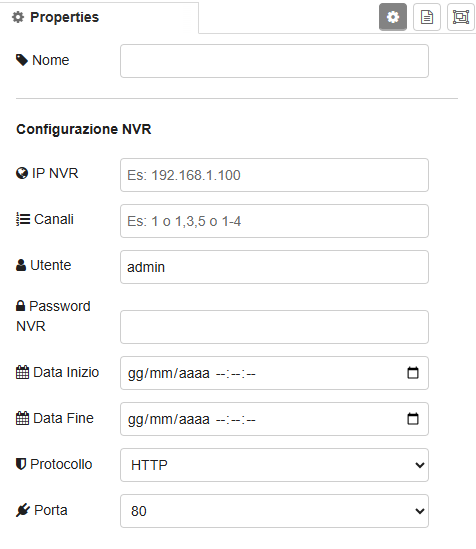
To configure the node you need to enter the IP, user and password of the NVR, you can also choose the protocol and port to use.
You must also enter the start time and the end time and the number of the channels you want to get the playback of.
If you enter "1", you will get the playback of the first channel on the NVR, if you enter "1,3", you will get the playback of channel 1 and 3 on the NVR, if you enter "1-3", you will get the playback from channel 1 to channel 3 on the NVR
This below is an example of msg output:
msg = {
    payload: buffer[6058100], //Buffer of the video
    localFilePath: "C:/download/2026-07-15/NVR_Cam2_085510.mp4", // Path of the video
    channel: 2, // Channel of the camera
    filename: "NVR_Cam2_085510.mp4" // Name of the file
};
