node-red-contrib-crestron-isc 0.2.2
Node-RED nodes for the Crestron ISC (Intersystems Communications) protocol. Ships three nodes: a TCP server/client, a standalone encoder, and a standalone decoder — so you can run ISC over TCP, serial (RS232/RS485), or any other Node-RED transport.
node-red-contrib-crestron-isc
Node-RED nodes for the Crestron ISC (Intersystems Communications) protocol. Encodes and decodes digital, analog, and serial signals against an ISC symbol on a Crestron control processor.
The package ships three nodes so you can pick the right shape for your transport:
| Node | Purpose |
|---|---|
| Crestron ISC | Bundles encode + decode + TCP server/client. Use this when ISC runs over TCP (the common case). |
| Crestron ISC TX | Encoder only: msg in, raw Buffer out. Wire to any transport node (serial, RS232/RS485, MQTT, raw TCP, etc.). |
| Crestron ISC RX | Decoder only: raw Buffer in, decoded msgs out. Same idea, in the other direction. |
Why ISC
Crestron's ISC (Intersystems Communications) protocol is extremely lightweight: 2 bytes for a digital signal, 4 bytes for a 16-bit analog, and a 2-byte header + payload + 1-byte terminator for serial strings. No length prefixes, no per-frame headers, no checksums, no handshake. The high bit of every byte does double duty as the framing marker, so the decoder can resync from any byte boundary the moment a clean frame-start byte appears.
That tiny footprint is the point of these nodes:
- Native peer to existing Crestron systems. When the SIMPL program already has an Intersystem Communications symbol, Node-RED slots in as another peer on the bus — no translation layer, no API gateway, no schema to maintain.
- High-frequency updates without bus pressure. A button press, a fader move, a feedback indicator — 2 to 4 bytes on the wire each, versus dozens of bytes for the JSON/MQTT-encoded equivalent. Matters on serial links and slow networks where every byte costs.
The flip side of "lightweight" is that the protocol does no integrity checking — single-bit errors produce wrong-but-plausible decoded values. On unreliable transports, lean on the RX node's hardening options (see below) and consider layering a periodic re-broadcast of authoritative state from the Crestron side.
Install
From the Node-RED editor (easiest): open the hamburger menu → Manage palette → Install tab → search for node-red-contrib-crestron-isc → Install.
From the command line:
cd ~/.node-red
npm install node-red-contrib-crestron-isc
For local development (when working from a checkout of this repo):
cd /path/to/node-red-contrib-crestron-isc
npm link
cd ~/.node-red
npm link node-red-contrib-crestron-isc
After installing, restart Node-RED. The three nodes — Crestron ISC, Crestron ISC TX, and Crestron ISC RX — appear in the network category of the palette.
Usage
Drop one node, configure it, then wire upstream producers into its input and downstream consumers from its output.
Inputs
msg.topic—"digital"/"analog"/"serial". ISC signal type to send.msg.channel— number, or array of numbers. Signal channel (1-indexed).msg.payload— boolean / number / string / array. Signal value (see below); arrays parallelchannel.
Per-topic payload types:
- digital: boolean (or 0/1)
- analog: integer 0..65535
- serial: latin1 string, non-empty, no
0xFFbytes
Outputs
One msg per decoded ISC frame, with topic, channel, and payload populated using the same
conventions.
Configuration
- Mode (default
server) —Server (listen)accepts incoming connections;Client (connect)dials out. - Host — client mode only: the Crestron processor's IP.
- Port (default
49152) — TCP port (1..65535). - Reconnect (ms) (default
3000) — client mode only: wait between reconnect attempts. - Total Analog Signals (default
1) — total count of analog + serial signals on the ISC symbol.
Total Analog Signals must match the count of analog + serial signals defined on the Crestron ISC symbol in the SIMPL program. Both sides of the symbol must have identical quantities. This value is used as the digital channel offset in the wire protocol.
Crestron program setup
Wire your SIMPL Windows program as shown:
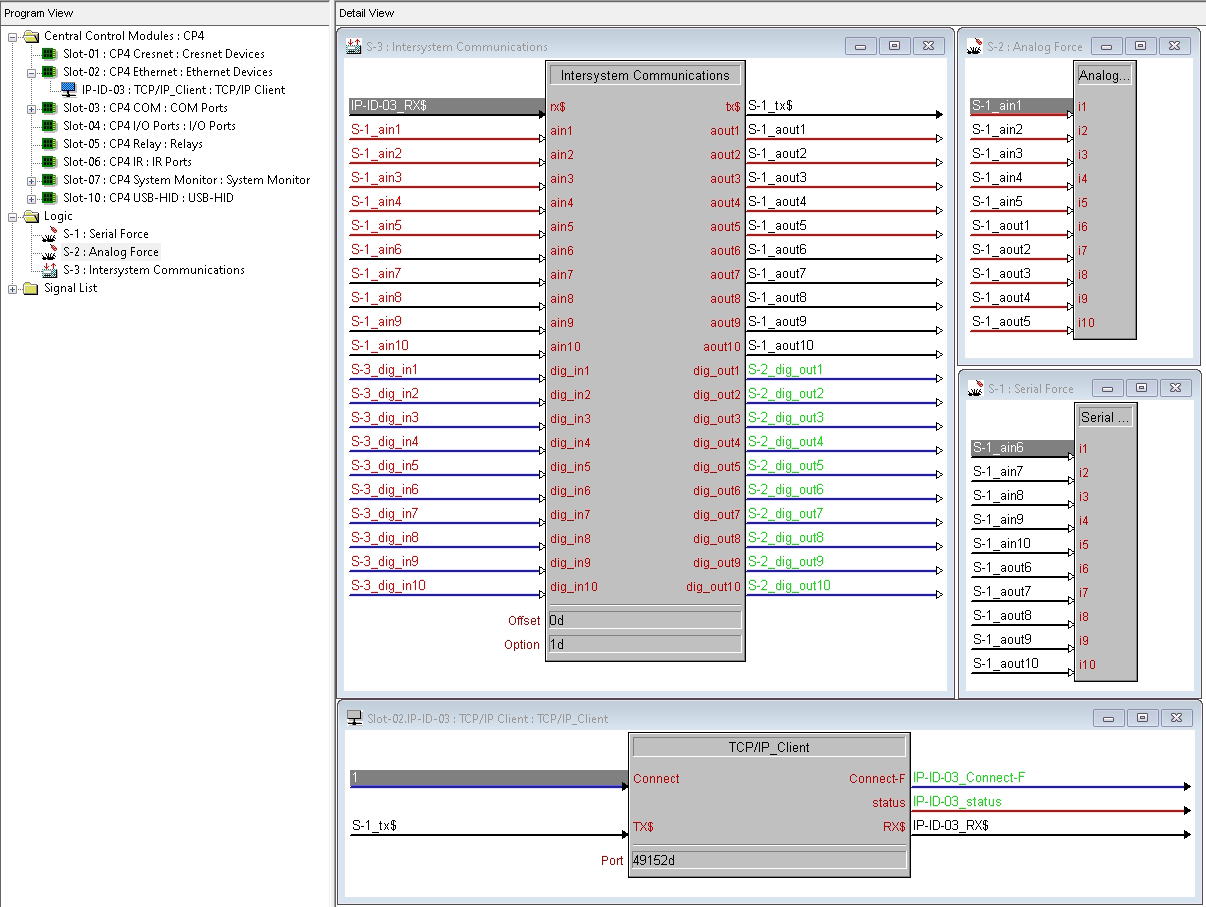
Key elements:
- Intersystem Communications symbol in your program logic. Configure as many
ain*/aout*,dig_in*/dig_out*, and serial input/output pairs as your application needs. Both sides of the symbol (the inputs and the matching outputs) must have identical quantities. - TCP/IP Client (or Server) symbol on the Ethernet slot, with its
RX$andTX$wired to the ISC symbol'srx$andtx$pins respectively. TheConnectinput drives whether the processor is connected. - Port on the TCP/IP symbol must match the Port in the Node-RED node. The example uses
49152. - Direction:
- If the Node-RED node is configured as Server (listen), use a Crestron TCP/IP Client symbol pointed at the Node-RED host's IP.
- If the Node-RED node is configured as Client (connect), use a Crestron TCP/IP Server symbol listening on the same port.
- Total Analog Signals in the Node-RED node must equal the number of analog + serial signal pairs on the ISC symbol.
Standalone encoder / decoder (non-TCP transports)
The Crestron ISC TX and Crestron ISC RX nodes are pure codecs with no transport. Use
them when ISC needs to ride over something other than TCP — for example a serial RS232/RS485
link via node-red-node-serialport,
or even MQTT.
Typical wiring:
[inject]──▶[Crestron ISC TX]──▶[serial out]            (outgoing)

[serial in]──▶[Crestron ISC RX]──▶[debug]              (incoming)
The TX node accepts the same topic / channel / payload inputs as the all-in-one Crestron
ISC node, but instead of writing to a socket it sets msg.payload to the encoded Buffer and
forwards. The RX node accepts a Buffer (or Uint8Array / Array) on msg.payload, buffers
partial frames internally across calls, and emits one msg per decoded frame.
Per-stream state: the RX node's partial-frame buffer is per node instance. If you have two independent byte streams (e.g. two serial ports), drop two RX nodes — sharing one across streams will interleave bytes and corrupt frames.
Hardening for unreliable transports
ISC has no checksum or framing CRC, so on lossy transports (RS232/RS485 in particular) the RX node exposes three protections against stuck/corrupt streams:
- Max Buffer (bytes) (default
4096) — Hard cap on the partial-frame buffer. On overflow — typically a missing0xFFserial-frame terminator — the runaway prefix is discarded and the decoder resyncs at the next frame-start byte. - Idle Timeout (ms) (default
0, disabled) — If no input arrives for this long while partial-frame bytes are buffered, flush them so a stalled mid-frame doesn't poison the next valid frame. msg.reset === true— Send a message withmsg.reset: trueto flush the buffer immediately. Hook this to your transport's link-down event or your own watchdog.
What the decoder cannot detect: bit errors inside a frame's value bytes will produce a wrong but plausible decoded value (e.g. an analog reading off by a power of two). If your transport is noisy enough to matter, layer your own integrity check above the protocol — for example periodic re-broadcast of authoritative state from the Crestron side.
Multi-client behavior
In server mode, encoded frames are broadcast to every connected client. Incoming bytes are buffered per-connection, so frames from different peers cannot interleave. ISC is normally a one-to-one peer link, so broadcast collapses to unicast in typical use, but it allows tools (e.g. a tester or monitor) to connect alongside a live Crestron without bumping anyone off.
Status indicator
| Color | Shape | Meaning |
|---|---|---|
| blue | ring | Server: listening on the port |
| green | dot | One or more clients connected |
| yellow | ring | Client mode: waiting to reconnect |
| red | ring | Error (port in use, missing host, socket error) |
License
MIT
