node-red-contrib-ccu 4.5.3
Node-RED Nodes for the Homematic CCU
node-red-contrib-ccu


Node-RED Nodes for the Homematic CCU
With these Nodes you can connect Homematic and Node-RED. Homematic is a series of smart home automation hardware from the manufacturer eQ-3, popular especially in Germany.
⚠️ node-red-contrib-ccu >= 4.0 needs Node-RED >= 4.0 and Node.js >= 20 (primary target: Node-RED 5 on Node 24). On older Node-RED versions use the latest 3.x release of node-red-contrib-ccu.
For the communication with the CCU both RPC and ReGaHSS remote script are used. It's possible to connect to multiple CCUs from one Node-RED instance. RPC setValue calls can be comfortably complemented with ON_TIME and RAMP_TIME values and special nodes ease the control of displays and mp3 actuators. RPC events can be filtered comprehensively (even through regular expressions and also by rooms and functions). It's possible to start rega-programs and set rega-variables and last but not least there are nodes to execute arbitrary rega-scripts and RPC calls.
These nodes are included in RedMatic which ships Node-RED as an addon package for installation on a Homematic CCU3 or RaspberryMatic.
Some example flows can be found in the RedMatic Wiki (German language).
A modern Browser is required, Internet Explorer won't work.
Starting with Version 3.x these Nodes need Node-RED >= 1.0 to work correctly
openccu-lite
openccu-lite is a Homematic CCU firmware based on OpenCCU without
ReGaHSS. The interface processes (rfd, hs485d, hmipserver) are the same, so everything these nodes do over
BINRPC/XMLRPC works unchanged. Device, channel, room and function names come from the system's metadata API instead of
ReGaHSS; the connection node detects this at start (GET /api/meta/v1/version), nothing has to be configured, and
msg.channelName, msg.rooms, msg.functions and the room/function filters keep their shape.
- Node-RED on the system (RedMatic from its addon catalogue): the system's own read-only token is used, nothing to do.
- Node-RED elsewhere: an API token of the system goes into the connection node's openccu-lite token field.
- System variables, programs and HM-Script do not exist there. The
ccu-sysvar,ccu-program,ccu-scriptandccu-pollnodes stay in the flows and answer every message with an error.
Topics
Every node that emits messages builds msg.topic from the same template, configurable per node, with these defaults:
| Node | Default topic |
|---|---|
| rpc-event | ${CCU}/${Interface}/${channelName}/${datapoint} |
| value | ${CCU}/${Interface}/${channel}/${datapoint} |
| get value | (empty: msg.topic stays as it came in) |
| sysvar, program | ReGaHSS/${Name} |
| rpc | ${CCU}/${Interface}/${Method} |
| script | ${CCU}/${Interface} |
Placeholders are the message's properties, matched case-insensitively: ${CCU}, ${Interface}, ${device},
${deviceName}, ${deviceType}, ${channel}, ${channelName}, ${channelType}, ${channelIndex}, ${datapoint},
${datapointName}; ${Name} for a variable or program, ${Method} for an RPC call. To get one scheme everywhere -
hm/<interface>/<channel>/<datapoint>, say - enter hm/${Interface}/${channel}/${datapoint} in each node; the defaults
stay as they are so existing flows and subscriptions keep working. The value node's input accepts a datapoint address in
msg.topic either as iface.channel.datapoint or in the emitted shape (ccu3/BidCos-RF/OEQ1868878:1/STATE,
hm/BidCos-RF/OEQ1868878:1/STATE: the last three segments count), so an event's topic can be fed straight back. The
ccu-mqtt node has its own templates for its MQTT topics.
Home Assistant
The ccu-homeassistant node publishes
MQTT discovery configurations (device-based,
Home Assistant >= 2024.11) for the devices you tick in its config dialog. It is a companion to the ccu-mqtt node:
it reuses that node's topic templates and payload format, so state and commands keep flowing through ccu-mqtt and
the discovery configs simply point Home Assistant at those topics. Wire both nodes to the same mqtt out node and
feed the hm/set/# topics from an mqtt in node into ccu-mqtt — see
examples/home-assistant.json. One Home Assistant device is created per Homematic
device with switch, light, cover, climate, binary_sensor, event, lock and sensor entities; every other datapoint can
optionally be included as a disabled-by-default entity. Unticking a device removes it from Home Assistant on the
next deploy.
A device's availability in Home Assistant follows the UNREACH datapoint of its maintenance channel. The node
publishes its current value (retained) right after the discovery configs and every change after that, so a device
is available without ever having been unreachable. Any message on the node's input republishes both; the example
wires Home Assistant's birth message (homeassistant/status) to it, so a Home Assistant restart gets them again.
Dynamic configuration
Most nodes can be reconfigured per message: put an object in msg.config and its
properties override that node's own configuration for that one message. The stored
configuration is never modified, so the next message starts from the dialog settings
again — sending a different room, channel or brightness each time works as you would
expect.
// one signal node, a different colour and duration per message
msg.config = {dimmerColor: 4, durationValue: 10};

// one set-value node, a different room per message
msg.config = {rooms: 'Kitchen'};
return msg;
Which keys a node accepts is listed in its help panel in the editor. Anything not on
that list is ignored, so an unrelated property in msg.config cannot reach node
internals. msg.ccu is not used for this because it already carries the CCU host name.
The value, get value and set value nodes additionally read plain top-level
properties (msg.channel, msg.datapoint, msg.rooms, …) to fill in fields left empty
in the dialog. That is the older mechanism and is unchanged; msg.config wins over it.
Inside a subflow, Node-RED substitutes ${PARAMETER} placeholders in a node's text
fields before the node is created, so a subflow parameter can be typed straight into the
Channel or Datapoint field and each instance reads its own device.
Configuration Examples
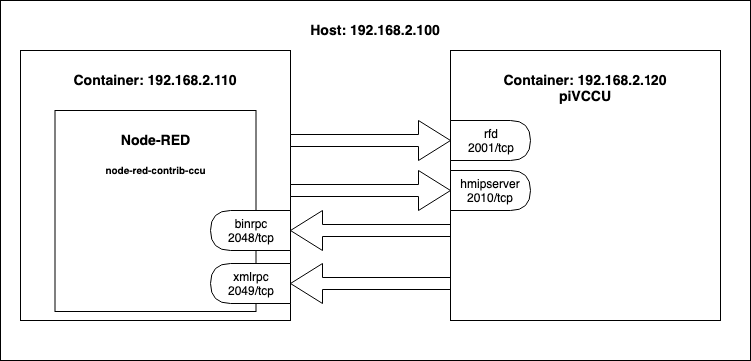
The communication with the Homematic CCU needs independent connections in two directions. Node-red-contrib-ccu connects to the CCU's interface listeners (e.g. 2001/TCP for BidCos-RF) while the CCU connects to node-red-contrib-ccu's BINRPC/XMLRPC listeners (2048/tcp and 2049/tcp in examples below).
NAT'd network
If Node-RED/node-red-contrib-ccu runs inside a Container or a VM with NAT'd network it's necessary to forward/expose the ports for connections from the CCU to node-red-contrib-ccu's callback listeners (example below for a Docker container: use options -p 2048:2048 -p 2049:2049in the docker run command).
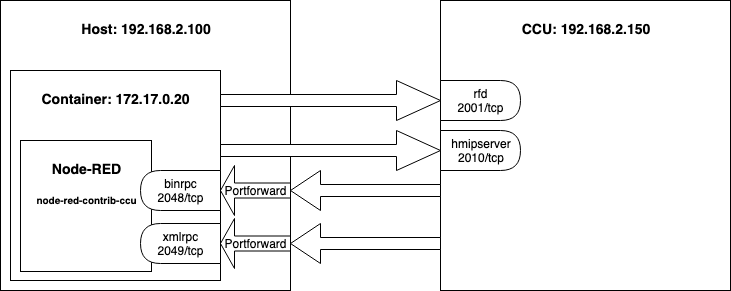
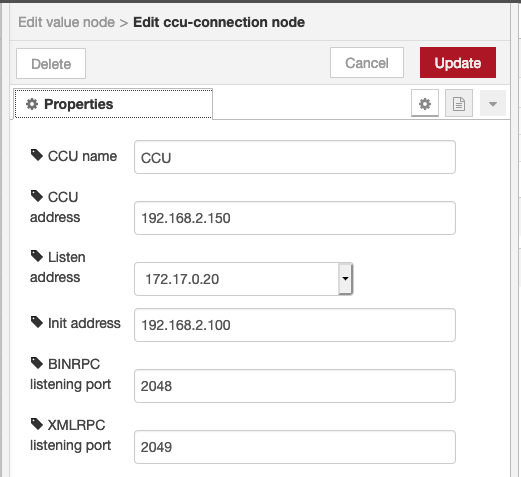
The config option Init addresswill be used to tell the CCU on which Address node-red-contrib-ccu is reachable. As 172.17.0.20 is not reachable for the CCU the Hosts IP Address and port forwarding/exposal has to be used. As Listen address setting also 0.0.0.0 (which tells node-red-contrib-ccu to bind it's listeners to all available interfaces) would be possible.
piVCCU
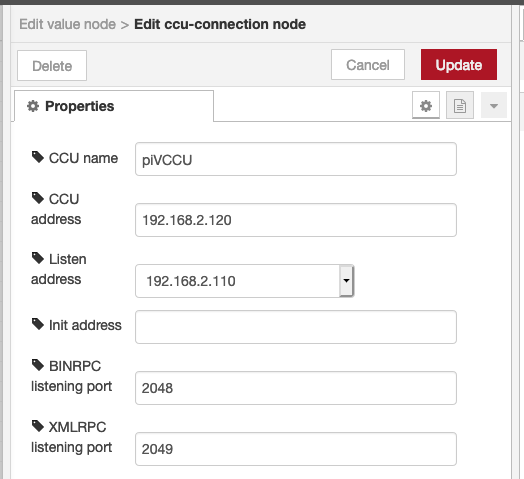
This example shows a configuration for piVCCU and Node-RED running in containers with bridged networking.
debmatic
In this example both Node-RED and debmatic are installed on the same (possibly virtual) host.
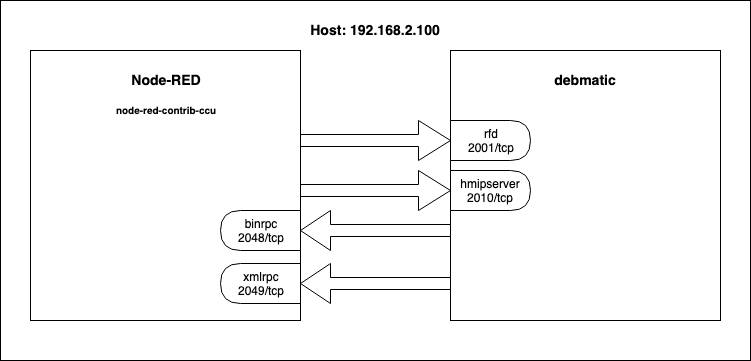
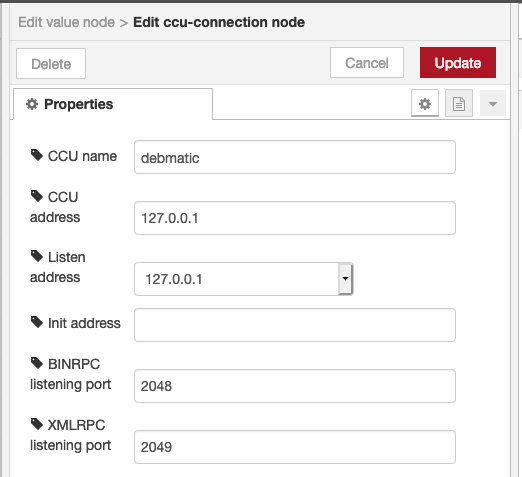
Multiple CCUs
With the same logic as shown above, multiple CCUs can be managed within one Node-RED instance. This will require two individual configuration nodes, in which the respective connection setting are provided.
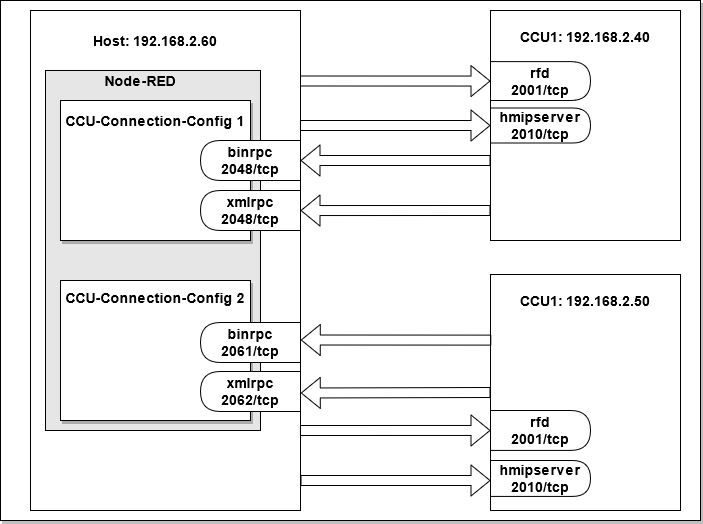
Listen addresstypically is the same for both Configurations as it is determined by the host that is running Node-REDBINRPC listening portandXMLRPC listening portneed to be different across the two configurations. One configuration can use the defaults (2048/tcp and 2049/tcp), the other needs to use two new ports. node-red-contrib-ccu will make a proposal, but this can be modified, e.g. if the proposed ports are already used.- The examples for NAT'd network, piVCCU and debmatic will apply likewise for multiple CCUs. This means, for running Node-RED within a docker, all BINRPC and XMLRPC ports must be forwarded, e.g.
-p 2048:2048 -p 2049:2049 -p 2061:2061 -p 2062:2062
License
MIT (c) Sebastian Raff and node-red-contrib-ccu contributors
