node-red-contrib-ask4me 2.0.0
一个用于向 Ask4Me 服务发送请求的 Node-RED 节点,支持 MCD 和 JSON 表单的可视化编辑器。
English | 中文
node-red-contrib-ask4me
一个 Node-RED 节点,用于向 Ask4Me 服务发送请求。该节点提供了一个用户友好的界面,可以使用 MCD (Markdown Control Description) 或 JSON Forms 创建交互式请求。内置支持 Server酱 和 Apprise,连接 Telegram, Discord, Slack 等数百种渠道。
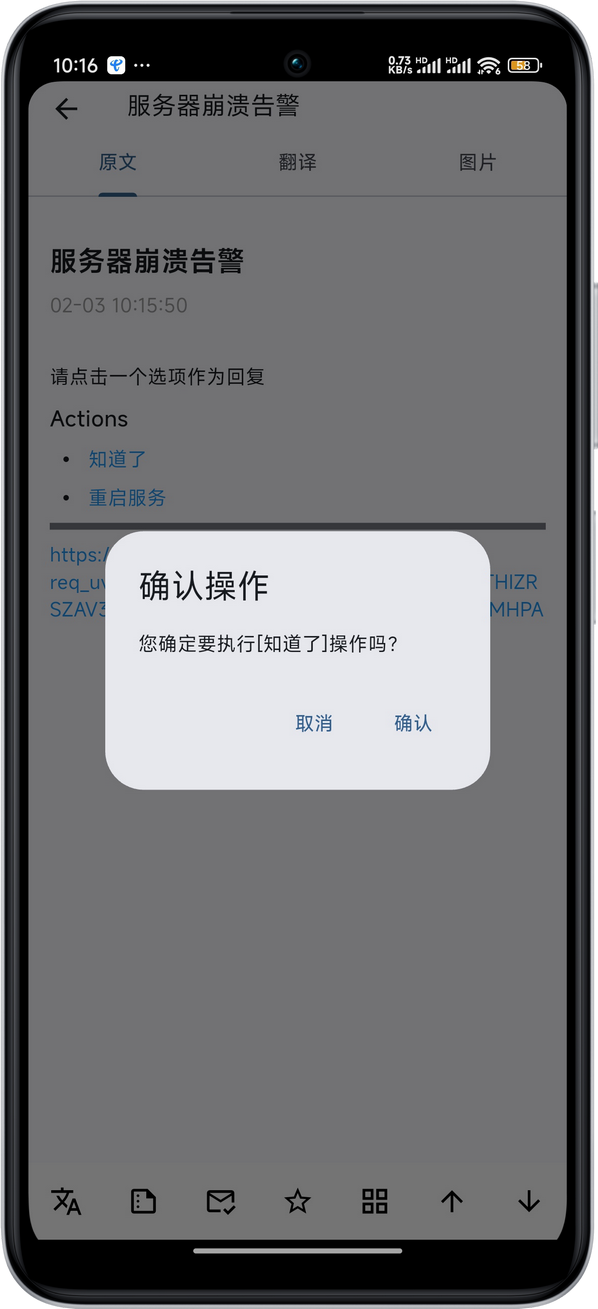
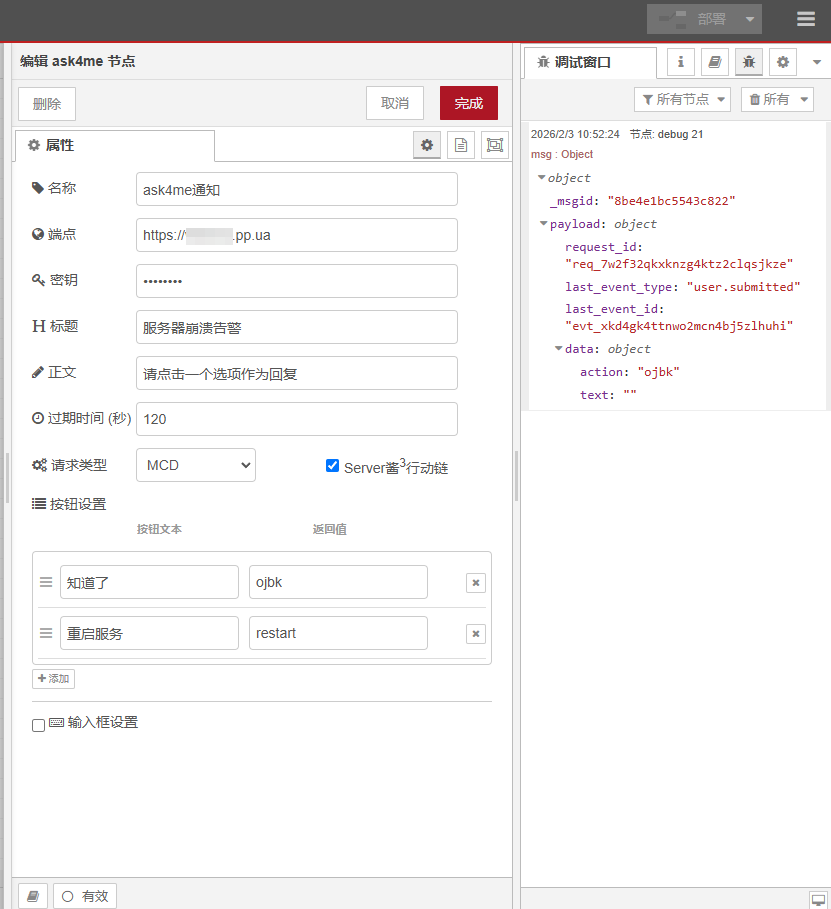
Ask4Me 介绍
Ask4Me 是方糖气球(Server酱出品方)最新开源的一个可自建服务,开源地址:https://github.com/easychen/ask4me。你通过 API 发起一个“请求”,服务端把交互链接推送到你的通知渠道(Server酱 / Apprise)。你在手机或浏览器里点开链接,按按钮或输入文字提交后,发起请求的那条 HTTP 长连接会拿到最终结果(JSON 或 SSE)。
从概念上说,这是一种 Human-in-the-Loop:这可能是你能自建的最简单的 Human-in-the-Loop 方案之一。
也就是以前的通知只能通知,不能交互,比如通知某项服务奔溃了,你只能干瞪眼。而现在的 Ask4Me 则是在通知的基础上,增加了一个交互的通道,你可以在通知渠道里点击链接,服务器上会收到信息,通过该信息服务器可运行后续处理程序。
自建服务也很简单,安装或下载二进制文件,运行即可。 ./ask4me -config ./.env 配置文件参考:https://github.com/easychen/ask4me/blob/main/.env.example
节点功能
- 可视化编辑器: 简化复杂请求的创建。
- MCD 模式: 使用可视化辅助工具快速添加按钮和输入字段。
- JSON Forms 模式: 一个功能强大的可视化编辑器,用于
schema、uischema和data。 - 简易配置: 为 ask4me API 提供简单直观的设置。
- 错误处理: 对 API 错误或配置错误提供清晰的反馈。
节点安装
要安装此节点,您可以:
通过 Node-RED 面板管理器安装:
- 搜索
node-red-contrib-ask4me并点击“安装”。
- 搜索
从本地目录安装:
- 克隆此仓库或下载源代码。
- 在您的 Node-RED 用户目录(通常是
~/.node-red)中运行:npm install /path/to/node-red-contrib-ask4me - 重启 Node-RED。
如何使用
- 将
ask4me节点从面板拖到您的工作区。 - 双击该节点以打开其配置面板。
节点配置
- 名称 (Name): 节点的自定义名称。
- 端点 (Endpoint): 您的 ask4me API 端点的 URL (例如,
http://localhost:8080)。 - API 密钥 (API Key): 您用于 ask4me 服务的秘密 API 密钥。
- 标题 (Title): 请求通知的标题。
- 正文 (Body): 请求的主要内容/消息。
- 过期时间 (秒) (Expires In (sec)): 请求过期前的秒数。节点将在此期间等待响应。
- 请求类型 (Request Type):
- MCD: 使用简单的基于文本的语法来定义控件。编辑器提供了按钮来帮助您生成按钮和输入的语法。
- JSON Forms: 使用模式驱动的方法来生成表单。编辑器为
schema、uischema和data提供了三个独立的可视化 JSON 编辑器。
- Server酱³行动链 (Server酱³ Action Chain): 当端点Url为'https'时可勾选,Server酱³APP收到通知后,无需跳转浏览器即可点击回复。
输入
该节点由任何输入消息触发。输入的 msg.payload 会被忽略,但消息对象用于发送输出。
输出
msg.payload: 用户与请求交互后,来自ask4me服务的 JSON 响应。这通常会包括request_id、last_event_type和data。
示例流程
这是一个演示如何使用 ask4me 节点的示例流程。您可以直接将其导入 Node-RED。
[
    {
        "id": "737fd9e89f603cfa",
        "type": "debug",
        "z": "c0ded79879f1030a",
        "name": "debug 21",
        "active": true,
        "tosidebar": true,
        "console": false,
        "tostatus": false,
        "complete": "true",
        "targetType": "full",
        "statusVal": "",
        "statusType": "auto",
        "x": 780,
        "y": 200,
        "wires": []
    },
    {
        "id": "713df944a9151442",
        "type": "inject",
        "z": "c0ded79879f1030a",
        "name": "",
        "props": [],
        "repeat": "",
        "crontab": "",
        "once": false,
        "onceDelay": 0.1,
        "topic": "",
        "x": 290,
        "y": 200,
        "wires": [
            [
                "b8b39966efac7719"
            ]
        ]
    },
    {
        "id": "6d21209fec702264",
        "type": "ask4me",
        "z": "c0ded79879f1030a",
        "name": "ask4me通知",
        "server": "b4dfd3fc0a4cb5a0",
        "title": "通知notify",
        "body": "",
        "expiresIn": 120,
        "requestType": "mcd",
        "mcd": ":::buttons\n- [知道了](ojbk)\n- [重启服务](restart)\n- [稍后再问](later)\n:::",
        "serverchanActionLinks": false,
        "jsonformsSchema": "{\n  \"type\": \"object\",\n  \"properties\": {\n    \"name\": {\n      \"type\": \"string\",\n      \"minLength\": 1\n    },\n    \"age\": {\n      \"type\": \"integer\",\n      \"minimum\": 0\n    }\n  },\n  \"required\": [\n    \"name\"\n  ]\n}",
        "jsonformsUiSchema": "{\n  \"type\": \"VerticalLayout\",\n  \"elements\": [\n    {\n      \"type\": \"Control\",\n      \"scope\": \"#/properties/name\"\n    },\n    {\n      \"type\": \"Control\",\n      \"scope\": \"#/properties/age\"\n    }\n  ]\n}",
        "jsonformsData": "{\n  \"age\": 18\n}",
        "x": 610,
        "y": 200,
        "wires": [
            [
                "737fd9e89f603cfa"
            ]
        ]
    },
    {
        "id": "b8b39966efac7719",
        "type": "function",
        "z": "c0ded79879f1030a",
        "name": "通知类容",
        "func": "\nvar newMsg = {\n    title:\"标题\",\n    body:\"服务奔溃了,怎么处理?\",\n    expiresIn:60,\n    requestType:\"mcd\",\n    mcd:`:::buttons\\n- [重启服务](systemctl restart apache2)\\n- [重启机器](reboot)\\n- [就这样吧](ojbk)\\n:::\\n`,\n    serverchanActionLinks:true  \n};\nreturn newMsg;",
        "outputs": 1,
        "timeout": 0,
        "noerr": 0,
        "initialize": "",
        "finalize": "",
        "libs": [],
        "x": 440,
        "y": 200,
        "wires": [
            [
                "6d21209fec702264"
            ]
        ]
    },
    {
        "id": "b4dfd3fc0a4cb5a0",
        "type": "ask4me-server",
        "name": "Ask4me服务",
        "endpoint": "https://ask4me.example.com"
    }
]
许可证
该项目根据 MIT 许可证授权。
