@vitormnm/node-red-simple-opcua 1.12.0
OPC UA server and client nodes with a graphical interface, powered by node-opcua
OPC UA client and server with a simple graphical interface for Node-RED.
This package provides a simplified, highly parameterized set of nodes to establish OPC UA Servers and Clients in Node-RED without complex coding.
Features Overview
- Dynamic OPC UA Address Space: Build hierarchical folders, objects, variables, and alarms dynamically from a visual tree editor or JSON.
- IPC Process Separation: Server runtime runs in a child process, preventing heavy OPC UA operations from blocking the main Node-RED event loop.
- Rich Node-RED Integration: Support for reading, writing, subscribing, calling methods, and managing sessions directly in Node-RED flows.
Server Functionalities
The server implementation consists of two nodes: opc-ua-server (the server runtime) and opcua-server-io (the data input/output node).
1. OPC UA Server (opc-ua-server)
This node instantiates the OPC UA Server process.
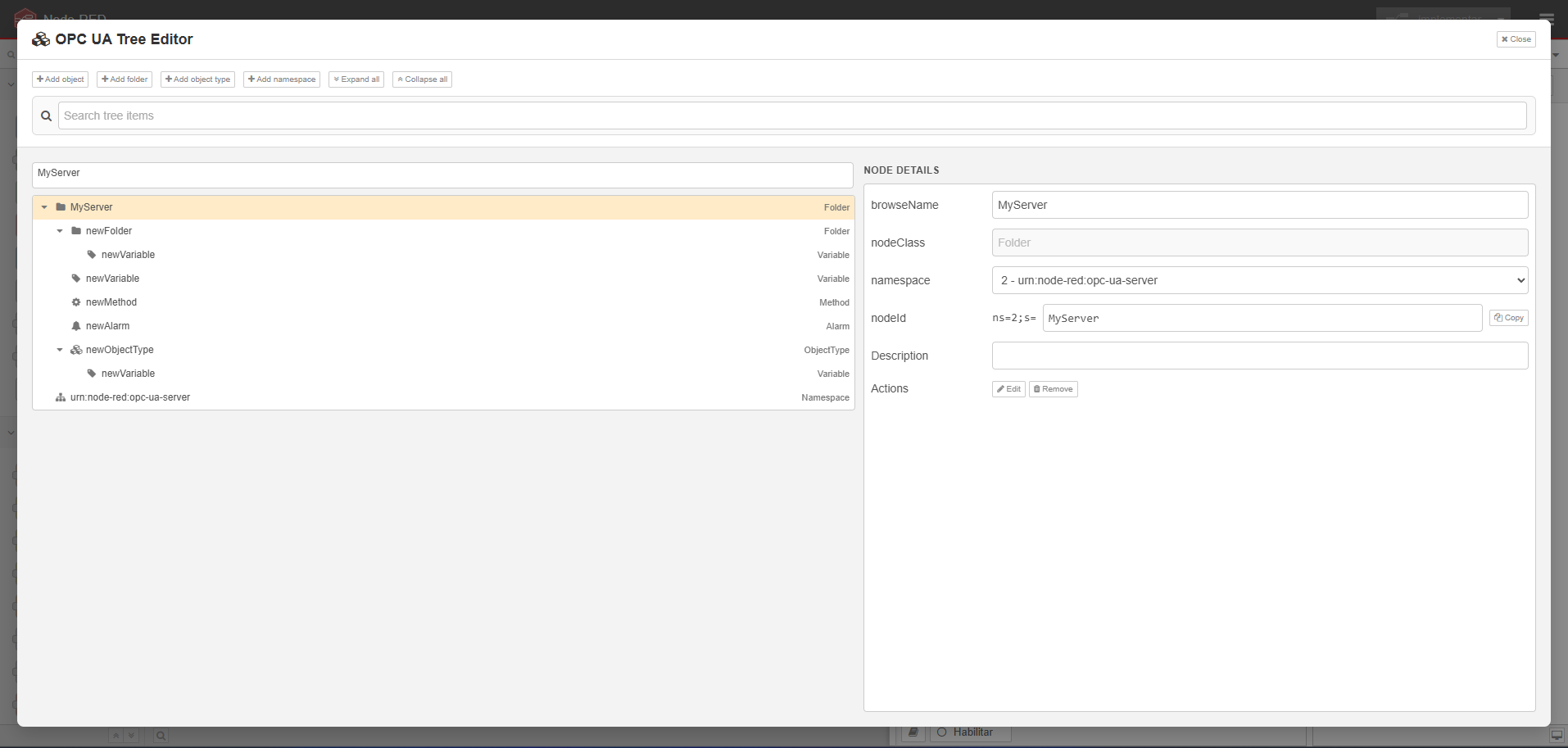
- Visual Tree Editor: Build folders, variables, custom objects, ObjectTypes (templates), alarms, methods, and enumerations visually.
- Dynamic Address Space: Rebuild the address space at runtime by passing a new JSON tree configuration in
msg.payload. - Authentication & Authorization: Configure users, groups, and comma-separated access permissions for folders, variables, and methods.
- Security Policies: Supports multiple security policies (
None,Basic256Sha256,Aes128_Sha256_RsaOaep, etc.) and security modes (None,Sign,SignAndEncrypt). - Certificate Management: Manage trusted/rejected client certificates.
2. Server I/O Node (opcua-server-io)
Interacts with an active local server instance. It supports the following modes:
- Read: Read values from server variables using a tag path or NodeId.
- Write: Write values to server variables.
- Event: Fire custom OPC UA events on target nodes.
- Events: Stream variable read, write, and alarm events.
- Status: Monitor server variable status snapshots.
- Active Alarms: Query active alarms on the server.
- Get Sessions: Retrieve active OPC UA client sessions.
- Delete Sessions: Forcefully close specific active sessions by ID.
- Method Input / Output: Route OPC UA method calls from clients into Node-RED flows and return output results.
Supported Variable Data Types, Arrays & Matrices
The server supports the following standard OPC UA data types, including arrays and matrices:
- Integers:
Int16,UInt16,Int32,UInt32,Int64 - Floats:
Float - Others:
Boolean,String,ByteString - Arrays (1D): Pass standard JavaScript arrays or JSON arrays as values (e.g.,
[1, 2, 3, 4]or"[1, 2, 3, 4]"). - Multi-Dimensional Arrays (Matrices): Pass nested arrays. The dimensions are automatically detected based on the shape (e.g.,
[[1, 2], [3, 4]]is registered as a 2x2 matrix with dimensions[2, 2], and[[[1, 2], [3, 4]], [[5, 6], [7, 8]]]as a 2x2x2 matrix).
Note on 64-bit Integers (Int64/UInt64):
- Scalars are represented as
[high, low]arrays (e.g.,[0, 100]for the value 100). - Arrays of 64-bit integers are represented as arrays of doublets (e.g.,
[[0, 100], [0, 200]]). - They are handled internally using JavaScript
BigInt.
Client Functionalities
The client implementation consists of opcua-client-config (shared connection configuration) and opcua-client (the action node).
1. Client Connection Config (opcua-client-config)
Manages connection configuration to an external OPC UA server.
- Connection Strategy: Limit reconnect retries to fail fast when servers are offline.
- Authentication: Supports anonymous or username/password authentication.
- Session Caching: Caches and reuse client sessions and method definitions.
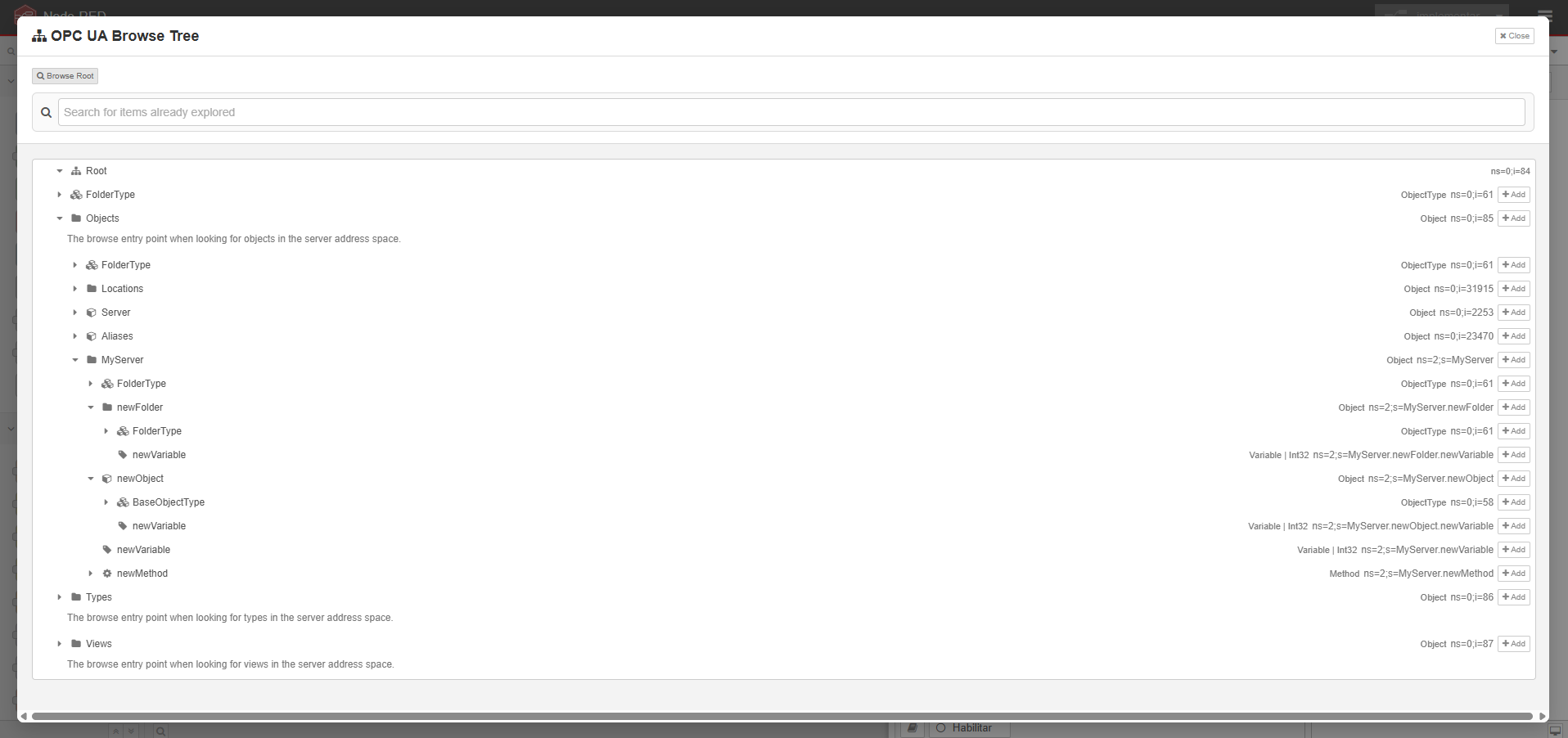
- Address Space Browser: Provides an endpoint for browsing the server address space directly in the Node-RED editor.
2. OPC UA Client (opcua-client)
Performs actions on the configured OPC UA server. It operates in the following modes:
- Read: Batch read selected variables.
- Write: Batch write values with automatic type resolution.
- Browse: Browse child nodes of one or more node paths.
- Browse Recursive: Recursively search all nodes starting from specified NodeIds, returning resolved type definitions, values, descriptions, and method arguments in optimized batched reads.
- Method: Call OPC UA methods on the server.
- Subscription: Subscribe to variable value updates (minimum 50ms sampling/publishing).
- Events: Subscribe to OPC UA events.
Editor Interfaces
Server Editor
Client Editor
Support the Project
If you find this project useful, please support its development: