@theotherwillembotha/node-red-whatsapp 0.4.6
Node-RED nodes for WhatsApp messaging via the Baileys library.
@theotherwillembotha/node-red-whatsapp
Node-RED nodes for WhatsApp messaging via the Baileys library. Supports sending and receiving messages to/from WhatsApp groups and individual contacts, with persistent session management and per-message-type filtering.
[!WARNING] This package is in early development. Many features may be incomplete, unstable, or behave unexpectedly. A significant amount of diagnostic information is currently printed to the Node-RED console — this is intentional while the package matures and will be reduced in future releases. Use with caution in production environments.
Prerequisites
- Node.js >= 18
- Node-RED >= 4.0.0
- A WhatsApp account that can be linked via QR code (WhatsApp Web / Linked Devices)
Installation
Either use the Manage Palette option in the Node-RED editor, or run the following in your Node-RED user directory (typically ~/.node-red):
npm install @theotherwillembotha/node-red-whatsapp
Nodes
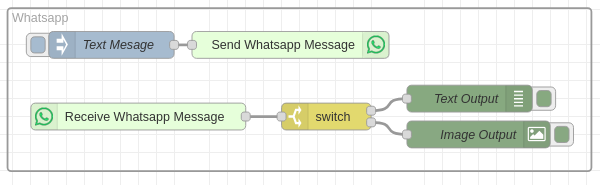
WhatsApp Account (config node)
Manages a WhatsApp Web session. Handles QR-code pairing and persists session credentials to disk so the connection survives Node-RED restarts.
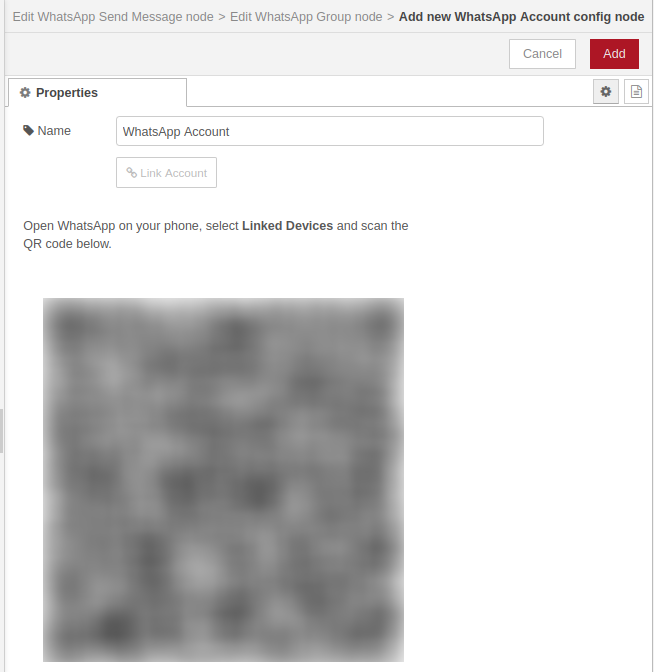
| Property | Description |
|---|---|
| name | Display label for this account |
Linking an account — open the node editor and click Link Account. A QR code is displayed; scan it with WhatsApp on your phone (Linked Devices). Once scanned, the session is saved and reconnected automatically on each restart. To unlink, click Unlink Account and remove the linked device from WhatsApp on your phone.
Claiming an existing account — if a WhatsApp session was linked outside of a config node (e.g. from a previous deployment), unclaimed accounts appear in a dropdown. Select one and click Claim to adopt it.
WhatsApp Group (config node)
References a WhatsApp group within a linked account. Used as the target for Send Message nodes and the source for Receive Message nodes.
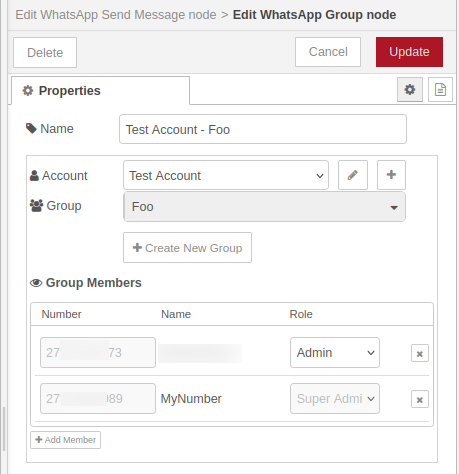
| Property | Description |
|---|---|
| name | Display label for this config node |
| account | The WhatsApp Account config node that owns this group |
| group | The WhatsApp group to use — populated from groups available on the selected account |
Click Create New Group to create a new WhatsApp group directly from Node-RED. The group members list allows adding, removing, and promoting/demoting participants.
WhatsApp Send Message
Sends a message to a WhatsApp group when triggered by an incoming Node-RED message.
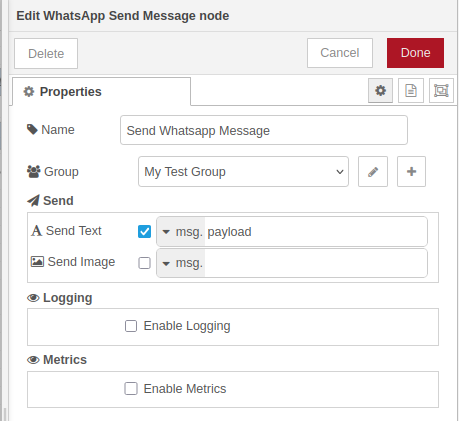
| Property | Description |
|---|---|
| name | Display label |
| group | The WhatsApp Group config node to send to |
Messages — each row in the messages list is sent as a separate WhatsApp message. Supported types:
| Type | Value sources |
|---|---|
| Text | msg, flow, global, str |
| Image | msg, flow, global |
| Video | msg, flow, global |
| Document | msg, flow, global (with optional filename and MIME type) |
The node resolves each field's value against the incoming message (for msg type) or from context, then sends to the group.
WhatsApp Dynamic Send Message
Sends one or more WhatsApp messages to a recipient resolved at runtime — for example, replying directly to the sender of a group message.
| Property | Description |
|---|---|
| name | Display label |
| account | The WhatsApp Account config node to send from |
| recipient | The target JID, resolved from msg, flow, global, or a static string. Defaults to msg.payload.sender.id |
If the recipient JID ends with @lid (newer WhatsApp addressing), the node automatically resolves it to the corresponding phone-number JID via the contact store before sending.
The messages list supports the same types as Send Message (Text, Image, Video, Document).
WhatsApp Receive Message
Outputs a Node-RED message for each incoming WhatsApp message in a group.
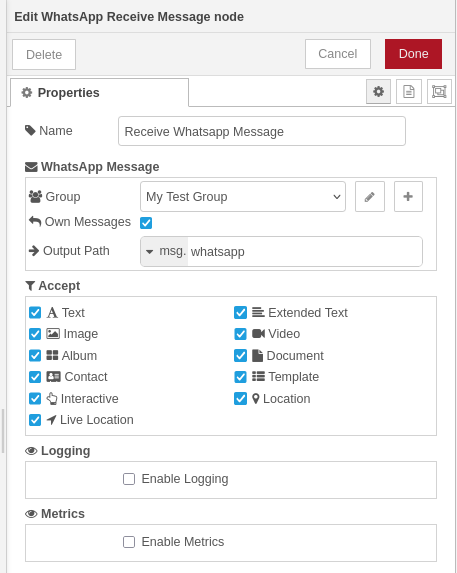
| Property | Description |
|---|---|
| name | Display label |
| group | The WhatsApp Group config node to listen on |
| own messages | Whether to forward messages sent by this account |
| output path | Where in the output msg to place the WhatsApp message (or which flow/global context variable to write to) |
Accept filters — each message type can be individually enabled or disabled. Enabled by default: Text, Extended Text, Image, Video, Album. Available types: Text, Extended Text, Image, Video, Album, Document, Contact, Template, Location, Event, Event Response, Sticker.
Output message — the WhatsApp message object is placed at the configured output path (default: msg.payload). The object includes:
| Field | Description |
|---|---|
messageId |
WhatsApp message ID |
timestamp |
Unix timestamp (seconds) |
chat.id |
Group JID |
chat.name |
Group display name |
sender.id |
Sender JID |
sender.name |
Sender display name |
sender.me |
true if sent by this account |
type |
Message type (e.g. Text, Image, Location) |
payload |
Type-specific content (text, image buffer, coordinates, etc.) |
Data storage
Session credentials and the SQLite message store are written to /data/whatsapp/ if the /data directory exists (standard Node-RED Docker image), otherwise to ./whatsapp/ relative to the Node-RED working directory.
Part of the node-red-plugincore ecosystem
| Package | Description |
|---|---|
| node-red-plugincore | Core framework |
| node-red-telemetry | Structured logging flow node |
| node-red-loki | Grafana Loki log transport |
| node-red-prometheus | Prometheus metrics provider |
| node-red-circuitbreaker | Circuit breaker fault tolerance |
| node-red-zookeeper | Apache ZooKeeper integration |
| node-red-reolink | Reolink camera integration |
| node-red-temporal | Temporal.io workflow integration |
| node-red-whatsapp | WhatsApp messaging (this package) |
