@stfi/node-red-dashboard-2-ui-qrcode-scanner 1.0.4
A QR-Code / Barcode scanner widget for Node-RED Dashboard 2.0, based on the popular html5-qrcode lib.
node-red-dashboard-2-ui-qrcode-scanner
A QR-code / barcode scanner widget for Node-RED Dashboard 2.0, based on the popular html5-qrcode lib. The widget renders a live camera preview inside a Dashboard 2.0 group and emits a Node-RED message every time a code is decoded.

Please note:
- HTTPS (or http://localhost like in the example) is required for camera access. Mobile browsers do not enable the camera when using plain HTTP.
- There is a workaround available via Chrome Flags (chrome://flags/#unsafely-treat-insecure-origin-as-secure) or Edge Flags (edge://flags/#unsafely-treat-insecure-origin-as-secure). These flags allow you to declare insecure URLs as secure, thereby enabling camera access.
- However, this approach is recommended only during the development phase. In a production environment, Node-RED should be operated in HTTPS mode. This requires an appropriate HTTPS certificate, which is typically provided by the IT department.
Features
- Works with QR codes plus every other format supported by
html5-qrcode(Aztec, Code 39 / 93 / 128, Data Matrix, EAN-13 / 8, ITF, PDF-417, UPC-A / E, ...). - Responsive camera preview — fills the widget width at a configurable aspect ratio.
- Front or rear camera selection, or facing-mode auto-detect.
- Cookie-based camera memory — when controls are visible the last selected camera
is stored in a browser cookie (
nrdb-qrs-cam) and restored automatically on the next page load. - Fixed camera by index — when controls are hidden, a specific camera can be pre-selected by its OS-assigned index (Camera 1, Camera 2, …).
- Configurable FPS, scan-box size and aspect ratio. The scan box scales with the widget size automatically.
- Auto-start, stop-on-scan, and torch toggle (where the device supports it).
- Optional suppression of the "Last scan" result display.
- Programmatic control via
msg.action = 'start' | 'stop' | 'toggle' | 'torchOn' | 'torchOff'. - Runtime overrides of every option via
msg.ui_update.
Installation
From your Node-RED user directory (usually ~/.node-red):
npm install node-red-dashboard-2-ui-qrcode-scanner
Then restart Node-RED. A new node qr-code scanner appears in the
dashboard 2 category.
Installing from source
cd ~/.node-red
npm install /path/to/checkout-of-node-red-contrib-html5-qrcode-scanner
This puts an entry in ~/.node-red/package.json whose key is
node-red-dashboard-2-ui-qrcode-scanner, which is what Dashboard 2
scans for. If you previously installed the package under the
node-red-contrib-html5-qrcode-scanner name, uninstall it first
(npm uninstall node-red-contrib-html5-qrcode-scanner) or the widget
will continue to fall back to ui-template.
Outputs
| Property | Type | Description |
|---|---|---|
msg.payload |
string | The decoded text. |
msg.topic |
string | qrcode for scans, qrcode/error for runtime errors. |
msg.qrcode |
object | { text, format, result } – the raw decoder result. |
msg.error |
string | Present when topic === 'qrcode/error'. |
Inputs
Send a message in to control the scanner at runtime.
// Start / stop / toggle the scanner
msg = { action: 'start' }
msg = { action: 'stop' }
msg = { action: 'toggle' }

// Torch (where supported by the device + browser)
msg = { action: 'torchOn' }
msg = { action: 'torchOff' }

// Change configuration on the fly
msg = { ui_update: { fps: 15, cameraFacingMode: 'user', stopOnScan: true } }
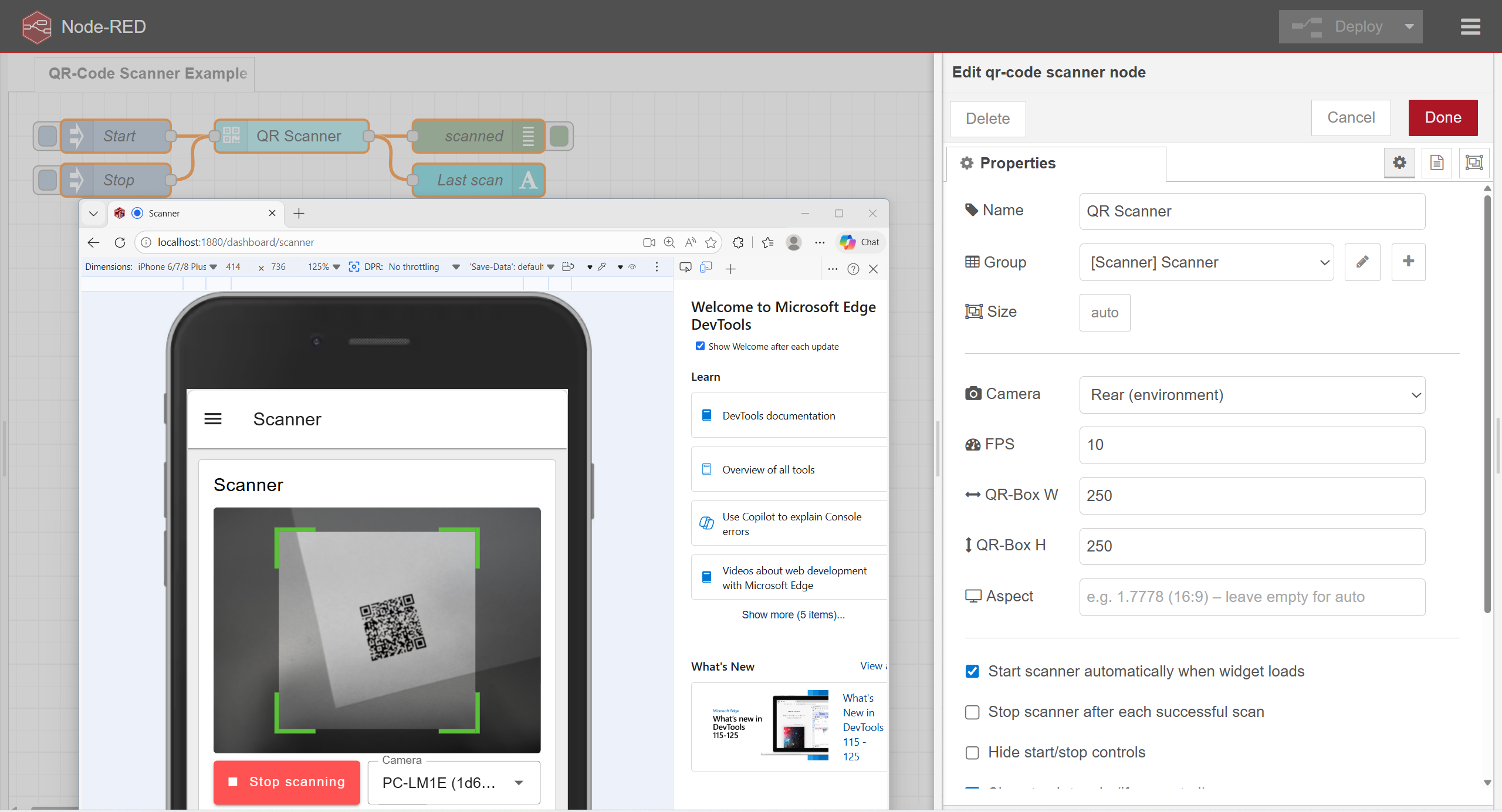
Configuration
| Option | Default | Description |
|---|---|---|
fps |
10 |
Frames per second the scanner samples at. |
qrboxWidth |
250 |
Width (px) of the scanning region inside the preview. |
qrboxHeight |
250 |
Height (px) of the scanning region inside the preview. |
aspectRatio |
(auto) | e.g. 1.7778 for 16:9. Leave blank to let the browser decide. |
cameraFacingMode |
environment |
environment (rear) or user (front). Used as fallback when no cookie or camera index is set. |
cameraIndex |
0 (auto) |
Force a specific camera by its OS-assigned index (1 = first, 2 = second, …). Only shown in the node editor when Hide start/stop controls is enabled. The camera sequence is determined by the operating system. |
autoStart |
true |
Start the scanner as soon as the widget loads. |
stopOnScan |
false |
Stop the scanner after each successful scan. |
hideControls |
false |
Hide the start/stop/camera/torch buttons. |
showTorch |
false |
Show a torch toggle while scanning (if the camera supports it). |
disableFlip |
false |
Disable the mirrored-image scanning attempt (slightly faster). |
hideLastResult |
false |
Hide the "Last scan" result box below the video area. |
startLabel |
Start scanning |
Label of the start button. |
stopLabel |
Stop scanning |
Label of the stop button. |
Camera selection priority
When the widget mounts it picks the initial camera in this order:
- Cookie (
nrdb-qrs-cam) — the camera the user last selected manually, if it is still present in the device's camera list. Only consulted when controls are visible. - Camera index — if
cameraIndexis set to a value > 0. - Facing-mode label matching — searches camera labels for
back/rear/environmentorfront/user/facekeywords, depending oncameraFacingMode. - First available camera — fallback.
Example flow
An example flow is included in examples/qrcode-scanner.json. Import it
through Menu → Import → Examples → node-red-contrib-html5-qrcode-scanner
after installation.
Building from source
git clone https://github.com/boehand/node-red-contrib-html5-qrcode-scanner
cd node-red-contrib-html5-qrcode-scanner
npm install
npm run build
The build emits resources/ui-qrcode-scanner.umd.js, which Dashboard 2.0
loads automatically.
Author
Created by boehand using Claude Sonnet 4.6
License
Apache-2.0 – see LICENSE.
Built on top of html5-qrcode by Minhaz (also Apache-2.0).
