@rosepetal/node-red-contrib-rosepetal-message-control 1.0.0
Node-RED runtime plugin that records and exposes the last input and output message seen by every node for easier debugging.
@rosepetal/node-red-contrib-rosepetal-message-control
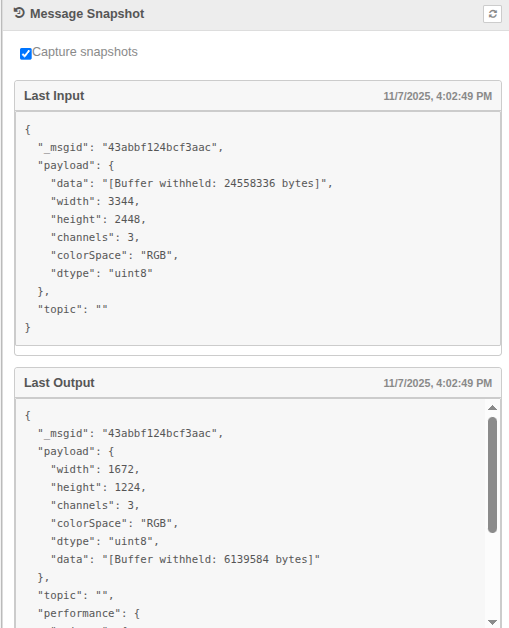
A Node-RED runtime plugin that remembers the last message each node received and sent. It gives you a live “what just happened?” snapshot without wiring extra debug nodes.
Why you might want it
- See data instantly: select any runtime node in the editor and the latest inbound/outbound payloads appear in the Info sidebar.
- Stay lightweight: snapshots are automatically cleaned (buffers, long arrays, base64 blobs become annotated previews) so they are safe to ship to the editor.
- Pause when needed: a single toggle lets you stop capturing if you are chasing performance or privacy issues.
- Script-friendly: the same data is available over HTTP for tooling, tests, or dashboards.
Quick start
- Change into your Node-RED user directory (usually
~/.node-red). - Install the plugin:
npm install @rosepetal/node-red-contrib-rosepetal-message-control - Enable it inside
settings.js:plugins: { '@rosepetal/node-red-contrib-rosepetal-message-control': { enabled: true } } - Restart Node-RED.
Node-RED 3.0+ is required because the plugin relies on the RED.hooks runtime API.
Using the snapshots in the editor
- Open the Info sidebar.
- Click any node on the canvas.
- A Message Snapshot card appears with two sections:
- Last Input: the most recent message the node received.
- Last Output: the most recent message it sent.
- Use the refresh button on the card to re-fetch without changing selection.
Snapshots use a clean format: large payloads are summarised, but every placeholder includes the original length so you can judge the size at a glance.
Pausing/resuming capture
At the top of the Message Snapshot card you will find a Capture snapshots switch. Turning it off:
- Stops the runtime hooks from storing new payloads.
- Clears previously stored snapshots.
- Changes the card status to “Snapshots paused. Enable capture to resume.”
Turn it back on whenever you are ready—the view refreshes automatically for the currently selected node.
Inspecting snapshots over HTTP
If you prefer to script or automate, the plugin exposes a small admin API that mirrors the sidebar data (list nodes, inspect a specific node, get/set the capture flag). Details and example payloads live in docs/http-api.md.
How it works (at a glance)
- Hooks into
onReceive/onSendviaRED.hooksso every runtime node is observed without patching node prototypes. - Stores the last inbound/outbound payload, node metadata, and timestamps in memory.
- Runs each payload through a clean-up pass (depth/length limits, typed-array summaries, buffer placeholders, base64/data URL detection, 256 KB cap) before exposing it.
- Serves the snapshot data to both the editor plugin (for the Info sidebar panel) and the admin HTTP endpoints.
Limitations & notes
- Snapshots live only in memory. Restarting Node-RED or redeploying flows clears them.
- Payloads larger than 256 KB are truncated to a preview string.
- The HTTP routes require
flows.read(GET) orflows.write(POST) permissions when admin authentication is enabled. - Only runtime nodes that have processed a message since the plugin was enabled will appear.
