@rosepetal/node-red-contrib-git-control 1.0.3
A Node-RED advanced Git control sidebar plugin
node-red-contrib-git-control
A Node-RED sidebar plugin for Git version control. Manage commits, branches, merges, and remote synchronization directly from the editor — including flow-aware diff, revert, and merge-conflict resolution that understands flows.json at the node level.
Why you might want it
- Flow-aware merge resolver: When a merge conflicts on
flows.json, the plugin decomposes it into per-tab / per-node 3-way diffs. Take ours, take theirs, or hand-pick per node — no manual JSON surgery. - Flow-aware diff & revert: Diff a single tab or subflow against any commit, and revert one tab (or a specific node) without touching the rest of the flow file.
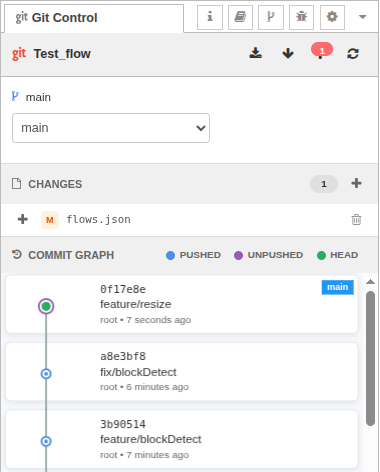
- Visual commit graph: Branch labels, push status, and parent relationships on a canvas-based timeline.
- Detached HEAD safety: Auto-branches when committing from historical states to prevent orphaned commits.
- Flow synchronization: Reloads flows after checkout, reset, pull, or merge so the editor stays in sync with disk.
- Conflict / interrupted-op safety net: A persistent banner appears whenever the repo is mid-merge, mid-cherry-pick, mid-revert, or mid-rebase, with one-click Resolve and Abort actions.
- Smart error messages: Context-aware suggestions guide you through divergence, lock issues, missing upstreams, etc.
- Integrated workflow: Uses Node-RED's project system and SSH keys — no separate Git configuration needed.
Quick start
Install the plugin in your Node-RED user directory:
cd ~/.node-red
npm install @rosepetal/node-red-contrib-git-control
Restart Node-RED.
Open the Node-RED editor and look for the Git Control tab in the right sidebar (next to Debug, Config, etc.)
Node-RED 2.0+ with projects enabled is required. The plugin works only with Node-RED project directories that are Git repositories.
Using the sidebar
Toolbar
- Fetch: Download updates from remote without merging
- Pull: Download from remote and merge (reloads flows automatically)
- Push: Upload commits to remote (auto-sets upstream for new branches; offers a 3-way decision — Cancel / Pull / Force push — when the remote has diverged)
- Refresh: Reload all data from repository
Sync indicators show how many commits you are ahead/behind the remote.
Branch picker
Pick a branch from the combo, or open the branch action menu (the icon next to the combo) for:
- Create branch (from current or any commit)
- Create orphan branch
- Merge branch into current (flow-aware resolver kicks in if
flows.jsonconflicts) - Rename branch
- Delete branch
Remote-only branches (not yet checked out locally) appear alongside local branches.
Changes panel
- Unstaged: modified, created, or deleted files not yet staged
- Staged: files ready to commit
Use + to stage individual files or stage all at once, − to unstage. The trash icon on unstaged files discards changes (⚠️ irreversible).
Commit panel
With staged changes: enter a message and click Commit. If you're in detached HEAD (viewing an old commit), the plugin creates a new branch automatically (named from-<hash>) to preserve your work.
Commit graph
Visual timeline:
- Blue nodes: commits already pushed to remote
- Purple nodes: local commits not yet pushed
- Green center: current HEAD
- Branch labels: which branches point to each commit
Click any commit to open an actions modal: switch to commit, diff against working tree, see which branches contain it. Hover for hash + message.
Flow-aware diff & revert
From any commit's modal, open the diff against the current working tree. The diff is grouped by tab / subflow — each conflicting node is shown in isolation with its base, ours, and theirs versions. From there you can:
- Revert a whole tab to the chosen commit's version
- Revert a single node without disturbing the rest of
flows.json
Merge conflict resolver
When a pull or merge produces a conflict in flows.json, the conflict-safety banner exposes a Resolve button that opens a full-screen 3-way diff modal:
- Bulk choice: "Take ours for all" / "Take theirs for all" (global, wins over per-tab and per-node choices)
- Per-tab choice: "Take ours" / "Take theirs" for an entire tab/subflow
- Per-node choice: pick base/ours/theirs for individual nodes, with field-level diffs for long values
- Commit message: pre-filled from
.git/MERGE_MSG, editable
The resolver is also fully driveable from outside the UI — see docs/http-api.md for the merge/preview and merge/resolve endpoints.
Detached HEAD warning
If you check out an old commit, a warning banner appears explaining you're in detached HEAD state. Click Return to Latest to go back to your branch tip.
HTTP API
The plugin exposes admin HTTP endpoints for scripting, testing, and external tools (including AI agents). Full reference with request/response examples lives in docs/http-api.md.
Highlights:
| Category | Endpoints |
|---|---|
| Project / status | project-info, status, log, branches, commit-branches |
| Working tree | add, unstage, commit, discard, discard-all, reset |
| Branches | checkout, validate-checkout, create-branch, orphan-branch, delete-branch, rename-branch, set-upstream |
| Remote | fetch, pull, push, force-push |
| History ops | merge, revert, cherry-pick, abort |
| Conflict resolver | merge/preview, merge/resolve |
| Diff | file-diff, commit-diff, flow-diff, flow-units |
| Flow-aware revert | revert-flow-unit, revert-flow-nodes |
| SSH keys | ssh-keys, ssh-key |
All routes require git-control.read or git-control.write permissions when Node-RED admin authentication is enabled. Read endpoints work with a bearer token; mutating endpoints same.
