@pauldeng/node-red-contrib-redis 3.0.0
Redis integration nodes for Node-RED with Cluster, Sentinel, streams, pub/sub, commands, Lua, and Redis Functions.
@pauldeng/node-red-contrib-redis


Redis nodes for Node-RED built on ioredis: standalone connections, Redis Cluster, Sentinel, AWS MemoryDB/ElastiCache-style cluster endpoints, blocking inputs, pub/sub, streams, command coverage, Lua scripts, and Redis client injection into context.
Use this package when a flow needs Redis as an event source, queue, cache, stream, coordination point, or custom command target without dropping into a Function node for every call.
| Cloud-style config | Stream consumer groups | Lua scripts & functions |
|---|---|---|
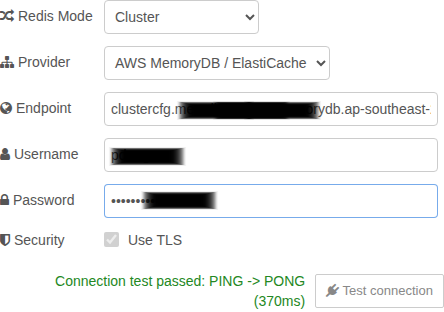 |
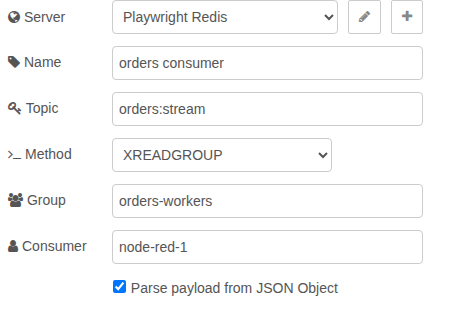 |
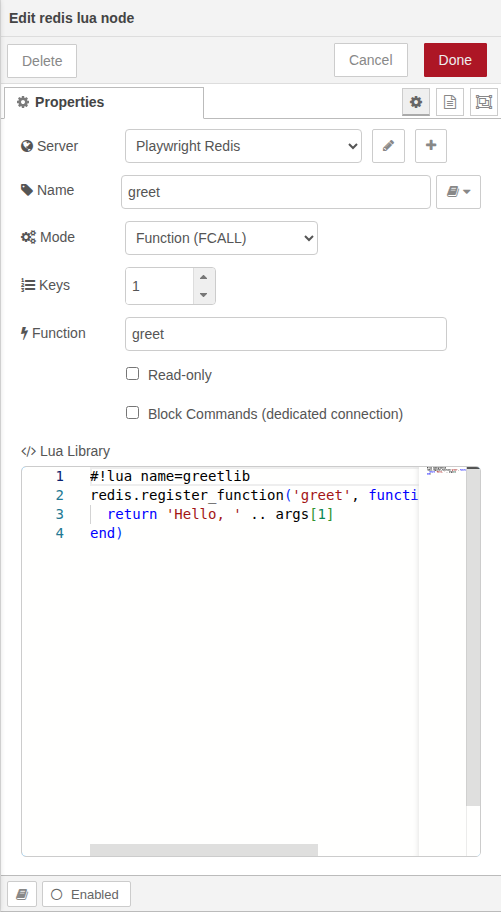 |
Install
In the Node-RED editor, open Menu > Manage palette > Install, search for
@pauldeng/node-red-contrib-redis, and install it.
From the command line, install it in your Node-RED user directory and restart Node-RED:
cd ~/.node-red
npm install @pauldeng/node-red-contrib-redis
Compatibility
| Package | Supported |
|---|---|
| Node.js | >= 22.9 |
| Node-RED | >= 5.0.0 |
| Redis client | ioredis 6.x (RESP3, legacy reply mapping) |
| Redis / Valkey server | Redis and Valkey, each tested at their current latest release — no pinned minimum version |
| Deployments tested | Standalone, ACL auth, Cluster, Sentinel, Unix socket, AWS MemoryDB opt-in |
Upgrading From 1.4.0
Version 2.0.0 raises the runtime floor to Node-RED 5 and Node.js 22.9, fixes previously silent error paths, and changes some edge-case argument handling. Read CHANGELOG.md before upgrading production flows.
Quickstart
- Add a redis-config node and choose the connection shape: Single, Cluster, Sentinel, or ConnString from an environment variable.
- Use Test connection before deploying. JSON-mode passwords are stored in Node-RED encrypted credentials; environment-variable mode keeps secrets in the environment.
- Add one of the runtime nodes:
redis in for subscriptions, blocking queues, and
XREADGROUP; redis out for writes such asRPUSH,PUBLISH,XADD, andZADD; redis cmd for broad Redis and module command coverage; redis lua for atomic Lua scripts; or redis instance to place an ioredis client in flow/global context. - Import an example flow from
examples/rather than starting from a blank canvas.
Useful examples:
redis-set-and-get.json- basic set/get commands.redis-list-queue.json- list producer and blocking consumer.redis-priority-queue.json- sorted-set priority queue.redis-pub-sub.jsonandredis-psubscribe.json- channels and pattern subscriptions.redis-streams.json-XADDwith anXREADGROUPconsumer.redis-lua-script.json- Lua scripting patterns.redis-fcall.json- Redis Functions (FCALL) pattern.redis-script-function-management.json-FUNCTION/SCRIPTmanagement (LOAD, LIST, STATS, DELETE, EXISTS, FLUSH) viaredis-command.
Nodes
| Node | Use it for | Highlights |
|---|---|---|
redis-config |
Shared connection configuration | Single Redis (TCP or Unix socket), Cluster, Sentinel, AWS MemoryDB/ElastiCache-style endpoints, env JSON, encrypted credential storage, and Test connection. |
redis-in |
Redis as an input source | BLPOP, BRPOP, BZPOPMIN, BZPOPMAX, SUBSCRIBE, PSUBSCRIBE, and XREADGROUP (Topic is <stream-key>:<id>, split at the last colon, so the stream key may itself contain colons); blocking consumers retry with capped backoff until the node closes. |
redis-out |
Focused writes | List pushes, publish, XADD, and ZADD; writes are awaited and failures go through Node-RED error handling. |
redis-command |
General Redis commands | Runs configured commands through ioredis, supports JSON params, message overrides, and a dedicated connection option for blocking work. Home for FUNCTION/SCRIPT management subcommands. |
redis-lua-script |
Atomic server-side logic | Script mode (EVAL/EVAL_RO, stored SCRIPT LOAD+EVALSHA/EVALSHA_RO, NOSCRIPT recovery) and Function mode (FUNCTION LOAD REPLACE + FCALL/FCALL_RO); Lua editor, library metadata, dedicated-connection option. |
redis-instance |
Advanced Function-node workflows | Stores a live ioredis client in flow or global context under a configured key. |
Configuration Notes
Standalone
Use the Connection tab for the common case, or JSON like:
{
  "host": "127.0.0.1",
  "port": 6379,
  "db": 0
}
Add username, password, and tls: {} when your Redis server requires ACL auth or TLS.
In JSON mode, saved passwords are moved into Node-RED credentials instead of remaining in
the exported flow.
Redis Cluster
Cluster mode accepts a startup-node array. Username and password values on startup nodes
are also applied to ioredis redisOptions, so discovered cluster nodes authenticate too.
[
  {
    "host": "127.0.0.1",
    "port": 7000,
    "username": "node_red",
    "password": "use-an-environment-secret"
  }
]
For AWS MemoryDB or ElastiCache cluster configuration endpoints, use the provider in the
Connection tab or include dnsLookupStrategy: "identity" in JSON. That enables identity
DNS lookup and TLS for the cluster connection.
[
  {
    "host": "clustercfg.example.memorydb.region.amazonaws.com",
    "port": 6379,
    "username": "node_red",
    "password": "use-an-environment-secret",
    "dnsLookupStrategy": "identity"
  }
]
Sentinel
Sentinel mode uses a master name plus Sentinel endpoints:
{
  "name": "mymaster",
  "sentinels": [
    {
      "host": "127.0.0.1",
      "port": 26379
    }
  ],
  "username": "node_red",
  "password": "use-an-environment-secret"
}
If the Sentinel nodes themselves require auth or TLS, use sentinelUsername,
sentinelPassword, and sentinelTLS.
Environment Variables
Choose ConnString > Environment variable and enter the variable name. The value can be an ioredis connection string, standalone JSON object, cluster startup-node array, or Sentinel JSON object.
export NODE_RED_REDIS_OPTIONS='{"host":"127.0.0.1","port":6379}'
Environment-variable mode is useful for deployments because secrets stay outside
flows.json and outside exported flow snippets.
Prefer JSON object options or encrypted credentials for passwords. Passwords in Redis connection URLs are redacted from connection-test diagnostics, but object-form passwords are easier to audit and migrate.
Message Patterns
redis-in emits Redis data as Node-RED messages. Pub/sub messages use msg.topic and
msg.payload; pattern subscriptions also include msg.pattern; stream consumer groups
include msg.stream, msg.messageId, and msg.payload.
redis-out and redis-command let incoming messages override configured keys and
arguments. Use Catch nodes around write-heavy flows; Redis command failures are surfaced
through Node-RED's normal error path instead of being swallowed.
For advanced commands or Redis modules, prefer redis-command before writing a Function
node. redis-lua-script executes Lua scripts and Redis Functions, while FUNCTION * and
SCRIPT * management subcommands run through redis-command. For custom client code that
really needs ioredis directly, use redis-instance.
Development And Tests
Install dependencies:
npm install
Run the browser editor suite:
npm run test:playwright
Run the full Docker-managed deployment matrix:
npm test
The test matrix covers standalone no-auth/auth Redis, Redis Cluster, Redis Sentinel, and
optional AWS MemoryDB when MEMORYDB_ENABLED=1 plus endpoint credentials are present in
the environment. See docs/TESTING.md for the Docker boundary and
docs/NODE_GUIDE.md plus
docs/ARCHITECTURE.md for implementation details.
