@papakpmartin/node-red-azure-iot-edge 1.0.0
Module to connect to and interact with Azure IoT Edge using Node-Red
Azure IoT Edge nodes for Node-RED
Connect Node-RED flows to Azure IoT Edge and IoT Hub. Send and receive routed JSON messages, read desired twin properties, report device/module state, and handle module direct methods using Azure's IoT device SDK over MQTT.
This package provides Node-RED nodes, not a container image or a complete IoT Edge deployment. Bring your own Node-RED runtime and Azure identities.

- Choose a connection
- Requirements and installation
- Quick start: send a module message
- Importable examples
- Node and message reference
- Direct device twin with X.509
- Diagnostics and troubleshooting
Choose a connection
| Your goal | Nodes | Identity and environment |
|---|---|---|
| Run Node-RED as an IoT Edge module; exchange routed messages, access its twin, or receive module methods | Module Client, Module Input/Output/Twin/Method | Edge-supplied module workload identity; normally runtime-managed SAS |
| Access an IoT Hub device twin directly | Device Client, Device Twin | An existing X.509 device identity, certificate chain, and matching private key |
Share one Module Client configuration across all module nodes. Only one may be active in a Node-RED process. Device Client is separate: it accesses a device twin, not a module twin, and does not require Node-RED to run as an Edge module.
Installing the package in ordinary desktop Node-RED does not create an Edge workload environment. Module-only flows do not need the device private key, even when the Edge host was provisioned with X.509.
Requirements and installation
- Node.js 22.16.0 or newer within 22.x.
- Node-RED 4.1.13 or newer within 4.x; offline qualification covers 4.1.13 and 4.1.16. Node.js 24/25 and Node-RED 5 are not qualified.
- Linux containers for IoT Edge module operation; MQTT is the supported transport.
- Existing IoT Hub/Edge identities and the required deployment/network setup.
Azure IoT Edge 1.6 LTS is recommended. Use current supported security patches that your deployment has qualified; compatibility with an older patch is not a recommendation to remain on it.
Stable installation and scoped package
From the relevant Node-RED user/application directory, install the stable version:
npm install --save-exact @papakpmartin/[email protected]
For an application manifest, use:
"@papakpmartin/node-red-azure-iot-edge": "1.0.0"
Stable publication targets npm's latest tag; prereleases use next. Check
npm view @papakpmartin/node-red-azure-iot-edge dist-tags to verify registry
availability before rollout. Remove the old unscoped dependency first if
migrating; do not install both package identities. See the
release and validation guide for checksums,
migration, release approval, and remaining field-validation recommendations.
1.0.0 promotes rc.4's runtime, editor files and resolved dependencies unchanged,
using the final repository URLs at papakpmartin/node-red-azure-iot-edge.
Earlier prerelease artifacts and their qualification records remain preserved.
To use the local artifact, copy
dist/papakpmartin-node-red-azure-iot-edge-1.0.0.tgz into your Node-RED
application's packages/ directory and set its dependency:
"@papakpmartin/node-red-azure-iot-edge": "file:packages/papakpmartin-node-red-azure-iot-edge-1.0.0.tgz"
For a conventional Node-RED user directory, an alternative is to run this from
that directory, after copying the tarball into its packages/ directory:
npm install ./packages/papakpmartin-node-red-azure-iot-edge-1.0.0.tgz
For containers, use the application's normal dependency/lockfile update and image build instead of modifying a running production container. Back up flows, encrypted credentials/settings, certificate references, application lockfile, and the previous image digest. Fully restart Node-RED/the container after installation. Do not operate two clients under the same IoT identity to compare versions.
Migrating from the old package
The npm identity changed from node-red-contrib-azure-iot-edge-kpm to
@papakpmartin/node-red-azure-iot-edge. The GitHub repository is now
papakpmartin/node-red-azure-iot-edge.
This is a new npm package, not an automatic update to existing installations;
its versions, download history, and npm access settings are separate.
Remove the old dependency rather than installing both packages. They register
the same seven types. Existing flows, node IDs, client references, method names,
and wiring do not need to change. Keep a backup of the old application manifest,
lockfile, flows/settings, and image before migration.
For a conventional user directory, stop Node-RED, then run from that directory:
npm uninstall node-red-contrib-azure-iot-edge-kpm
npm install --save-exact @papakpmartin/[email protected]
Restart and check that only the scoped package is installed and all existing nodes load. For immutable containers, replace the dependency key, update the application lockfile, and rebuild/redeploy instead. For Node-RED Projects, make the corresponding change in the active project's dependency manifest/lockfile and dependency metadata, not an unrelated user directory. Do not hand-edit Node-RED's private registry cache or recreate flow nodes.
For rollback, stop the candidate and restore the matching old image or package, application manifest/lockfile, and protected flow/config snapshot. Do not run both versions concurrently under the same IoT identity. See the migration and release guide for detailed checks.
Quick start: send a module message
Prerequisites: Node-RED is deployed as a working IoT Edge module, the package is
installed, and Edge has supplied its workload environment. This example uses
the deployment module ID nodeRed; substitute your actual module ID exactly.
Check the startup log for the required Node.js/Node-RED versions and any package-loading errors.
In the editor, choose Import → Examples → @papakpmartin/node-red-azure-iot-edge → 01-module-output. You can also import the linked JSON file below.
Open Module Output and select its Module Client configuration. If you already have a Module Client, reuse it and remove the unused imported configuration before deploying. Leave the output name as
output1.Merge this route into
edgeHub.properties.desired.routesin your Edge deployment manifest, then apply the deployment:{ "telemetryToHub": "FROM /messages/modules/nodeRed/outputs/output1 INTO $upstream" }Deploy the flow and wait for Module Output's Connected status. Press the Send sample telemetry Inject button. The examples do not send periodically or automatically on startup.
Verify the JSON body in your IoT Hub event-monitoring tool, using a separate service-side identity with receive permission. A Complete event in Node-RED confirms SDK send completion, not downstream processing.
nodeRed is the deployment module ID, not the Node-RED flow node ID or label.
output1 is the Module Output node's configured output. Deployment module IDs and
input/output names must match your deployment; a connected client with no matching
route will not deliver the message to the intended destination.
Receive from another module and forward upstream
For 04-module-input-output, merge these routes instead, substituting both
deployment module IDs as needed:
{
  "sensorToNodeRed": "FROM /messages/modules/sensor/outputs/output1 INTO BrokeredEndpoint(\"/modules/nodeRed/inputs/input1\")",
  "forwardedToHub": "FROM /messages/modules/nodeRed/outputs/output2 INTO $upstream"
}
The sensor module must actually emit a JSON message on its output1; the
Node-RED flow cannot generate that upstream module's traffic. The example adds
forwardedAt to object payloads and forwards arrays/scalars unchanged in value,
including correctly re-encoding strings as JSON text for Module Output.
Importable examples
| File | What to try and what to expect |
|---|---|
| 01-module-output.json | Manually send a JSON object on output1; observe scoped Complete/Catch/Status diagnostics and verify upstream receipt. |
| 02-module-twin.json | Receive initial desired state and later patches in Debug; manually report { "moduleStatus": "running" } and verify it on the module twin. |
| 03-module-method.json | Invoke module method echo with { "value": 42 }; expect status 200 and { "echo": { "value": 42 } }. No real device setting is changed. |
| 04-module-input-output.json | Route JSON into input1, transform object payloads, and forward on output2. |
| 05-device-twin-x509.json | With X.509 configured, receive device desired properties and manually report device state. No Module Client is included. |
| example.json | Combined module demonstration: twin, routed input/output, and an echo method. Start with a focused example first. |
Each export has its own tab, introductory Comment, and configuration references. Import one module example at a time, or reassign imported module nodes to your existing single Module Client and remove redundant configurations before deploying. Importing several examples without doing this creates competing Module Client configurations. Likewise, do not create two Device Clients for the same device identity.
The source examples may be newer than an already-built candidate tarball. If an example is absent from Import → Examples, open its link, copy/download the raw JSON, and import it through the editor. Importing a flow does not configure Edge routes, provision cloud identities, or mount certificates.
To test echo, use an IoT Hub service-side tool to invoke the method on the
Edge device ID and Node-RED module ID, not on the parent device alone. Use a
caller response timeout of at least 30 seconds. Preserve msg.requestId through
the response flow; the examples return the original message.
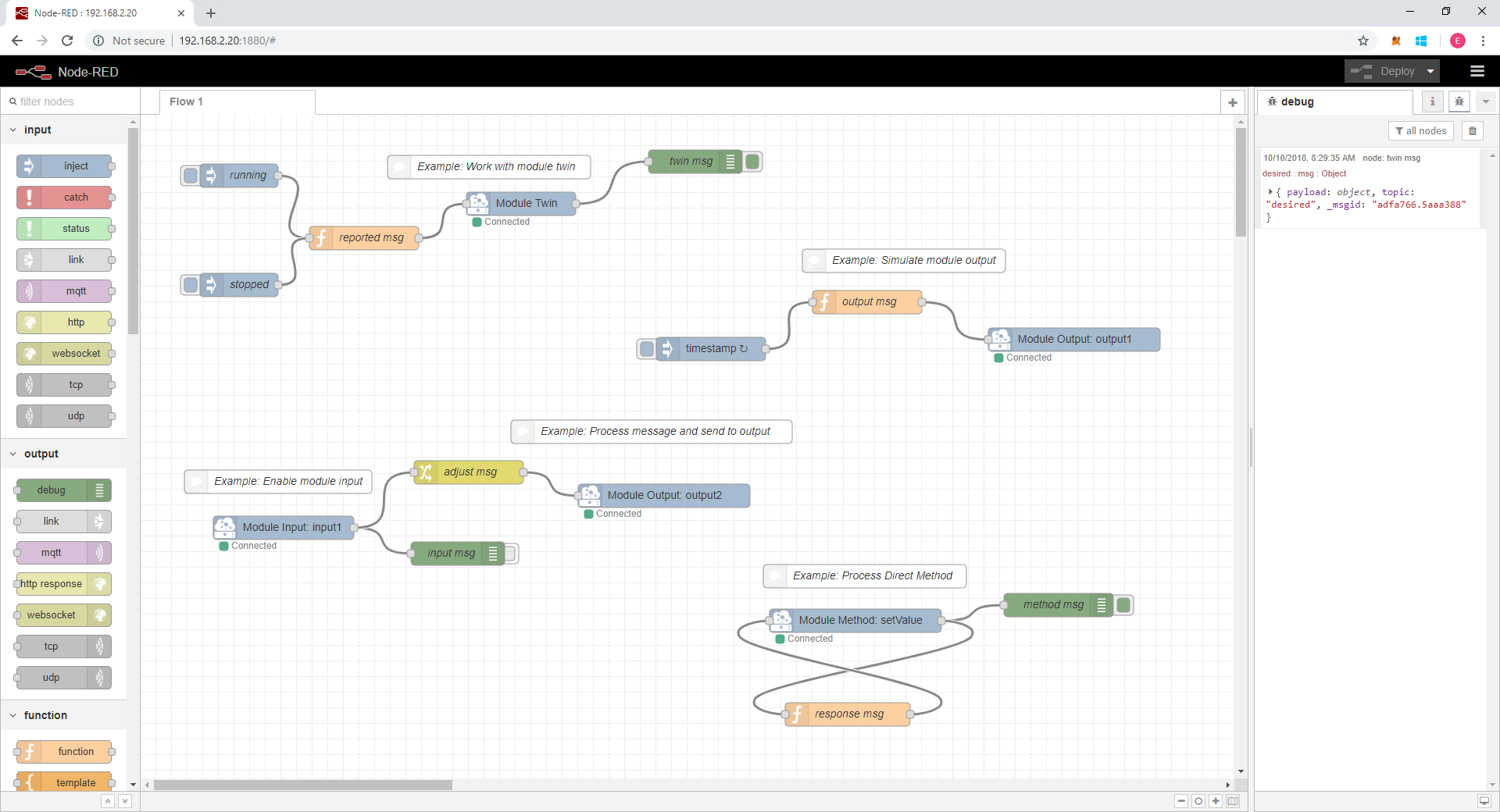
The screenshot illustrates the combined layout; import the JSON for current behavior rather than copying historical response code from an image.
Node and message reference
Nodes appear in the Azure IoT Edge palette category. Module Client and Device Client are configuration nodes selected in the other nodes' edit dialogs.
| Node | Flow input | Flow output |
|---|---|---|
| Module Client | No ports; owns the module connection | No ports |
| Module Output | msg.payload: JSON value or JSON text; output name comes from its configuration |
No output port; completion/error through Complete/Catch |
| Module Input | No input port; listens on its configured input name | { topic: "input", input: "input1", payload: <parsed JSON> } |
| Module Twin | msg.payload: reported-properties object, or JSON object text |
{ topic: "desired", payload: <desired properties> } |
| Module Method | Response with requestId, status, and payload |
Request with topic: "method", method, requestId, and payload |
| Device Client | No ports; owns the direct X.509 device connection | No ports |
| Device Twin | msg.payload: reported-properties object, or JSON object text |
{ topic: "desired", payload: <desired properties> } |
JSON messages
For Module Output, prefer an object:
msg.payload = { temperature: 21.5, source: "node-red" };
return msg;
A string payload means JSON text, not arbitrary unquoted text:
msg.payload = '{"temperature":21.5}';  // JSON object text: accepted
msg.payload = JSON.stringify("hello"); // JSON string text: accepted
// msg.payload = "hello";              // Not valid JSON text: rejected
Output messages use application/json and UTF-8. Module Input emits parsed
objects, arrays, or scalars, including false, 0, "", and null. Do not
assume every incoming payload has properties you can modify. Invalid JSON is
reported as an error; it is not converted into a raw-text message.
Desired and reported properties
Twin nodes emit initial desired state and subsequent desired-property changes
with topic: "desired". Preserve Azure metadata such as $version; later
messages can be patches rather than a full replacement document. Desired and
reported properties are separate: reporting a value does not change desired state.
Send a reported-properties patch into the appropriate Twin node:
msg.payload = { moduleStatus: "running", firmwareVersion: "1.2.3" };
return msg;
Use objects for reported properties, not an entire twin document. A property
value of null requests deletion according to Azure twin semantics. Twin
operations do not use Edge Hub message routes. Verify reported values on the
correct module or device twin in IoT Hub.
Module direct methods
A request looks like:
{
  "topic": "method",
  "method": "echo",
  "requestId": "<opaque request identifier>",
  "payload": { "value": 42 }
}
Wire Module Method → Function → the same Module Method node. In the Function:
msg.payload = { echo: msg.payload };
msg.status = 200;
return msg; // Retains requestId; do not replace msg with an uncorrelated object.
msg.requestId, msg.status, and msg.payload are required. Status must be an
integer from 100 through 599. Requests expire after 25 seconds; unknown,
expired, duplicate, or cross-node response IDs are rejected. Only one active
Module Method node may handle a given method name.
Method responses use their native JSON type, unlike Module Output's JSON-text string convention. An object response is not double encoded. If you construct a new response message, explicitly copy the original request ID into it.
Direct device twin with X.509
Device Client connects directly to IoT Hub as the configured device identity, not through the module workload identity. The identity must already exist with the supplied thumbprint or CA-signed certificate configured. Confirm no other process is competing for the same device identity.
Configure these environment variables in the Node-RED process/container before starting it:
IOTEDGE_IOTHUBHOSTNAME=example.azure-devices.net
IOTEDGE_DEVICEID=device-01
PATH_TO_CERTIFICATE_FILE=/data/certs/device-full-chain.cert.pem
PATH_TO_KEY_FILE=/data/certs/device.key.pem
If using an Edge module deployment manifest, environment entries use the usual
"NAME": { "value": "..." } form. Do not blindly replace Edge-injected identity
variables to target a different device while also using a Module Client in that
process: the module factory consumes those variables too.
For a container, merge a read-only mount into its create options:
{
  "HostConfig": {
    "Binds": [
      "/path/to/certs/on/host:/data/certs:ro"
    ]
  }
}
Then import 05-device-twin-x509, deploy, inspect desired properties in Debug,
and press Report device state. Verify the reported properties on the device
twin in IoT Hub. No module message routes are needed.
The certificate chain and private key must be PEM encoded, valid, matching, and readable by the container user. Keep private keys out of flows, logs, images, and source control. The client warns at startup when the certificate expires within 30 days. A module-only flow never reads these files.
For rotation, install a matching certificate/key pair atomically, ensure IoT Hub trusts the replacement, and recreate the Device Client configuration or restart the process/container. A child-only redeploy need not reload credentials. Environment-variable changes require a process/container restart. The Node/ container trust configuration must trust current IoT Hub server roots: never disable TLS verification or pin Azure leaf/intermediate certificates.
Module authentication
Normal Edge module operation uses the runtime-provided IOTEDGE_WORKLOADURI,
IOTEDGE_DEVICEID, IOTEDGE_MODULEID, IOTEDGE_MODULEGENERATIONID,
IOTEDGE_IOTHUBHOSTNAME, and IOTEDGE_AUTHSCHEME=sasToken, plus workload socket
access and gateway connectivity. Let Edge supply these rather than pasting
production credentials into a flow.
Client creation uses Azure's official ModuleClient.fromEnvironment factory,
preserving workload signing, gateway selection, and trust-bundle setup. The MQTT
adapter catches authentication-provider errors missed by the current SDK and
closes the client before recreation. It does not use SDK private fields or
process-wide exception handlers.
For compatibility, the SDK checks EdgeHubConnectionString first, then
IotHubConnectionString, before using workload authentication. Do not set these
overrides accidentally: they change authentication precedence. Keep connection
strings out of flows and logs. An X.509-provisioned Edge host still normally
gives modules a runtime-managed SAS identity; do not mount its private key just
to create a Module Client.
Diagnostics and troubleshooting
The focused examples include scoped Catch, Status, and, where an input operation completes, Complete nodes wired to Debug:
- Catch observes errors associated with flow input messages. It does not automatically answer a failed direct method or replace startup-log inspection. Malformed incoming Edge messages and some configuration failures have no originating flow input message: inspect runtime logs even if Catch is silent.
- Status shows connection/activity transitions; it is not a delivery receipt.
- Complete means the node's SDK operation completed successfully. It does not guarantee delivery to an application, exactly-once handling, or cloud-side processing. A method Complete event follows response-send completion, not completion of a real-world action.
The examples intentionally show diagnostic messages. Review Debug output before production use: payloads can contain sensitive application data. Disable/remove unneeded Debug nodes; never log credentials or private keys.
| Symptom | First checks |
|---|---|
| Flows stopped due to missing node types | Read earlier startup warnings. Confirm Node-RED >=4.1.13 <5, installed package version, enabled palette module, and no missing dependency/load errors. Do not recreate or rewire the flow nodes. rc.1 excluded 4.1.13; rc.2 fixes that version gate. |
| Connected, but nothing arrives | Match route module IDs and exact input/output names. Verify the sender emits on the expected output and use a service-side monitor for upstream messages. |
| More than one Module Client / duplicate active method | Reuse the existing Module Client after importing examples; remove redundant configurations. Keep one active handler per method name. |
| Module Client cannot connect | Confirm Edge workload variables/socket permissions, gateway DNS/trust, network access, and unintended connection-string overrides. |
| Module Input reports invalid JSON | Send UTF-8 JSON. Scalars are valid, but unquoted raw text is not. |
| Module Output rejects a string | String payloads must be JSON text. Prefer objects or use JSON.stringify for a literal string. |
| Method caller times out | Invoke the module identity; use its exact method name, preserve requestId, return to the same node within 25 seconds, and allow at least 30 seconds on the caller. |
| Device Client cannot start | Check environment values, IoT Hub identity/trust, read permissions, PEM validity, matching key/certificate, expiry, and clock synchronization. |
| Reported values appear unchanged | Check the correct device/module twin and Catch output. Send a reported-properties object, not desired state or the full twin document. |
| Client could not close safely; restart required | Restart the Node-RED process/container. The owner deliberately refuses a replacement connection when the old client's shutdown is uncertain. |
Reliability limits
- Each configuration owns its client and twin. Transient startup/disconnect failures retry with bounded exponential backoff; Azure SDK operation retries remain enabled. Uncertain client closure requires a process restart.
- Per client, at most 100 pending telemetry/reported-property operations and 100 pending method requests are retained. Flow-provided module method responses have a separate 100-operation pool. Excess work fails through completion/error handling. A response rejected at admission retains its request timeout and may be retried while the request remains valid; do not replay side effects.
- Shutdown/redeploy removes owned listeners and terminates pending methods with an unavailable response where possible.
- MQTT input settlement is automatic. This package is not a persistent local spool and does not offer transactional downstream acknowledgement. Edge store- and-forward depends on Edge Hub routes, storage, and TTL after send acceptance.
See dependency risks and the validation/rollback guide before fleet rollout.
Upgrading from 0.6.1
- Serialized node types and
clientreferences are preserved. - Method response flows must retain the new
msg.requestId; objects now arrive at the cloud caller as native JSON rather than double-encoded JSON strings. - Valid falsy module-input values (
false,0,"",null) are now delivered. - The unused AMQP dependency was removed; MQTT remains supported.
- Node.js 22 and the Node-RED 4 versions listed above are required.
Test the release and rollback procedure on representative devices before fleet rollout. The 1.0.0 owner approval accepts the documented dependency risks and defers unfinished formal field gates; it does not establish qualification of every deployment. Release details are in CHANGELOG.md.
History and attribution
This package continues a Node-RED module recovered from an existing Docker image
after its original npm package disappeared around February 17, 2020. Related
historical sources include iotblackbelt/noderededgemodule
and gbbiotwesouth/noderededgemodule.
This project publishes the Node-RED nodes independently of those container images.
The former npm name was node-red-contrib-azure-iot-edge-kpm; the public scoped
successor is @papakpmartin/node-red-azure-iot-edge.
The modernization uses Azure's IoT Node.js device SDK and retains the serialized node types published in 0.6.1. The original MIT license and attribution are preserved; see LICENSE.md.
