@open-avc/node-red-openavc 0.2.0
Node-RED nodes for OpenAVC: read room state and events, send device commands, run macros, write variables, emit events.
OpenAVC nodes for Node-RED
Use Node-RED as the logic behind an OpenAVC space. OpenAVC keeps the devices, the state and the touch panels; the flow decides what happens.
A panel button sets a variable, the flow sees it within 50 ms, does whatever it does (checks a calendar, an occupancy sensor, a building system), sends device commands and writes status back, and the panel re-renders from state. The panel never knows where the logic lives.
Nodes
| Node | What it does |
|---|---|
| openavc-server (config) | One OpenAVC system. All the nodes on it share a single WebSocket that reconnects on its own. Two systems in one flow are two of these. |
| state in | A message for every change to a matching state key (var.*, device.projector.power, ...). Optionally replays current values on connect. |
| state get | Reads what a key holds right now, when a message arrives. A pattern gives every matching key. |
| event in | A message for every matching event (custom.*, ui.press.*, device.disconnected.*, ...). |
| command | Sends a device command and answers with whether the device accepted it. |
| macro | Runs a macro and answers when it has finished, with any step errors; or cancels one that is running. |
| set variable | Writes a var.* value. Every panel control bound to it updates. |
| emit event | Emits a custom.* event, which fires an event trigger or a script's handler. |
Every node's help (the book icon in the editor) says what goes in on the message and what comes out. Device, command, macro and key fields fill their lists from the system, so you pick rather than type.
Install
In Node-RED: Manage palette › Install › @open-avc/node-red-openavc, or in your Node-RED user directory:
npm install @open-avc/node-red-openavc
Needs Node-RED 4.0 or later and OpenAVC 0.33 or later.
Connect
Add an openavc-server, enter the host and port the Programmer opens on, and deploy. Leave the API key blank to connect as a panel (read all state, send commands, run macros, write var.*, emit custom.* events), or paste a key from the Programmer's Settings › Access to connect as the Programmer, which can also write any state namespace and hear every event.
Give the server node a name under Announce as and OpenAVC publishes system.integration.<name>.connected, so a panel light or an alert can say when the flow is not there.
Examples
Three working flows ship with the nodes, under Import › Examples › @open-avc/node-red-openavc in the editor. All three match the Conference Room starter project, so a fresh OpenAVC with that project open (and its devices simulated) runs them as they are.
| Example | What it shows |
|---|---|
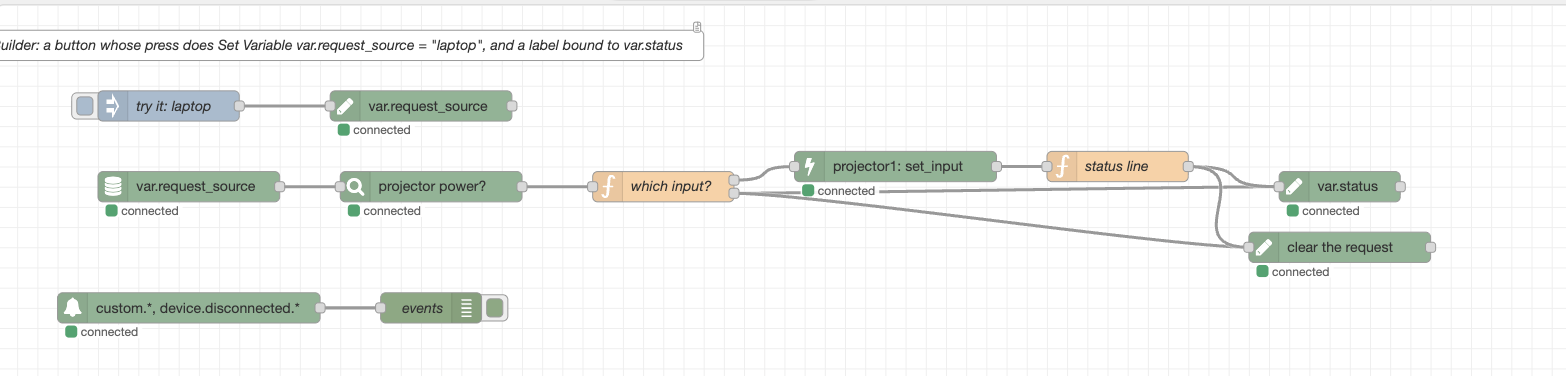
| logic-engine | The pattern above: a panel button writes var.request_source, the flow checks the projector's power, switches its input and writes var.status back. An inject node stands in for the button. Also watches custom.* and device events. |
| fire-a-trigger | The reverse: the flow decides a meeting started and emits custom.meeting_started; a macro with an Event trigger runs the sequence and reads $trigger.organizer. |
| macros-do-the-sequences | The flow decides when, OpenAVC's macros do the warm-up and shut-down. Runs system_on / system_off from var.room_mode, waits for them to finish, and a catch node puts a failure on the panel. |
Each tab's description (the i panel) says what to set up on the OpenAVC side. Point the openavc-server node at your system and deploy.
The full guide is in the OpenAVC docs: docs.openavc.com/node-red.
License
MIT
