@lazybirdai/node-red-lazybird 0.1.2
Node-RED node for Lazybird: turn text into natural AI speech (MP3) with 500+ voices in 150+ languages.
@lazybirdai/node-red-lazybird
A Node-RED node for Lazybird. It turns text into natural AI speech (MP3) in your flows, for announcements, alerts, home automation, voiceovers and anything else that should talk.
Lazybird is an AI voiceover generator with 500+ voices in 150+ languages and accents, voice cloning, voice design and a text to speech API.
Install
In Node-RED, open Menu → Manage palette → Install, search for @lazybirdai/node-red-lazybird and click Install.
Or run this in your Node-RED user directory (usually ~/.node-red) and restart Node-RED:
npm install @lazybirdai/node-red-lazybird
Requires Node-RED 3.1 or later and Node.js 18 or later.
Set up your account
- Sign up for Lazybird. The free plan includes 10,000 credits a month, no credit card needed.
- Open Studio settings and create an API key.
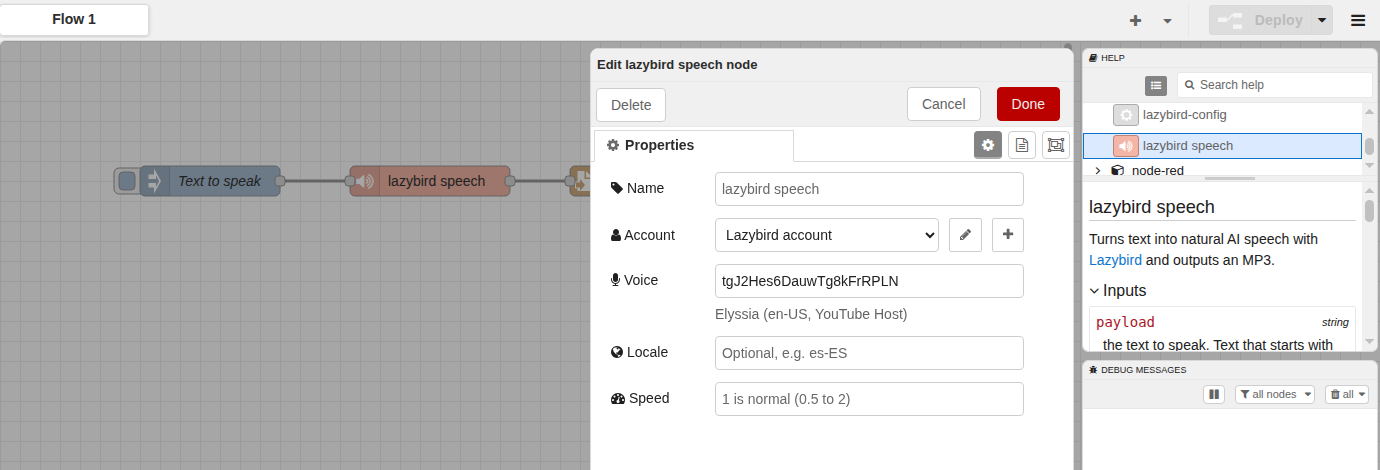
- In Node-RED, add a lazybird speech node, click the pencil next to Account, paste the key and deploy.
The key is kept in Node-RED's encrypted credentials file, not in your flow.
Usage
Send the text to speak in msg.payload. The node outputs the MP3 as a buffer in msg.payload, with msg.contentType set to audio/mpeg. Wire it to a file node to save it, to an http response node to serve it, or to any node that plays or uploads audio.
| Input | |
|---|---|
msg.payload |
The text to speak. Text that starts with <speak> is sent as SSML. |
msg.voice |
Optional voice ID, overrides the node's voice. |
msg.locale |
Optional language and accent, such as es-ES or hi-IN. Any voice can speak other languages. |
msg.speed |
Optional, 1 is normal speed (0.5 to 2). |
msg.settings |
Optional pitch (0.5 to 1.5), volume (0 to 2), and style and styleIntensity for voices with speaking styles. |
Choosing a voice. The voice field suggests Lazybird's library voices and your own voices. Type to search by name, language or style, or paste a voice ID. Deploy the account config node once so the list can load.
SSML. Use SSML for pauses and pronunciation:
<speak>Good morning. <break time="500ms"/> The front door is open.</speak>
Errors. Errors such as an invalid API key, an unknown voice or missing credits go to catch nodes, with a message that says what to fix.
Example. Import Menu → Import → Examples → @lazybirdai/node-red-lazybird → save-speech-to-mp3 for a flow that saves speech to an MP3 file.
Pricing
One credit is one character of text, shared between the Lazybird studio and the API. The free plan includes 10,000 credits a month; paid plans start at $9 a month and include commercial usage rights. See pricing.
