@gybalazs/node-red-dashboard-2-ac-control 0.1.1
Air-conditioner control & telemetry widgets for FlowFuse Dashboard 2.0 (Node-RED). Renders a canonical AC state and emits the change the user made — driven by any flow that speaks the schema. UI currently tuned for Daikin; the data contract is open.
@gybalazs/node-red-dashboard-2-ac-control
Air-conditioner control and telemetry widgets for FlowFuse Dashboard 2.0 (Node-RED). A thin, good-looking control panel that renders a canonical AC state and emits the change the user made — driven by any flow that speaks the schema.
The UI is currently tuned for Daikin (a device-profile selector, more to come), but the data
contract is open: feed it a plain msg.payload and it just works. Perfect partner for
@gybalazs/node-red-contrib-daikin-faikout,
which produces exactly this schema from real Daikin/Faikout hardware — but that package is optional.
Widgets
- AC control (
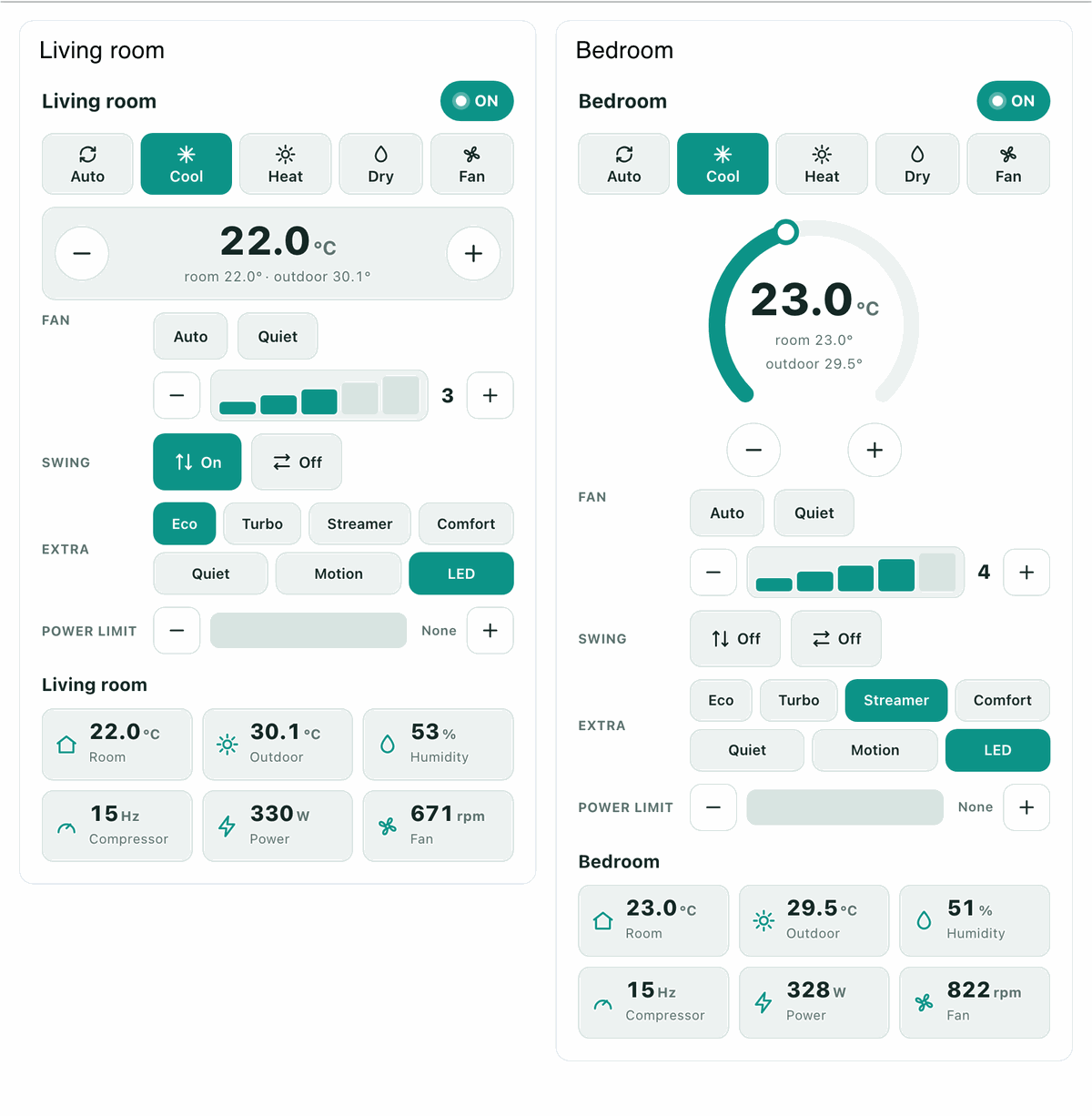
ui-gyb-ac) — power, mode, setpoint, fan (auto/quiet + a volume-style stepper), swing, extra modes (eco/turbo/streamer/comfort/quiet/motion/LED), power-limit and target-humidity where supported. Three layouts: remote (button panel), dial (thermostat), compact (one line, expands). Everything clickable is also settable viamsg.payload. - AC telemetry (
ui-gyb-ac-telemetry) — a tidy tile grid (room/outdoor temp, humidity, compressor Hz, power, fan RPM, coolant/inlet temp, energy counters). Per-metric checkboxes; a unit hides what it can't report.
Both bring their own theme (teal, overridable via --daikin-* CSS variables) and follow the
dashboard's light/dark mode. No config node of their own — they live in a normal dashboard group.
Install
npm install @gybalazs/node-red-dashboard-2-ac-control
Or Menu → Manage palette → Install. Node-RED ≥ 3, Node.js ≥ 18, FlowFuse Dashboard 2.0.
Quick start
Import Import → Examples → @gybalazs/node-red-dashboard-2-ac-control: an inject pushes a
canonical state into the widget, and the widget's output shows the deltas you produce by clicking.
Minimal by hand:
[ inject {"power":true,"mode":"cool","setpoint":22,"roomTemp":25} ] → [ AC control ] → [ debug ]
The input is a canonical state (full or partial — a single key refreshes one control). The output is
only what the user changed, e.g. { "setpoint": 22.5 }. Wire that to your own logic, or to the
daikin ac node to drive a real unit.
Driving it from real hardware
Install the companion package, wire its daikin ac node's state output into this widget and the
widget's output back into the daikin ac input. The core sends a caps object with the state, so
the widget automatically shows only what the unit supports.
Docker
Installing a Dashboard 2.0 widget package into a Docker image needs one extra step, because the
dashboard discovers widgets from the userDir (/data) — and /data is usually a runtime volume,
so a build-time install there is hidden. (Core/non-widget node packages don't have this problem.)
Install into the image and link it into /data on startup:
Dockerfile
FROM nodered/node-red:4.1.8

RUN npm install --no-audit --no-fund --no-update-notifier \
      @gybalazs/node-red-dashboard-2-ac-control \
      @gybalazs/node-red-contrib-daikin-faikout

COPY link-widgets.sh /usr/local/bin/link-widgets.sh
USER root
RUN chmod +x /usr/local/bin/link-widgets.sh
USER node-red
ENTRYPOINT ["/usr/local/bin/link-widgets.sh"]
CMD ["npm", "--no-update-notifier", "--no-fund", "start", "--", "--userDir", "/data"]
link-widgets.sh (handles one or more widget packages)
#!/bin/sh
set -e
APP=/usr/src/node-red/node_modules

# List the WIDGET packages to link (space/newline separated). The core package does NOT go here.
WIDGETS="
@gybalazs/node-red-dashboard-2-ac-control
"

for WIDGET in $WIDGETS; do
  mkdir -p "$(dirname "/data/node_modules/$WIDGET")"
  ln -sfn "$APP/$WIDGET" "/data/node_modules/$WIDGET"
done

WIDGETS="$WIDGETS" node -e '
const fs=require("fs"), p="/data/package.json";
let j; try { j=JSON.parse(fs.readFileSync(p,"utf8")); } catch { j={name:"node-red-project",version:"0.0.1",private:true}; }
j.dependencies = j.dependencies || {};
for (const w of process.env.WIDGETS.split(/\s+/).filter(Boolean)) j.dependencies[w] = "*";
fs.writeFileSync(p, JSON.stringify(j,null,2)+"\n");
'
exec "$@"
Both the symlink and the /data/package.json dependency are required — either alone leaves the
widget as an empty box. Make sure the bind-mounted ./data is writable by the node-red user
(uid 1000): chown -R 1000:1000 ./data. The core package (…-daikin-faikout) needs no linking.
If instead /data is a named volume (not a bind-mount), Docker seeds it from the image on first
run, so WORKDIR /data && npm install … in the Dockerfile is enough and no entrypoint is needed.
Theming
The widgets use their own palette and only borrow the host theme's light/dark polarity. Override any
token with CSS variables, e.g. in a ui-template (head) or your dashboard CSS:
:root { --daikin-primary: #2563eb; --daikin-radius: 10px; }
License
MIT © Balazs Gyarmati
