@calcslive/node-red-calcslive 0.2.0
Unit-aware calculations for Node-RED via CalcsLive. 630+ units, 70+ categories, zero config unit conversion.
@calcslive/node-red-calcslive
Unit-aware calculations for Node-RED via CalcsLive.
Plug any CalcsLive calculation article into your Node-RED flow as a blackbox UDF. Send input values in any unit — receive output values in any unit. 630+ units across 70+ categories handled automatically.
Install
Requires Node-RED 3.0 or later and Node.js 18+.
From the Node-RED palette manager: search for calcslive.
Or in your Node-RED user directory:
npm install @calcslive/node-red-calcslive
Setup
- Create a CalcsLive account at calcslive.com
- Get an API key at calcslive.com/account/api-keys
- Create or find a public calculation article — note its short ID from the URL
- In Node-RED, add a CalcsLive Calculate node and configure it:
- Config → Add new
calcslive-config→ paste your API key - Article ID → paste the article short ID
- Inputs → JSON with your input symbols and values
- Outputs → JSON with desired output symbols (leave empty for all)
- Config → Add new
Node: calcslive-calculate
Config Panel
| Field | Description |
|---|---|
| Config | Select a calcslive-config credential node |
| Article ID | Short ID of the CalcsLive article (e.g. 3LYPD4C96-34U) |
| Inputs | JSON: {"symbol": {"value": 5, "unit": "m/s"}} |
| Outputs | JSON: {"symbol": {"unit": "J"}} — leave empty to return all outputs |
Runtime msg Overrides
Set these on msg before the node to override static config:
| Property | Type | Description |
|---|---|---|
msg.articleId |
string | Overrides Article ID |
msg.inputs |
object | Overrides Inputs JSON |
msg.outputs |
object | Overrides Outputs JSON |
Output
| Property | Type | Description |
|---|---|---|
msg.payload |
object | Calculation outputs: {"KE": {"value": 125, "unit": "J", ...}} |
msg.calcslive |
object | Full API response (inputs echo, outputs, usage) |
msg.error |
object | Set on error: {"code": "...", "message": "...", "statusCode": 401} |
Example Flows
Quick Start
[{"id":"inject1","type":"inject","name":"Trigger","payload":"{}","payloadType":"json","wires":[["calc1"]]},{"id":"calc1","type":"calcslive-calculate","name":"Speed Calculator","configNodeId":"cfg1","articleId":"3M7ALBF4U-3BL","inputs":"{\"d\":{\"value\":100,\"unit\":\"km\"},\"t\":{\"value\":1,\"unit\":\"h\"}}","outputs":"{\"v\":{\"unit\":\"km/h\"}}","wires":[["debug1"]]},{"id":"debug1","type":"debug","name":"Result","active":true,"wires":[]},{"id":"cfg1","type":"calcslive-config","name":"My CalcsLive"}]
Four-Method Demo Flow
The examples/ folder contains a full demo flow (speed-calc-demo-4-methods.json) showing four ways to use the node with the same speed calculation article:
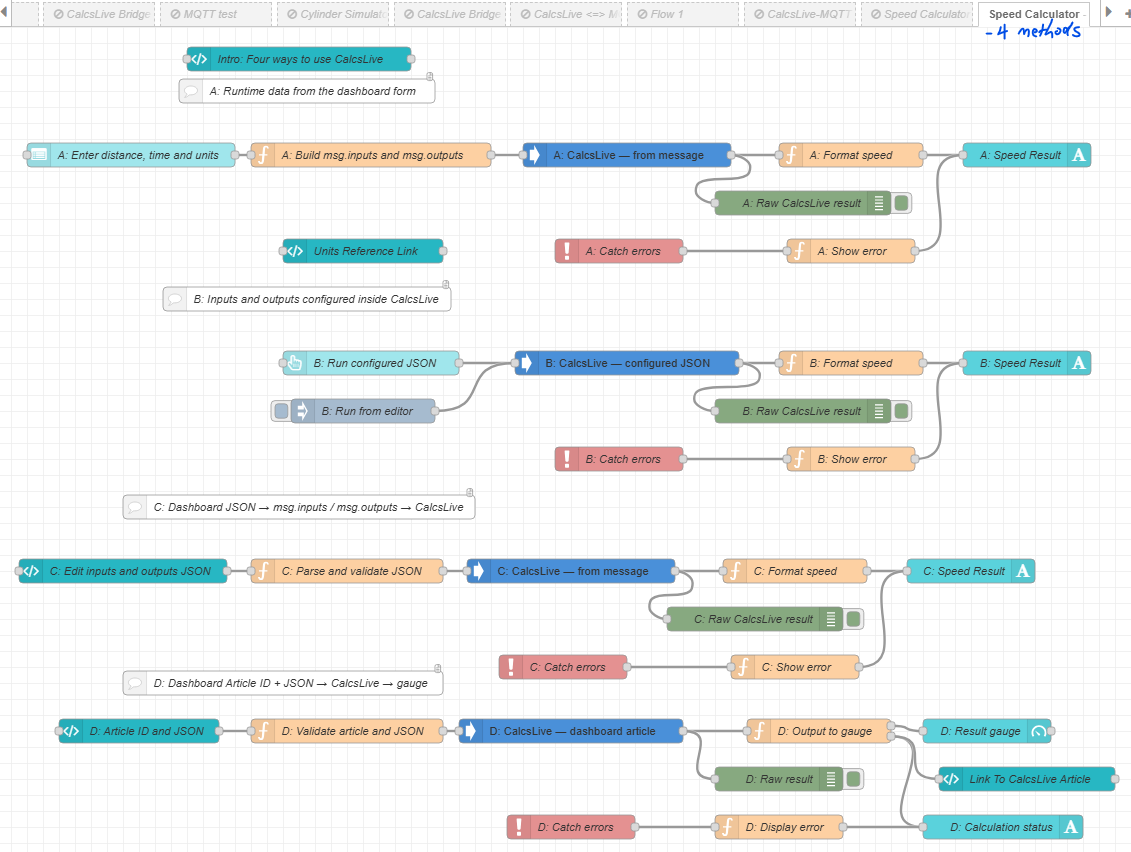
| Path | Approach | Best for |
|---|---|---|
| A | Dashboard input nodes → function builds msg.inputs |
Interactive UIs where users enter values |
| B | JSON configured statically inside the node | Fixed automation triggers, scheduled jobs |
| C | Dashboard JSON editor → parse → msg.inputs |
Power users who want to edit raw JSON at runtime |
| D | Article ID + JSON → CalcsLive → gauge + article link | Full ecosystem demo, dynamic article selection |
Import via Node-RED menu → Import → select file. Requires @flowfuse/node-red-dashboard.
Error Handling
Wire a Catch node scoped to the CalcsLive node to handle errors. msg.error.code values:
| Code | Meaning |
|---|---|
API_KEY_REQUIRED |
Invalid or missing API key |
RESOURCE_NOT_FOUND |
Article ID not found |
RESOURCE_ACCESS_DENIED |
Private article not owned by your account |
CALC_UNDEFINED_SYMBOL |
Unknown symbol in calculation expression |
VALIDATION_INVALID_FORMAT |
Malformed request |
| (network error) | CalcsLive unreachable or timed out |
License
MIT — CalcsLive
