@bannsaenger/node-red-contrib-artnet-controller 0.2.1
Node-RED node that controls lights via Art-Net. Acts as a Art-Net controller.


This is a complete solution for sending and receiving dmx-data via Art-Net without the need of additional hardware
Credits
Art-Net™ is a trademark of Artistic Licence Engineering Ltd.
This work is basend on the node-red-contrib-artnet nodes developed by Gunnebo
The Art-Net library is taken from margau/dmxnet
Added the features introduced by node-red-contrib-artnet-plus by Hayden Donald
Main changes to the previous work
- Basically it is fully compatible to the payload format defined by gunnebo
- More than one universe can now be served
- Transitions got more attributes and features
- This module is fully functional without any additional hardware
- The sending is completely rewritten, so that you can't flood the artnet
- The transition engine is rewritten, so that only one interval timer with the required resolution is doing the transition handling.
Install
Run the following command in the root directory of your Node-RED installation. Usually this is ~/.node-red
npm install @bannsaenger/node-red-contrib-artnet-controller
Or even from inside Node-RED with the palette manager.
Using
Sending DMX-Data
First you must specify a Art-Net controller configuration node. The controller is bound to one or all IP addresses found on the system and handles the Art-Net polling and shows up as an Art-Net node in the network.
For sending data there must be a Art-Net Sender configuration node. This node holds one universe of dmx-data and handles the sending of this universe to the network.
To get dmx-data out to the network, use the Art-Net Out node. This is basically connected to an Art-Net Sender node. If you pass a msg object without additional addressing, the dmx values are sent to the Art-Net Sender specified in the Art-Net Out node.
If you pass additional addressing information, the Art-Net Out node tries to find a sender with the given address information. If none is found the configured Art-Net Sender instance is taken.
msg.payload = {
  "net": 0,
  "subnet": 0,
  "universe": 1
};
net- int: net in [0, 127]subnet- int: subnet in [0, 15]universe- int: universe in [0, 15]
Receiving DMX-Data
With the Art-Net In node you can receive dmx values. Each Art-Net In node must be bound to a existing Art-Net controller configuration node.
You must specify a net, subnet and universe. Then the data can be received in form of buckets as described in Payload format later in this document or as a Uint8Array with the values of the whole universe.
Payload format
You can either set a single channel like the following example:
msg.payload = {
  "channel": 1,
  "value": 255
};
channel- int: address in [1, 512]value- int: value in [0, 255]
Or you can set multiple channels at once:
msg.payload = {
  "buckets": [
    {"channel": 1, "value": 255},
    {"channel": 4, "value": 0}
  ]
};
The buckets can take another parameter to set more than one channel value at once.
fill- int: repeat this value until this channel [2, 512]
The fill must be larger than channel
Example:
msg.payload = {
  "buckets": [
    {"channel": 1, "value": 255, "fill": 100},
    {"channel": 101, "value": 11, "fill": 200}
  ]
};
Will set channel 1 to 100 with the value 255 and channel 101 to 200 with the value 11
Also by setting the payload to an array of numbers or a UInt8Array for consistency with Art-Net In. Values will be assigned consecutively according to the array starting with channel 1.
msg.payload = [0, 1, 2];
msg.payload = new UInt8Array([0, 1, 2]);
You can also fade to values, either for a single channel or multiple channels. You should specify the transition, a duration in milliseconds and optionally a number of repetitions.
If mirror is defined the transition will be mirrored after the optional hold value.
The value of -1 for repeat forces the the transition to run infinitely until a value or other transition is sent to this channel.
If repetition is defined, then a gap between repetitions can also be defined.
The transition ends with the target value, holds while gap and starts again with the value before the transition.
msg.payload = {
    "id": "myTransition",
    "transition": "linear",
    "duration": 5000,
    "repeat": 1,
    "mirror": false,
    "hold": 0,
    "gap": 1000,
    "buckets": [
      {"channel": 1, "value": 255},
      {"channel": 4, "value": 0}
    ]
}
id- string: user defined id to identify the transition when output is definedtransition- string: the type or form of the transition to go [linear, gamma, quadratic, sine]gamma- int: value in [0 - 10] default = 2.2. Only for gamma transitionduration- int: value [-1 - MAX_SAFE_INTEGER] (in ms)hold- int: value in [0 - MAX_SAFE_INTEGER], time between transition and mirrored part (in ms)mirror- bool: [true/false], if true the transition is mirroredgap- int: value in [0 - MAX_SAFE_INTEGER], gap between transitions (in ms)repeat- int: value in [-1 - MAX_SAFE_INTEGER], number of repetitions. -1 = repeat infinitely till transition is canceledchannel- int: address in [1 - 512]value- int: value in [0 - 255] alternativelybuckets- array
Optional you can define start values. These will not be sent immediately. They can also be specified in the transition payload as well.
msg.payload = {
    "start_buckets": [
        {"channel": 1, "value": 255},
        {"channel": 4, "value": 123},
    ]
};
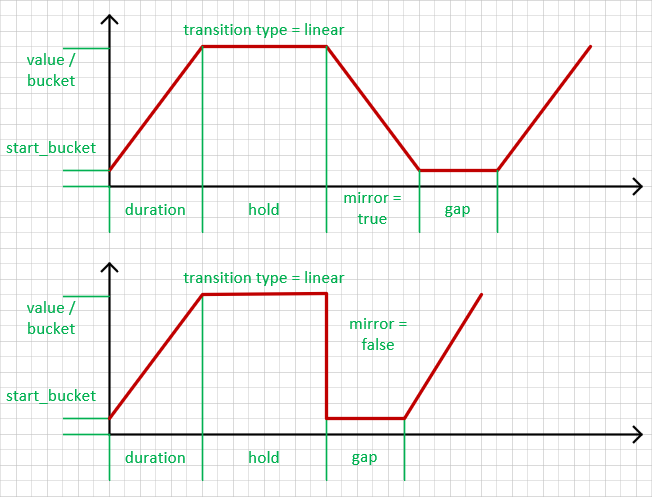
Timing example:
In order to perform an arc transition (movement by arc) you must specify more details:
msg.payload = {
    "transition": "arc",
    "duration": 2000,
    "arc": {
        "pan_channel": 1,
        "tilt_channel": 3,
        "pan_angle": 540,
        "tilt_angle": 255
    },
    "start": {"pan": 0, "tilt": 44},
    "center": {"pan": 127.5, "tilt": 63.75},
    "end": {"pan": 85, "tilt": 44}
};
where
arc- channels that should be involved in the arc transition (pan and tilt channels)start- channel's initial values (start point), by default, current channel's valuescenter- "center point" valuesend- channel's final values (end point)
In the example above, the moving head will move by arc starting from {pan: 0, tilt: 44} to {pan: 85, tilt: 44}. Center point ({pan: 127.5, tilt: 63.75}) defines nominal circle center.
The 'repeat' value can also be added in this transition.
Attention using the arc feature
This "arc" feature behaves exact like the original module. But the description does not meet reality. The start, center and end points are not realy channel values.
Must be revised.
Changelog
0.2.1
- (Bannsaenger) made output of Art-Net Out corresponding to the value of the feedback value
- (honza-kasik) fixed optional start_bucket handling
0.2.0
- (Bannsaenger) added possibility to send feedback messages on transition states
- (Bannsaenger) refactor main timer to state machine for handling of mirror and gap
- (Bannsaenger) refactor TransitionFactory to compute single values per step while the mainWorker runs
- (Bannsaenger) added sine transition
- (Bannsaenger) moved to own fork from dmxnet (@bannsaenger/dmxnet) to have the new error handling
- (Bannsaneger) added possibility to set more than one channel value at once. See parameter fill
0.1.5
- (szekelyisz) added support for
msg.payloadas array to Art-Net Out
0.1.4
- (Bannsaenger) added user defined error handler for dmxnet library. Works with dmxnet > 0.9.0. With versions prior to 0.9.0 the behaviour is like before
- (Bannsaenger) fixed the transfer of parameter port number to the dmxnet library
- (ServiusHack) fix validation function to use actual data
- (honza-kasik) added gamma and quadratic curve transitions
0.1.3
- (Bannsaenger) go back the original dmxnet dependency
- (JonnyTech) fixed typos in README.md
0.1.2
- (Bannsaenger) fix transition handling, more steps than values produces now a even timed transition with sometimes the same value in more than one step
- (Bannsaenger) fix start transition even if maxRate = 0
0.1.1
- (Bannsaenger) fix help for esta homepage
0.1.0
- (Bannsaenger) fixed some TypedInput issues
- (Bannsaenger) added ESTA type code to the "Art-Net Controller" and clarified OEM-code descriptions. OEM-code does not include the manufacturer code.
0.0.1
- (Bannsaenger) initial release
License
MIT License
Copyright (c) 2022 - 2026 Bannsaenger [email protected]
Permission is hereby granted, free of charge, to any person obtaining a copy of this software and associated documentation files (the "Software"), to deal in the Software without restriction, including without limitation the rights to use, copy, modify, merge, publish, distribute, sublicense, and/or sell copies of the Software, and to permit persons to whom the Software is furnished to do so, subject to the following conditions:
The above copyright notice and this permission notice shall be included in all copies or substantial portions of the Software.
THE SOFTWARE IS PROVIDED "AS IS", WITHOUT WARRANTY OF ANY KIND, EXPRESS OR IMPLIED, INCLUDING BUT NOT LIMITED TO THE WARRANTIES OF MERCHANTABILITY, FITNESS FOR A PARTICULAR PURPOSE AND NONINFRINGEMENT. IN NO EVENT SHALL THE AUTHORS OR COPYRIGHT HOLDERS BE LIABLE FOR ANY CLAIM, DAMAGES OR OTHER LIABILITY, WHETHER IN AN ACTION OF CONTRACT, TORT OR OTHERWISE, ARISING FROM, OUT OF OR IN CONNECTION WITH THE SOFTWARE OR THE USE OR OTHER DEALINGS IN THE SOFTWARE.
