@aaqu/fromcubes-react 0.3.0
Fromcubes React - React portals for Node-RED, built at deploy, with live WebSocket data binding
@aaqu/fromcubes-react







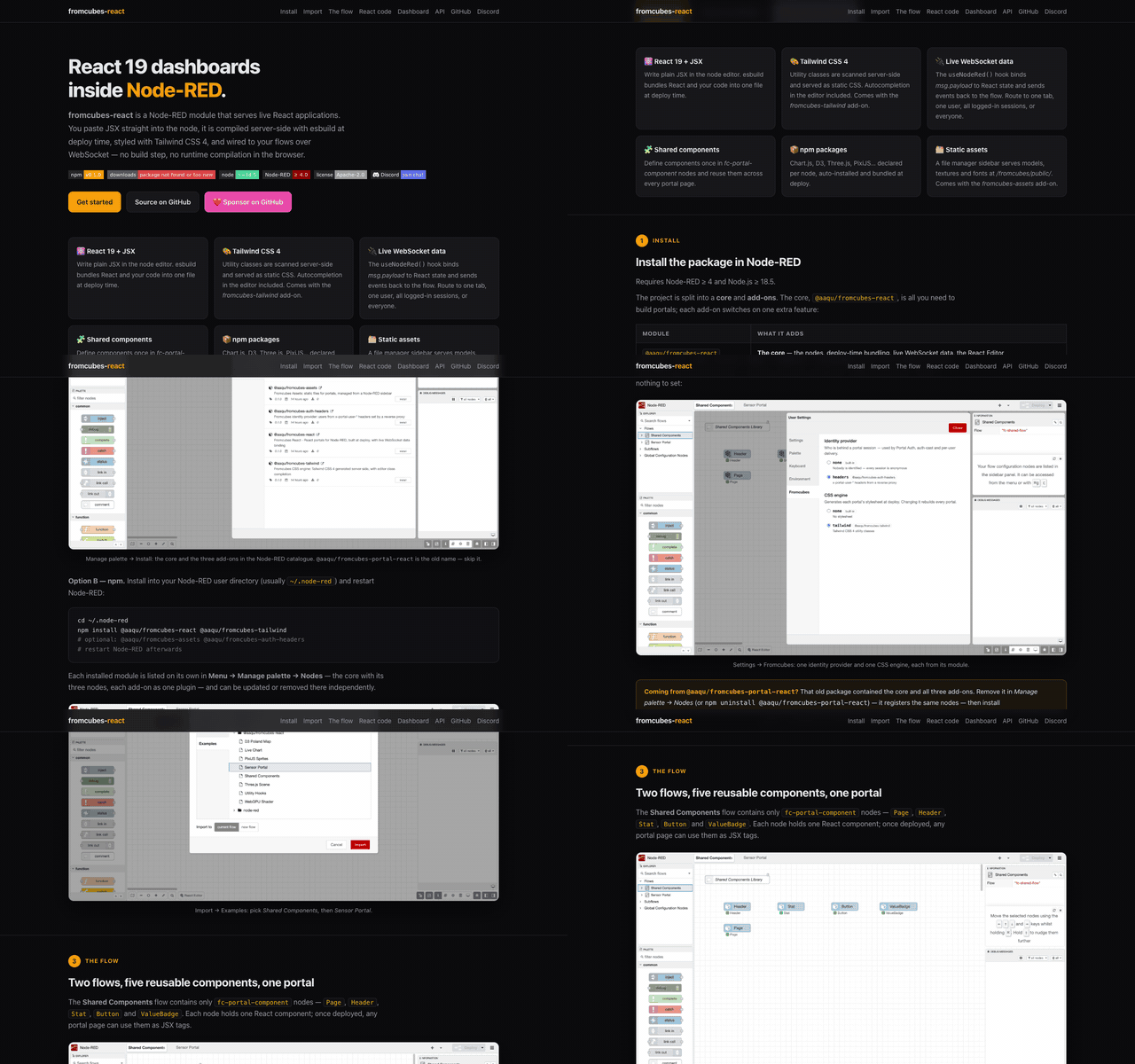
📖 Documentation — step-by-step guide with screenshots: aaqu.github.io/fromcubes-modules — install → import → edit JSX → live dashboard, on one example.
A Node-RED node that turns any /fromcubes/<sub-path> URL into a React page. Write JSX in the editor, deploy, open the URL — your component talks to the flow over WebSocket. No build step, no browser compiler. All portal pages are served under the hardcoded /fromcubes/ prefix so every node cleanly coexists under one URL tree.
For internals, plugin authoring, and the deploy pipeline see README-DEV.md.
💬 Questions, feedback, showcase? Join the fromcubes Discord.
❤️ Support the project:
Prerequisites
- Node-RED ≥ 4.0 — declared in
package.json'snode-red.versionand enforced by the editor's Palette Manager. - Node.js ≥ 18.5 — Node-RED 4.x's effective minimum.
- npm — only required when you use the
libsconfig field to install user packages at deploy time. The portal itself does not neednpmavailable at runtime. - A WebSocket-capable reverse proxy or direct connection — the portal
upgrades
/fromcubes/<sub-path>/_ws. If you front Node-RED with nginx / Traefik / Caddy, enableUpgrade: websocketheaders on that path.
Install
cd ~/.node-red
npm install @aaqu/fromcubes-react
# restart Node-RED
That's it — this is the whole core: the nodes, deploy-time bundling, the WebSocket bridge and the React Editor. No build step. Any npm packages you list in the node config (e.g. d3, three) are installed automatically on deploy.
Add-ons
Everything else is an add-on you install only if you need it:
cd ~/.node-red
npm install @aaqu/fromcubes-tailwind        # and/or -assets, -auth-headers
# restart Node-RED
| Package | What it adds |
|---|---|
@aaqu/fromcubes-tailwind |
Tailwind CSS 4 for portals, plus class completion in the editor |
@aaqu/fromcubes-auth-headers |
Users from x-portal-user-* headers set by a reverse proxy (Portal Auth) |
@aaqu/fromcubes-assets |
Static files for portals, managed from a sidebar tab |
Without an add-on its feature is simply off, and the editor says so once in
the log: no Tailwind means portals get no generated stylesheet (style them
with a <link>/<style> in Head HTML, or inline), no auth-headers means
Portal Auth sees every session as anonymous, no assets means no sidebar and no
/fromcubes/public/. Install an add-on later and it switches on by itself —
Menu → Settings → Fromcubes shows what is in use.
The shipped examples are styled with Tailwind; install
@aaqu/fromcubes-tailwind to see them as intended.
Each add-on is a Node-RED plugin built on the same API anyone can use — see Plugins.
Coming from @aaqu/fromcubes-portal-react? It contained all of the above.
Uninstall it first (both register the same nodes), then install the core
and the add-ons you used — for the same features as before:
npm uninstall @aaqu/fromcubes-portal-react
npm install @aaqu/fromcubes-react @aaqu/fromcubes-tailwind @aaqu/fromcubes-assets @aaqu/fromcubes-auth-headers
Your flows keep working unchanged.
Your first portal
- Drop a portal-react node onto a flow.
- Set Sub-path to e.g.
hello(the node will serve at/fromcubes/hello; the/fromcubes/prefix is fixed). - Open the code editor and paste:
function App() { const { data, send } = useNodeRed(); return ( <div className="p-4"> <p>From flow: {JSON.stringify(data)}</p> <button className="px-3 py-1 bg-blue-500 text-white rounded" onClick={() => send({ clicked: Date.now() })} > click me </button> </div> ); } - Deploy. Open
http://localhost:1880/fromcubes/hello. - Wire an inject node into the portal-react input → see
dataupdate live. Wire its output → see button clicks arrive in your flow.
The useNodeRed() hook
Everything your component needs from the flow lives in one hook:
const {
  data,          // last msg.payload delivered to this tab from the input wire (reactive)
  topic,         // msg.topic of that same message, "" when it had none
  send,          // send(payload, topic?) — emit msg on output wire
  user,          // portal user object (when Portal Auth is enabled), or null
  portalClient,  // unique session/tab ID assigned by server on connect
  authRequired,  // true when this session is anonymous on an authenticated-only portal
} = useNodeRed();
Initial data on connect
The server does not cache payloads — a freshly-loaded page has data === null until the flow pushes the next message. For periodic streams that's at most one interval of blankness. For event-driven or per-user data, request the initial state from the component:
const { data, send } = useNodeRed();
useEffect(() => { send({}, "init"); }, []);
In the flow, catch topic === "init", look up the state (per-user via msg._client.userId if needed) and reply — msg._client is already set on the inbound message, so the response returns as a unicast to exactly that tab.
Every message: useNodeRedMessages()
data and topic are React state: they hold only the last message. When two messages arrive before React renders — a flow answering two requests at once, a function node returning several msgs — React renders once and a useEffect(..., [data]) sees only the last one; the earlier ones are silently lost. The same effect also does not re-fire when the same primitive payload arrives twice in a row.
For events and request → response protocols, use useNodeRedMessages(handler). The handler is called once per incoming message, in order, as (payload, { topic }):
function App() {
  const { send } = useNodeRed();
  const [photos, setPhotos] = useState([]);
  const [saving, setSaving] = useState(false);

  useNodeRedMessages((payload, { topic }) => {
    if (topic === "photos") setPhotos(payload);
    else if (topic === "saved") setSaving(false);
  });
  useEffect(() => { send({}, "init"); }, []);
  // ...
}
- It pairs with the
send({}, "init")pattern above: the hook subscribes in its own effect, which runs before a lateruseEffectin the same component sends the request, so the reply cannot slip past it. - No replay: a component mounted later does not get an earlier message (unlike
data, which starts from the last payload this tab received). - The latest
handleris always the one called — no need to memoize it. It unsubscribes on unmount. - A handler that throws is logged to the console; other handlers and
useNodeRed()still get the message.
Rule of thumb: data to show current state, useNodeRedMessages for events. (Underneath is the low-level window.__NR.subscribeMessages(fn).)
If a portal already ships its own fc-portal-utility named useNodeRedMessages (written before the built-in existed), that utility keeps working and shadows the built-in — in every portal that references the name, since utilities are shared.
Node configuration
| Field | Purpose |
|---|---|
| Sub-path | Part after /fromcubes/, e.g. page1 → served at /fromcubes/page1. Required. Nesting allowed (team/alpha). Reserved: public, _ws. |
| Page Title | Browser tab title |
| npm Packages | Comma-separated, e.g. d3, three, @react-three/fiber |
| Portal Auth | Enable portal user header extraction (see Multi-user) |
| Authenticated-only delivery | Untargeted msgs (no msg._client) go only to sessions with portal identity headers; anonymous sessions get an auth_required frame on connect (see Multi-user). Off by default. |
| Show WS status | Small "fromcubes • connected/disconnected" badge in the page's bottom-right corner (off by default) |
| Head HTML | Extra trusted-author <head> tags (CDN, fonts, CSS, scripts). Runs in the public portal page. |
| Code Editor | Monaco with JSX — must define <App /> |
There is also a config node, fc-portal-component, that lets you define reusable React components once and reference them by name from any portal-react node. Referenced components (and their transitive dependencies) are injected at transpile time, so unused ones add nothing to the bundle.
For shared non-component code (helpers, custom hooks, constants), use fc-portal-utility — a sibling config node. Unlike component nodes (which export exactly one symbol via an IIFE wrapper), a utility node is injected raw at top level so it can declare any number of function / const / let / class symbols. Selective inclusion: a utility node lands in a portal's bundle only when the portal's JSX or any of its referenced library components mentions at least one of the symbols declared in that utility.
// fc-portal-utility, Module name = mathHelpers
const PI2 = Math.PI * 2;
function clamp(n, min, max) { return Math.max(min, Math.min(max, n)); }
function useDebounce(value, ms = 300) {
  const [v, setV] = React.useState(value);
  React.useEffect(() => {
    const t = setTimeout(() => setV(value), ms);
    return () => clearTimeout(t);
  }, [value, ms]);
  return v;
}

// portal-react, JSX tab
function App() {
  const { data } = useNodeRed();
  const slow = useDebounce(data?.value);
  return <div>{clamp(slow ?? 0, 0, 100)}</div>;
}
Editor features
- Monaco with full JSX support and
useNodeRed()type declarations - Tailwind CSS IntelliSense inside
className="...", as in VS Code (with@aaqu/fromcubes-tailwind): all ~23k Tailwind 4 classes and every variant, colour swatches,/50modifiers, the generated CSS beside each suggestion and on hover, colour squares in the code, and warnings with quick fixes for conflicting classes (p-2 p-4) and non-canonical ones (w-[16px]→w-4). Classes must be complete literals in a string — dynamicbg-${tone}-500generates no CSS (use a map of full classes). Arbitrary values incl.w-[calc(100%-2rem)],grid-cols-[repeat(2,1fr)],mt-0!and@md:flexare supported. - JSX tag completion — type tag name, Tab to expand
- Self-close collapse — type
/inside empty<tag></tag>to convert to<tag /> - Ctrl+D / Cmd+D — duplicate the current line or selection (in every Monaco editor of the package)
- Ctrl+/ / Cmd+/ — JSX-aware comment toggle. Style follows the first selected line (VS Code behavior): selecting a whole
return ( … )block gives plain//on every line, while lines between live JSX tags are wrapped in{/* … */}(a plain//there is literal text — JSX renders it on the page) - Component completion — registry components + any PascalCase word
- Utility-symbol completion — top-level identifiers from any
fc-portal-utilitynode, suggested in JS context - Components / Utilities dialogs — buttons in the JSX tab; Components inserts
<Tag></Tag>, Utilities expands to the symbols declared in each node and inserts the bare identifier on click - Portal Assets sidebar — file manager for static assets (GLB, textures, fonts…)
Multi-user / Multi-tenancy
Portal-react has four routing modes — broadcast, auth-cast (every authenticated session), user-cast (every tab of one user), and unicast (one specific tab). Everything works without authentication too — user-cast and auth-cast just degrade gracefully when there is no user.
Identity
| Identifier | Scope | Persistence | Source |
|---|---|---|---|
portalClient |
Single WS session (one tab) | Lost on reconnect — server assigns a new UUID | Generated server-side on connect |
userId / login |
All sessions of a user | Survives reconnect and new tabs | x-portal-user-* headers (when Portal Auth is enabled) |
Portal Auth header contract — injected by an upstream reverse proxy (the fromcubes-portal platform sets them from Traefik forward-auth). Every value is percent-encoded UTF-8 (%C5%81ukasz → Łukasz); the same field names appear in useNodeRed().user and msg._client:
| Header | Field |
|---|---|
x-portal-user-id |
userId — required; without it the session is anonymous |
x-portal-user-login |
login |
x-portal-user-display-name |
displayName |
x-portal-user-email |
email |
x-portal-user-role |
role (single value) |
x-portal-user-groups |
groups — comma-separated, each element encoded on its own (a%2Cb is one group a,b); always an array, [] when absent |
A value with a malformed escape is skipped (in groups, only that element). Without x-portal-user-id the session is anonymous and user is null, whatever other headers arrive. The pre-contract x-portal-user-username / x-portal-user-name headers are ignored.
The proxy must strip all six headers from the client's request before injecting its own. The package trusts them as they arrive; one header let through is enough to impersonate any user.
If Portal Auth is disabled or headers are absent, user is null and user-scoped features are silently skipped — broadcast and per-session features still work.
Routing modes
Every inbound msg arrives in your flow with msg._client already filled in by the server. The flow then decides where the response should go by setting (or clearing) msg._client on the outgoing msg:
// BROADCAST — everyone connected to this endpoint
delete msg._client;
return msg;

// UNICAST — only the tab that sent the original msg (echo)
// Keep msg._client as-is; it already carries portalClient.
return msg;

// UNICAST — a specific tab whose ID you know
msg._client = { portalClient: "a1b2c3d4-..." };
return msg;

// USER-CAST — every tab of a specific user (even ones that just opened)
msg._client = { userId: "alice" };
return msg;

// AUTH-CAST — every session that arrived with x-portal-user-* identity;
// anonymous sessions (no proxy headers) are skipped
msg._client = { authenticated: true };
return msg;
Auth-cast vs broadcast. Broadcast reaches every connected client, including anonymous ones. Auth-cast reaches only sessions that arrived with x-portal-user-* identity headers. Use auth-cast for data that any logged-in user may see; use broadcast only for data that is genuinely public. Nothing is cached server-side — each mode delivers to the clients connected at send time.
Authenticated-only delivery (fail-safe default)
With the Authenticated-only delivery checkbox enabled on the node, an untargeted msg (no msg._client) is delivered as an auth-cast instead of a broadcast — a forgotten _client then narrows delivery to logged-in sessions rather than leaking to anonymous ones. A true broadcast stays available explicitly:
msg._client = { authenticated: false };  // deliberate broadcast, anonymous included
return msg;
Anonymous sessions are told up front: right after hello the server sends a single auth_required frame (once per connection — never per skipped message, so unauthenticated clients learn nothing about traffic volume or timing). The hook exposes it so the page can render a login hint instead of staying silently empty:
const { data, authRequired } = useNodeRed();
if (authRequired) return <p className="p-4 text-zinc-500">Log in to see this data.</p>;
Anti-spoof guarantee. On every inbound message the server overwrites msg._client from scratch using the socket's own portalClient and the user data captured at connect. A browser cannot forge _client — whatever it puts there is discarded.
User-cast uses an O(1) index so a message to {userId: "alice"} reaches every tab of Alice with a single lookup, not a scan.
Without a user (anonymous mode)
If Portal Auth is off (or no proxy headers arrive), everything still works:
broadcastandportalClientunicast: unchangeduser-cast: gracefully skipped (nouserIdto target)auth-cast: delivers to nobody (no session has identity headers)useNodeRed().userisnull
Same model as dashboard 2 — no auth required to use the node.
Plugins: identity providers and CSS engines
Who the user is and how CSS is generated are both pluggable. The defaults,
headers (the contract above) and tailwind, are themselves plugins shipped
in this package and use exactly this API. A separate npm package can register its own, e.g. for a different
auth proxy or a different CSS tool:
// package.json: "node-red": { "plugins": { "my-providers": "plugin.js" } }
module.exports = function (RED) {
  RED.plugins.registerPlugin("my-sso", {
    type: "fromcubes-identity",
    apiVersion: 1,
    async resolveUser(req) {          // HTTP request or WS upgrade request
      const claims = await verify(req.headers.authorization);
      return claims ? { userId: claims.sub, login: claims.preferred_username, groups: claims.groups } : null;
    },
  });
  RED.plugins.registerPlugin("my-css", {
    type: "fromcubes-css",
    apiVersion: 1,
    async generate(source) {          // the portal's full source, components included
      return { css: await compileMyCss(source) };
    },
    editor: {                         // optional: className="…" completion
      classes() { return ["card", "btn", "btn-primary"]; },
    },
  });
};
Installing a plugin does not activate it. Choose one per kind in the editor,
Menu → Settings → Fromcubes: every installed provider is listed with the
package it comes from, and exactly one is selected. The choice is saved in
<userDir>/fromcubes/providers.json and applies at once — a new CSS engine
rebuilds every portal; a new identity provider asks for confirmation, then
reloads every open portal tab so page and connection both use it.
An administrator can pin either choice in settings.js; the editor then shows
it locked:
portalReact: {
  identityProvider: "my-sso",   // default "headers"; "none" = everyone anonymous
  cssEngine: "my-css",          // default "tailwind"; "none" serves no stylesheet
},
resolveUserreturns a user ornull. Only the known fields (userId,login,displayName,email,role,groups) are kept; a throw, a rejection or 5 s without an answer means anonymous.generatereturns{ css }. A failure shows the yellowcss-failstatus and the page is served unstyled.editor.classes()(optional, may be async) feeds the class completion in every code editor; it is asked once per installed plugin. Without it the engine just gets no completion. Strings only, no whitespace, ≤ 200 chars, at most 50 000.- For the rest of the IntelliSense experience an engine may add
editor.completions()→{ classes: [{ name, modifiers, color }], variants }(variants:{ name, values, hasDash, isArbitrary, detail, valueDetails })editor.describe(candidates)→ per class{ hover, documentation, detail, color, rules }ornull(CSS for the detail pane and hover, colour as#rrggbb/rgba(…), what the conflict check compares) — keep it fast, hovers wait for it — andeditor.canonical(candidates)→ per class a shorter spelling ornull(only the canonical-class warning waits for it). The Tailwind add-on is the reference implementation. - An unknown provider name is logged once; for identity every session is then anonymous. The settings pane flags a selected provider whose package is gone.
- Optional
label: "…"on the plugin is shown next to its id in the settings pane. require("@aaqu/fromcubes-react/api")gives the type names andAPI_VERSION, pluscreateAdminSecurity(RED)— the permission, CSRF and rate-limit gates the core puts on its own admin routes — for a plugin that adds routes. Declare@aaqu/fromcubes-reactas a peer dependency. The three add-ons above are complete examples.
Portal Assets
Static files (3D models, textures, fonts, etc.) can be uploaded and served from a public endpoint.
- Open the Portal Assets tab in the Node-RED sidebar
- Upload files via button or drag & drop
- Organize in folders (create, rename, move between folders)
- Copy public path with one click — use in JSX:
/fromcubes/public/models/scene.glb - Download and delete files from the context menu
All uploads require Node-RED admin authentication. Files are served publicly at /fromcubes/public/.
Limits: 100 MB per file, 500 MB total, 1000 files max.
Examples
Available via Menu → Import → Examples → @aaqu/fromcubes-react. Each flow includes a comment node with what to expect and the URL to open.
Import Shared Components first — it provides the UI building blocks (Page, Header, Stat, Button, ValueBadge) referenced by the others.
| Example | npm packages | Description |
|---|---|---|
| Shared Components | — | Reusable components: Page, Header, Stat, Button, ValueBadge |
| Sensor Portal | — | Sensor gauge with live WebSocket data |
| Live Chart | chart.js/auto |
Live updating Chart.js charts |
| D3 Poland Map | d3 |
Interactive SVG map of Poland (simulated data) |
| Three.js Scene | three, @react-three/fiber, @react-three/drei |
3D scene with Three.js |
| PixiJS Sprites | pixi.js, @pixi/react |
Clickable bunny sprites with PixiJS |
| WebGPU Shader | three |
WebGPU renderer + TSL animated shaders |
| Utility Hooks | — | fc-portal-utility demo: useDebounce custom hook + clamp helper |
Troubleshooting
| Symptom | Likely cause |
|---|---|
| Red status "transpile error" + error page on the endpoint | JSX syntax error — fix code, redeploy (cache invalidates automatically) |
| Red status "legacy endpoint" on deploy | Flow was saved before the /fromcubes/ prefix became hardcoded. Open the node, set Sub-path, redeploy. Automatic migration is disabled to avoid silent URL changes. |
| Red status "bad sub-path" | Sub-path is empty or violates the rules (no leading /, no whitespace, no .., segments must start alphanumerically, public/_ws reserved). |
| Yellow status "css-fail" | Tailwind generation failed (usually an invalid class in JSX). Page still loads but unstyled. Fix the class, redeploy — the status clears on the next successful build. |
Code editor stays blank / fromcubes-react/vs/loader.js 404s |
Monaco is served live from the package's own node_modules at /fromcubes-react/vs (no postinstall copy step). The 404 means RED.httpAdmin is mounted under a non-root httpAdminRoot the editor didn't account for, or monaco-editor failed to install. Reinstall the package and hard-refresh the editor (Cmd/Ctrl-Shift-R). |
npm install @aaqu/fromcubes-react ends with EACCES |
The Node-RED userDir/node_modules install path is not writable by the user running Node-RED. Re-run npm install from a shell with the right ownership. |
Browser request /fromcubes/css/<hash>.css returns 404 |
The portal's deploy hasn't produced a CSS bundle yet — open the editor, redeploy. If the URL is bookmarked from before a deploy, the hash is stale; reload the portal page itself. With a custom httpNodeRoot, prepend it to this path. |
| WebSocket reconnects in an endless loop | Reverse-proxy is not forwarding Upgrade: websocket on /fromcubes/<sub-path>/_ws. Check the proxy config — nginx needs proxy_set_header Upgrade $http_upgrade, Traefik needs the websocket middleware. |
libs packages fail to install on deploy |
The user-installed npm packages declared in Libs install via Node-RED's dynamicModuleList mechanism, which needs network access from userDir and a writable node_modules. Behind a corporate proxy set npm config set proxy … for the Node-RED user. |
Page loads but data stays null |
Nothing has been pushed since the page connected — payloads are not cached server-side. Push periodically, or request initial state from the component (send({}, "init") → flow replies) |
user is null even with Portal Auth on |
Upstream proxy is not injecting x-portal-user-id (required — the other headers alone count as anonymous), or sends a malformed percent-escape in it |
| Page reloads on every deploy | Expected for code changes; clients soft-reconnect with exponential backoff |
Architecture: source AND sink
The Node-RED guidelines suggest a node should "sit at the beginning, middle
or end of a flow — not all at once". portal-react intentionally violates
this: every node is both a sink (msg → render) and a source (UI
event → outbound msg). Trade-offs:
- Pro: one wire per portal is conceptually simpler — the same node owns the page lifecycle, its WebSocket, and the routing rules.
- Con: flow-error tracking only follows the
input → outputpath. Errors originating in the browser (e.g. a runtime exception inside a UI handler) cross the WebSocket as a source-event and are not routed to a Catch node on the same tab — they surface as a red node status and a log line. This matches the Node-RED guidance for source nodes: "produces messages in response to external events".
If you need explicit Catch-node visibility for UI-originated errors, wire
the portal's output through a Switch / Catch chain — a UI event landing on
msg.payload is then a regular wire-level message that Catch can observe.
Security
This module is meant to run behind a trusted Node-RED instance, ideally behind a reverse proxy. Highlights:
- Admin write endpoints require the
Node-RED-API-Versionheader (CSRF protection) and aportal-react.writepermission whenadminAuthis configured. - Token-bucket rate-limit (default 60 burst / 1 req/s steady) on every
write endpoint, tunable via
RED.settings.portalReact.rateLimit. - JSON bodies capped by Node-RED's own
apiMaxLength(settings.js, default 5 MB), 100 MB asset-upload cap, 500 MB / 1000 files total assets quota, 1 MB WebSocket frame cap. x-portal-user-*identity headers are trusted unconditionally — production deployments must terminate auth at a reverse proxy that strips all six inbound identity headers before injecting verified ones, and Node-RED must not be reachable except through that proxy.
Support
fromcubes is built and maintained by one person. If it saves you time, consider sponsoring its development:

License
Apache-2.0
